
Our team explored the most popular AI tools for SEO, content creation, marketing automation, social media, and more to determine which ones deserve a place in your tech stack.
Most Popular AI Tools: Key Findings
- Nutshell supports small to mid-sized teams with AI-powered context management inside a simplified CRM environment.
- The most effective tools are highly focused and built around purpose, like AdCreative.ai for ad visuals or StoryChief for content distribution, demonstrating the value of vertical AI.
- Tools like Uizard, Narrato, and ClickUp Brain show that automation can coexist with creativity, strategy, and execution.
What Are the Most Popular AI Tools?
In 2026, we see AI tools winning because they’re purpose-built rather than all-in-one.
For marketing and SEO, SEMrush, Perplexity AI, and Jasper are the go-to tools for faster content creation and optimization.
On the product and ops side, Sora speeds up video creation, Testim automates testing, and CrowdStrike covers security with AI threat detection.
Below, we break down 25+ of the most popular AI tools to see which are worth using in your day-to-day.
Full-Stack Marketing & Website Automation Tools
AI Tool | Best For | Key Features | Pricing (Starting At) |
WordPress site automation |
| Free (Beta) | |
AI digital marketing and content operations |
| $36/month |
1. Angie AI: Best for AI Website Management
Angie is Elementor’s step into agentic AI. Instead of just drafting text or suggesting layouts, it actually performs multi-step tasks across your entire WordPress site.
| Pros | Cons |
|
|
When we tested Angie, the real benefit wasn’t flashy; it was in how much time it saved. Creating a landing page with connected forms that normally takes 20-30 minutes was reduced to one prompt.
Bulk product discounts and blog post generation worked smoothly, though we noticed it sometimes struggled with plugin-heavy sites where conflicts can arise.
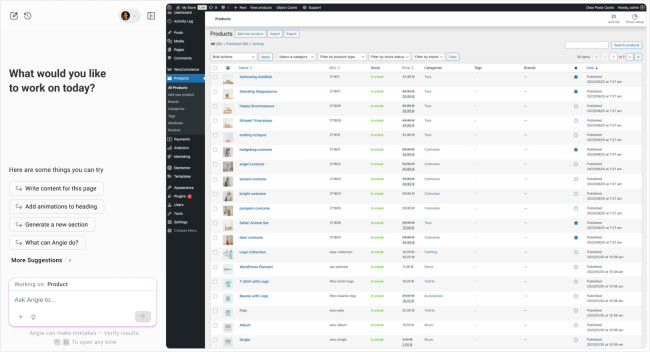
The learning curve isn’t as steep as the commands are plain English, but you do need to trust the AI with high-impact tasks like publishing or altering multiple pages.
Backups are a must if you’re experimenting with site-wide actions.
Angie doesn’t feel like a gimmick. It’s not trying to be creative for you, but it’s there to offload the grunt work.
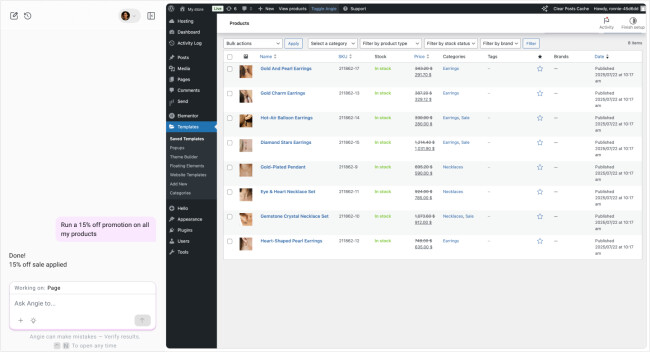
For businesses juggling several WordPress installs or WooCommerce shops, that’s a noticeable productivity boost.
For solo site owners, it might feel like overkill unless you run content or product updates regularly.
Pricing
- Free (Beta)
What Users Say
Because Angie is in the beta stage, there’s not a huge volume of in-depth reviews, yet early adopters are intrigued by Angie’s potential but cautious about relying on it fully.
On Reddit, one user described Angie as “extremely helpful and able to come up with some cool designs” when testing it on WordPress, though they noted results still needed refinement.
Others in Elementor forums expressed optimism, treating it as a promising new plugin worth experimenting with, especially for saving time on repetitive site management tasks.
At the same time, skepticism is common. Some users have voiced frustrations with Elementor’s broader AI features, calling them underwhelming when expectations weren’t met.
Who’s It For?
Angie is designed for brands and companies managing WordPress at scale. eCommerce businesses can use it to streamline product updates and promotions, while mid-sized to enterprise organizations gain efficiency in launching campaigns, running audits, and maintaining multiple sites.
Other Notable Features
- Run site audits (broken links, heavy images) with fixes included
- Bulk content and product publishing
- WooCommerce price and inventory management
- Page creation with template + form integration in one command
- Early workflow automation for plugins and settings
2. Narrato: Best for AI Digital Marketing

Narrato allowed us to brainstorm ideas, write with AI, collaborate as a team, and publish without toggling between several tools.
| Pros | Cons |
|
|
Before Narrato, we were keeping track of progress manually in spreadsheets. The AI tool replaced that and functioned almost like a content manager.
We used it to create briefs, assign tasks, generate first drafts, and monitor SEO and deadlines.

What stood out about Narrato for our team was its approach to structuring blog outlines.
Rather than presenting a scattered list of ideas, it grouped content under clear themes, making it easier to write pieces that flowed naturally.
Narrato quickly adapted to our writing style, tone, and structure, which sped up the drafting process. Moreover, the pre-built templates made it easy to onboard new collaborators and keep everything aligned.

With H2s setting the main flow and H3s breaking down the details, it created a content strategy based on our audience’s reading habits.
All in all, Narrato is a helpful tool that supports any business’s digital marketing efforts.
Pricing
- Pro: Starts at $36/mo
- Business: Starts $96/mo
- Customizable enterprise plan: Inquire
Start your free trial with Narrato.
What Users Say
View this post on Instagram
Even though Narrato is rich in features, managing more complex or large-scale projects can sometimes feel overwhelming due to the dense layout.
That said, it still significantly impacts workflow efficiency, especially given its ability to centralize everything from planning to publishing.
Who’s It For?
We’d recommend Narrato to editorial teams, marketing firms, and startups that work with multiple collaborators, stakeholders, and campaigns.
The digital marketing AI tool can take the hassle out of managing blogs, newsletters, and other related projects.
Other Notable Features:
- Collaboration tools for teams and contributors
- Real-time campaign progress tracking
- Task and deadline management
AI Sales, Lead Generation & CRM
AI Tool | Best For | Key Features | Pricing (Starting At) |
| Nutshell | Inbound sales, lead management & CRM |
|
|
| Seamless.AI | AI lead generation & prospecting |
|
|
| Chatbase | AI-powered customer support & sales chatbots |
|
|
1. Nutshell: Best for AI Lead Management
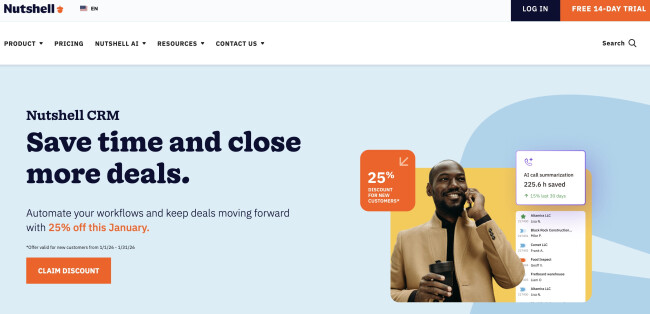
Upon trying, we found that Nutshell is one of the few CRMs that actually reduces sales friction.
From the moment we connected email and meetings and imported a few contacts, the platform started doing real work for us. It summarized lead histories, logged context automatically, and suggested what to do next.
| Pros | Cons |
|
|
Where Nutshell really shines is its AI-assisted sales execution.
Its AI timeline summaries, meeting and call transcriptions, and auto-logged email context saved us hours of manual review.
Each lead was condensed into a clean, readable overview with key talking points and next-step suggestions.
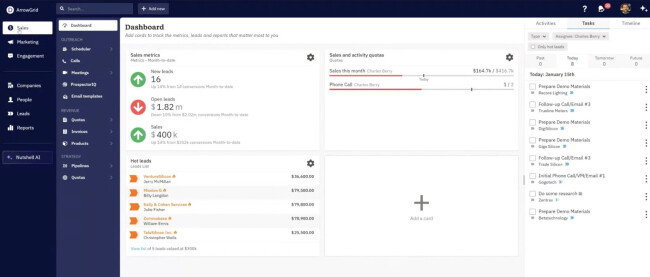
The built-in AI Sales Coach quietly nudges reps toward the strongest next move, which we found incredibly useful for keeping deals from stalling.
For lead generation, Nutshell is best when leads come from inbound channels like forms, website chat, and email campaigns.
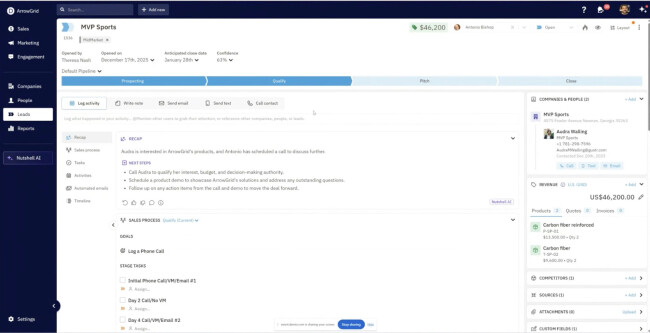
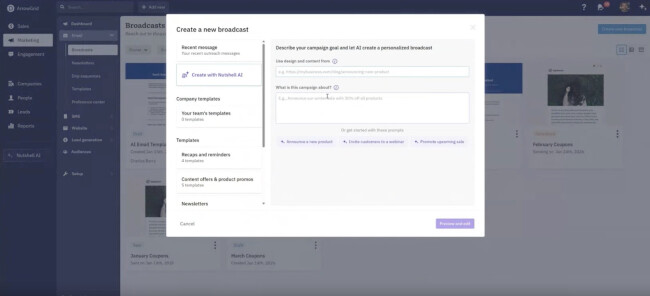
We were able to spin up pipeline and automate follow-ups, while the AI email reply starters and 1-click campaign generator made outreach faster.
Pricing
- CRM plans: Starts at $13/user/month (annually)
- Email marketing add-on: Starts at $49/month
- Engagement (SMS, chat, messaging): From $16/user/month
- No contracts, cancel anytime
Get started with Nutshell’s free 14-day trial – no credit card required.
What Users Say
Users consistently praise Nutshell for its clean pipeline views, strong email and contact tracking, and highly responsive customer support.
Some mention limits around advanced automation or deep enterprise reporting, but most agree that Nutshell delivers excellent value for money and is easy to adopt, even for teams new to CRM tools.
Who's It For?
Nutshell is ideal for small to mid-sized sales teams that want a simple, reliable CRM to manage and convert leads without enterprise-level complexity.
It’s especially well-suited for teams generating leads through inbound forms, email campaigns, referrals, or sales conversations, and who want AI-assisted follow-ups, clear pipelines, and strong reporting.
Other Notable Features
- Click-to-call, Zoom, Google Meet, and Teams transcription with AI summaries
- AI chatbot for website lead capture and meeting booking
- Voice-to-text notetaker for emails and CRM notes
- Visual pipelines with draft/testing mode
- Robust reporting for leads, forecasts, wins, and losses
- Thousands of native integrations (Gmail, Outlook, Slack, QuickBooks, PandaDoc, and more
2. Seamless.AI: Best for AI Lead Generation

Seamless.AI's lead search and CRM integration genuinely simplified our outreach process.
The platform’s AI continuously enriches data in real-time, so we always work with the most recent information on potential clients.
| Pros | Cons |
|
|
We saw real value in the AI tool’s all-in-one lead generation system and rich data access.
The writing assistant still has room for improvement, but the potential to grow our contact list and find more qualified leads made Seamless.AI worth exploring.

Its AI lead generation tool gave our team access to an extensive network of sales and business professionals, where we could easily pull over 100 data points per lead, all in one place.

Additionally, Autopilot efficiently managed the list-building and data verification, which markedly decreased the manual workload and kept our focus on strategy instead of data cleanup.
Pricing
- Free plan: Limited to 50 credits for trial purposes
- Paid plan: Inquire
Explore more leads with a free Seamless.AI account.
What Users Say
Some users compare Seamless.AI to other AI lead generation platforms and report better results elsewhere.
Still, many recognize its value and consider it a more affordable option for the features provided.
Who’s It For?
Sales and business development teams can use Seamless.AI to research prospects, reach out to decision-makers, and build a pipeline of leads.
The broad contact database helps target specific accounts and create tailored outreach strategies.
Other Notable Features:
- Connects businesses to leads with buying intent
- Auto-refreshes new and existing contact/company data
- Tracks job changes of important contacts in real-time
- Pulls B2B contact info from websites and LinkedIn using a Chrome Extension
3. Chatbase: Best Customer Support AI

Gone are the days of flat, robotic chatbot exchanges. The modern consumer is increasingly expecting personalized and personable customer service, even if it comes from a chatbot.
And with Chatbase, businesses can do exactly that.
| Pros | Cons |
|
|
Chatbase is a customer support AI tool that businesses can train using their data to provide accurate responses to questions.
It also has a built-in analytics and feedback loop that enables it to identify specific areas of improvement and iterate based on these.

What our team enjoyed most about Chatbase is its straightforward approach and ability to custom-fit its personality and tone.
For instance, we can dictate a more formal tone for employee onboarding and a casual tone for answering customer FAQs.
Try the Chatbase free package.
We can further train Chatbase using models like Google, Meta, and ChatGPT to adapt to more complex situations.
Because of its ample features and flexible integrations, Chatbase can be a valuable tool to upgrade customer services.
Pricing
- Free
- Hobby: Starts at $32/month
- Standard: Starts at $120/month
- Pro: Starts at $400/month
What Users Say
View this post on Instagram
Users enjoy Chatbase's ease of use and fast setup, allowing them to quickly deploy their live agents within a day or two.
However, they have noticed some issues with scalability and limitations with its customization capabilities, particularly when handling multi-step queries.
Who’s It For?
Chatbase is useful for businesses that want to quickly assemble or supplement their support and sales teams and require integrations like Slack, WhatsApp, and Zappier.
Other Notable Features:
- Uses AI guardrails to prevent misinformation and keep responses on-topic
- Connects to APIs to perform real actions like booking or updating info
- Supports around 95 languages and replies in the user’s language
- Hands off to human agents when the AI can’t resolve an issue
AI SEO & AEO Tools
AI Tool | Best For | Key Features | Pricing (Starting At) |
| Perplexity AI | AI search & research |
|
|
| SEMRush | AI SEO & competitive analysis |
| $165.17/month |
1. Perplexity AI: Best AI Search Engine

Perplexity scans the web to collect real-time data, consistently delivering fast, clear answers and showing exactly where the information originated.
Its high level of transparency solves a major issue we’ve encountered with other AI tools: not knowing what’s real and what’s made up. For teams relying on credible sources, that makes a big difference.
| Pros | Cons |
|
|
Additionally, Perplexity adjusts its answers to follow-up questions, functioning like one of our team members assisting with research.
We find this especially useful when working under pressure, pulling together a client update, checking facts for a presentation, or trying to understand a fast-moving trend.

As such, the AI search engine helps us stay informed and confident in our insights. It’s not a full replacement for deep research tools, but it’s a great option when we’re in the early stages of exploring a topic or just need a solid, fast summary.
Pricing
- Free access to core features
- Pro: $20/mo
Get started with Perplexity for free.
What Users Say
Users generally find Perplexity AI a valuable tool for getting quick, direct answers without the distraction of low-quality search results.
Many appreciate the option to choose between different language models, which adds flexibility depending on the query type. Meanwhile, some note that the AI search engine struggles with depth when it comes to niche or academic topics.
There are also mentions of occasional issues with follow-up questions, where the tool doesn’t always maintain context well.
Who’s It For?
@testingcatalog Perplexity's AI assistant is what Google Assistant was meant to be. If a secret Gemini model that has been in testing on Perplexity will somehow open real-time video & live audio capabilities, it will be a big opener for Perplexity to become a hands-free assistant that can run on any Android device. I love push-to-talk, but it needs a physical button. Otherwise, AVM will win. #ai#perplexity#aiassistant
♬ original sound - testingcatalog
Perplexity works best for businesses needing quick, accurate answers backed with updated, clickable sources.
It also helps teams that spend a lot of time fact-checking, gathering data, or keeping up with trends, as this AI search engine can help them move faster without sacrificing quality.
Other Notable Features:
- Chat-style search experience
- Real-time results with clickable citations
- Well-reviewed mobile app
2. SEMRush: Best for AI SEO

SEMrush has evolved into a key player in AI SEO. What once was a traditional SEO toolkit with light automation is now a fully integrated AI-driven platform that supports everything from optimizing content to analyzing competitors.
| Pros | Cons |
|
|
Unlike many newer tools that zero in on just one part of the SEO process, like writing or indexing, we found SEMrush strategically applies AI across the board.
Our team has used it for smarter keyword research, forecasting trends, and auditing sites. We’ve also optimized content through tools SEO Writing Assistant and ContentShake AI.

The SEO Writing Assistant gave us immediate, actionable feedback, including improvements in structure, keyword use, clarity, and tone. With it, we could tighten drafts without slowing down the creative process.

SEMrush Copilot works like an in-platform advisor that actively monitors rankings and competitor moves, guiding businesses with clear next steps based on current analytics.

Beyond numbers, this SEMrush feature helps brands strategically navigate shifts in rankings and competitor strategies.
Pricing
- Starter: Starts at $165.17/mo
- Pro+: Starts at $248.17/mo
- Advanced: Starts at $455.67/mo
Try SEMrush for free, or subscribe to a plan.
What Users Say
SEMrush offers many features that can appear complex at first. However, after spending time on the AI search engine, users found that its layout and tools support efficient navigation and use.
Who’s It For?
SEMrush is a solid fit for marketing agencies that manage different domains or clients simultaneously. It helps track the competition and fine-tune content strategies across projects.
Other Notable Features:
- Allows CMS integrations
- AI-enhanced backlink insights and toxic link detection
- Personalized AI recommendations based on user goals and campaigns
AI Content Marketing & Optimization Tools
AI Tool | Best For | Key Features | Pricing (Starting At) |
| StoryChief | Content marketing & distribution |
|
|
| Jasper AI | AI writing & collaboration |
| $29/mo |
1. StoryChief: Best for AI Content Marketing

We have noticed significant changes since we brought StoryChief into our workflow.
One was eliminating repetitive steps and saving us several hours each week, as the AI tool helped us quickly produce content and push it out across LinkedIn, X, and email newsletters.
| Pros | Cons |
|
|
Another feature we found especially helpful is the built-in analytics. In the past, tracking performance meant logging into multiple tools, which often gave us inconsistent data.
With StoryChief, we can access all the insights in one central dashboard. It was much easier to see content performance and adjust our strategy accordingly.

We also loved the platform’s collaboration tools, which made coordinating with writers, designers, and editors more manageable.
With it, all team members can plan, comment, edit, and approve content without switching between different platforms.

Overall, StoryChief has become a valuable tool in our content marketing process, consolidating all our marketing channels so we can swiftly publish, monitor, and collaborate on all our content.
Pricing
- Free version available
- Team plans: $34-$81/mo
- Agency plans: $58-$93/mo
- Enterprise: Request quote
What Users Say
While StoryChief is a robust AI content marketing tool, it has a few areas that could be improved.
Teams report noticeable gains in productivity after adopting the platform. At the same time, a few users have pointed out certain constraints around analytics reporting.
Who’s It For?
In our experience, StoryChief is excellent for marketing teams and content managers who handle multiple distribution channels. It’s especially useful for agencies that need to publish blogs, emails, and social content in sync.
If you oversee content across several platforms or clients, this AI tool can help keep everything organized and running smoothly.
Other Notable Features:
- Streamlined content approval workflows
- Integration with popular CMS platforms
- Social media post scheduling and editorial calendar
- AI-recommended keywords
2. Jasper AI: Best for AI-Powered Writing & Collaboration
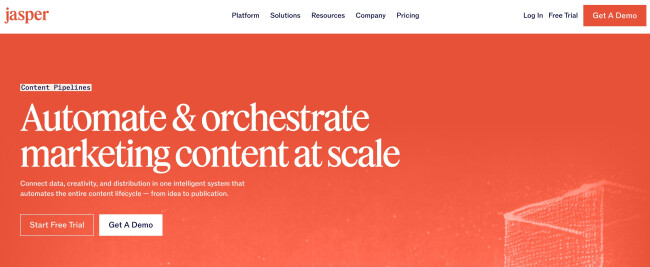
Since integrating Jasper into our workflow, creating, personalizing, and distributing content has become seamless.
| Pros | Cons |
|
|
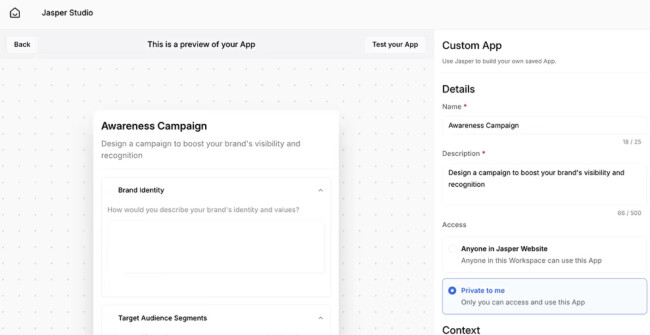
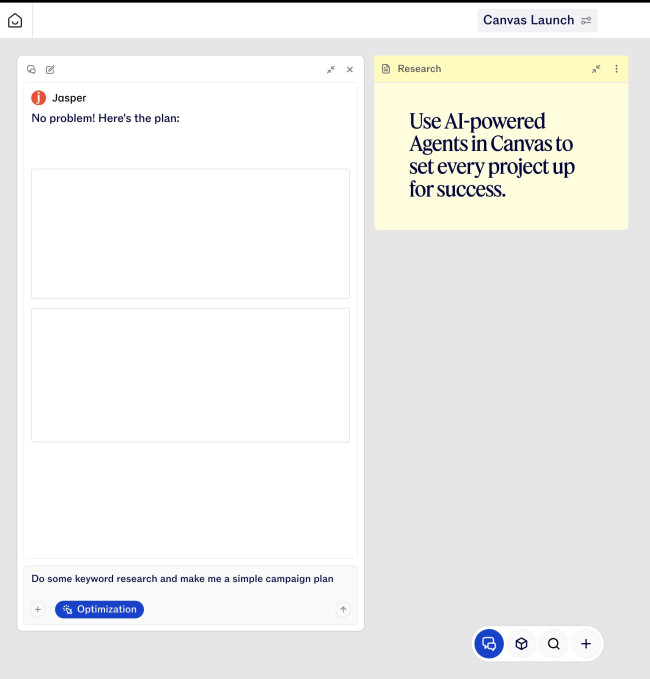
Jasper’s Content Pipelines allow us to connect our strategy, brand voice, and audience insights, automating content generation across blogs, emails, product descriptions, campaigns, and social media. 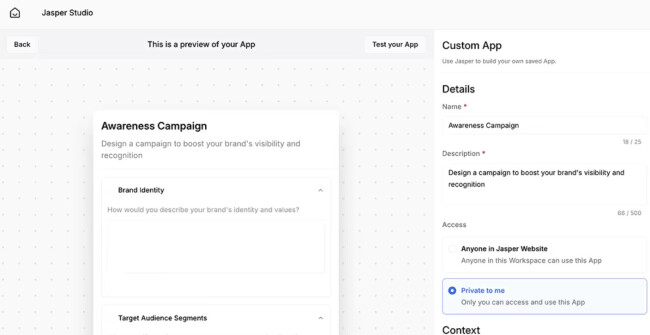
One of our favorite features is Jasper IQ, which blends marketing best practices with our company knowledge and audience data, ensuring every piece of content is relevant and context-aware.
Overall, Jasper has transformed our marketing team’s productivity, enabling us to produce more high-quality content in less time, with minimal chaos.
Pricing
- Pro: Starts at $29/mo
- Business: Custom pricing
Try Jasper for free for 7 days.
What Users Say
Users say Jasper is great for quickly generating content like blogs, social posts, and emails, and its features make creating and organizing content easier.
That said, it can feel a bit repetitive or expensive, and you still need to tweak and fact-check what it writes. Many suggest it’s best as a helpful assistant rather than a full replacement for human writing.
Who’s It For?
Jasper AI is ideal for marketing teams, content creators, agencies, and enterprises looking to scale content creation without losing brand consistency.
It’s especially useful for teams handling multi-channel campaigns, high-volume content production, or personalized messaging at scale.
Other Notable Features
- AI-driven personalization and SEO/AEO/GEO optimization
- Brand and audience context layers (Brand IQ, Audience IQ, Marketing IQ)
- Enterprise-grade security, governance, and compliance
AI Advertising, PPC & Conversion Optimization
AI Tool | Best For | Key Features | Pricing (Starting At) |
| Acquisio | AI-powered PPC management |
| Contact for pricing |
| AdCreative.ai | AI ad creative generation |
| $20/month |
1. Acquisio: Best for PPC AI

Coordination across Google Ads, Microsoft Advertising, and Facebook PPC platforms comes with its share of challenges. We’ve found that Acquisio aligns well with this workflow.
At the onset, we liked how Acquisio's dashboard helped centralize all our campaigns, making our workflow much smoother and providing a comprehensive overview of our work.
| Pros | Cons |
|
|
Additionally, Acquisio’s machine learning (ML) system saved us hours and reduced the margin of error by optimizing bids and budgets in real time.
As a result, we recorded a noticeable improvement in campaign performance and return on investment (ROI).

The AI PPC tool also streamlines reporting and delivers the insights we need without manual digging. Even though there was a bit of a learning curve when we started using the platform, the design is straightforward.
Also, support has been helpful when we’ve had questions. Acquisio has helped us solve several common campaign management problems and made our processes more efficient.
Pricing
- Contact for pricing
Get started with Acquisio now.
What Users Say
Feedback on Acquisio tends to vary. Some think that despite its ease of navigation, the AI PPC tool doesn't provide many advantages over what Google Ads already offers.
Others aren’t fully convinced it delivers enough value for the price.
Who’s It For?
eCommerce brands that want to optimize ad spend through automation can greatly benefit from Acquisio.
The AI PPC tool is also a smart fit for larger businesses that run several complex campaigns.
Other Notable Features:
- Campaign management across search, social, and display networks
- Custom reporting tailored to key business metrics
- Social ad integration
- Forecasting tools
2. AdCreative.ai: Best for AI Advertising

Our team found AdCreative.ai helpful for producing ad creatives that drive conversions. While testing it, we noticed how quickly it generates varying ad designs.

The tool's Creative Scoring AI scored each ad based on predicted performance, guiding us on how to more efficiently allocate our budgets.
| Pros | Cons |
|
|
Moreover, AdCreative.ai supports on-brand templates and creates ads without constant oversight. On the other hand, its built-in AdLLM tool for writing ad copy simplifies the process, generating text that is likely to convert.

Overall, AdCreative.ai is a practical tool for building data-backed ads, especially when speed is a priority.
Pricing
- Starter: Starts at $20/mo
- Professional: Starts at $125/mo
- Ultimate: Starts at $500/mo
- Enterprise: Custom
Try AdCreative.ai now for free.
What Users Say
Users say AdCreative.ai is a promising tool for quickly generating social media ad creatives. Many appreciate how easy it is to produce polished templates at scale, especially for marketing teams looking to expand into social platforms.
However, some mentioned that the static ad layouts can be hit-or-miss, with occasional issues in image placement. While video ad support is currently lacking, many still find it useful for testing concepts and speeding up the creative process.
Who’s It For?
Day 18 of #100DaysofAI
— Ryan Haggenjos 💯 (@rshaggen) July 24, 2024
I learned how to use https://t.co/X34airjUfu, an advertising tool that can bring speed and consistency to your advertising campaigns. Advertising can be difficult to execute but through this tool, it makes it feel effortless.
AdCreative.ai is for teams that quickly need to create high-performing social media ads.
It’s particularly useful for eCommerce brands and marketing teams that need to test many ad versions across platforms. It can also be valuable for smaller businesses trying to get the most value from their advertising budget.
Other Notable Features:
- Crafts and optimizes ad designs using consumer data
- Produces both visual content and ad copy
- Scores creative assets to predict performance
- Allows users to review competitor ads and analyze their results
AI Email Marketing & Lifecycle Automation
AI Tool | Best For | Key Features | Pricing (Starting At) |
| MailChimp AI | Email campaign automation |
|
|
| ActiveCampaign | Automating personalized email campaigns |
| $15/mo |
1. MailChimp AI: Best for Email Campaign Automation
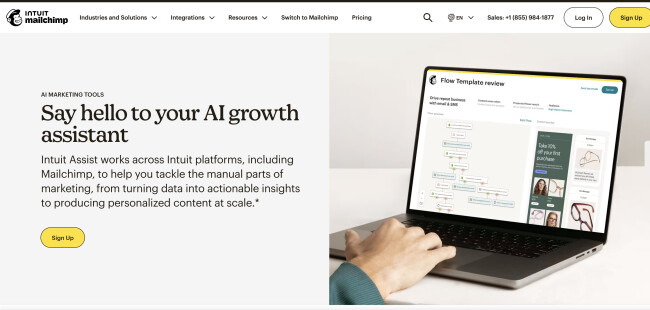
MailChimp’s Intuit Assist helps us automate personalized campaigns at scale, from welcoming new contacts to recovering abandoned carts and re-engaging inactive subscribers.
| Pros | Cons |
|
|
The send time optimization is especially a great feature. It predicts the best days and hours to reach our audience based on engagement patterns, ensuring each campaign hits inboxes at peak times.
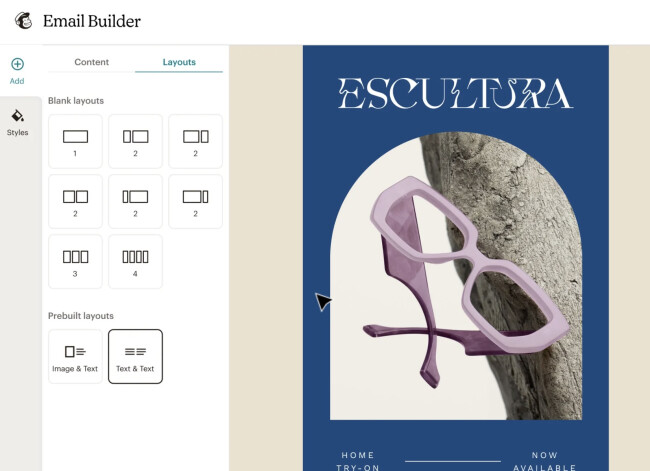
Beyond that, we also made use of its AI content generation to produce email copy within seconds and A/B testing to refine our campaigns.
Finally, Mailchimp AI’s predictive insights help target the right audience segments, increasing engagement and conversion rates.
Pricing
- Free plan
- Essentials: $13/month
- Standard: $20/month
- Premium: $350/month
Sign up to get started with MailChimp today.
What Users Say
Users appreciate Mailchimp’s easy-to-use templates, strong automation, and wide integrations. However, some find that it has become increasingly expensive and limited
Due to this, some users switched to alternatives like MailerLite, Brevo, or AI-powered automations for better flexibility, easier list management, and cost savings.
Who’s It For?
Mailchimp AI is perfect for small businesses, marketing teams, and solopreneurs who want professional, personalized email campaigns without a large team.
It’s especially useful for anyone looking to automate workflows, save time on content creation, and optimize email performance.
Other Notable Features
- Send day and send time optimization
- AI-generated email copy, subject lines, and content recommendations
- Integration with CRM and other marketing tools
2. ActiveCampaign: Best for Email Marketing AI

ActiveCampaign helped our team deliver more relevant and timely emails to our audience.
With features like dynamic content, predictive sending, and automation, the AI email marketing tool sent content that aligned with each contact's preferences and went out at the right time.
| Pros | Cons |
|
|
Upon using the platform, we felt its interface was pretty straightforward. The drag-and-drop builder and ready-to-go templates made setup easier.
Setting up drip campaigns, abandoned cart flows, and follow-ups didn’t take us long, and once they were active, they ran without much input from us.
That helped us stay consistent and reduced the manual work that engaged leads.

We also found the integrations to be seamless. With support for over 900 other functionalities, we could plug ActiveCampaign into our existing systems without issues.
However, the tool that stood out most for us was the AI-powered email generator. It helped us write polished and on-brand subject lines and full campaigns.

That said, the deliverability seemed solid. We didn’t track the exact numbers, but we didn’t encounter any deliverability problems we had seen with similar tools.
Pricing
- Starter: $15/mo
- Plus: $49/mo
- Pro: $79/mo
- Enterprise: $145/
What Users Say
View this post on Instagram
ActiveCampaign receives mixed user feedback, with many calling it ideal for serious marketers. They commend the email marketing AI tool's deep customization and educational resources.
However, steep price hikes, clunky UX, and limited email sends frustrate small business owners and less tech-savvy users.
Despite its relatively higher price point, ActiveCampaign remains a powerful and flexible tool with in-depth AI capabilities.
Who’s It For?
We'd recommend ActiveCampaign to marketing teams seeking to manage email automation, contact lists, and personalization with one email marketing AI tool.
Its features also match the needs of small to mid-sized businesses focused on lead nurturing and long-term customer relationships.
Other Notable Features:
- Includes A/B testing, dynamic content, and split testing tools
- Built-in CRM to ease sales workflows with lead scoring and tracking
- Uses CRM data, tags, and custom fields for advanced audience segmentation
AI Branding, Design & Visual Identity
AI Tool | Best For | Key Features | Pricing (Starting At) |
| Fiverr Logo Maker | Fast, affordable logo creation | AI logo generation Multiple styles Brand guidelines Social-ready assets | $30 (one-time) |
| uBrand | Full AI-powered brand identity |
| $19/mo |
1. Fiverr Logo Maker: Best AI Logo Generator

Fiverr Logo Maker offers various design styles, such as classic, modern, and fun, enabling startups and businesses to quickly craft their brand identity that aligns with their personality and industry.
| Pros | Cons |
|
|
Fiverr also allowed us to shape a logo that felt truly ours, not just another generic mark that can be mistaken for another brand or stock image.
It suggested fonts based on our input and guided Fiverr’s top creatives. We could quickly edit from many of the platform's options if the selection is unsatisfactory.

We also liked the color palette feature. The tool created schemes based on our choices, and we could either adjust them or pick from sets curated by professional designers.
After finalizing our logo, we received more than 20 high-resolution files, including versions for print, websites, and social media and a brand guidelines document.
Overall, Fiverr offers a good mix of speed and customization for organizations seeking to craft their logos but don’t know where to start.
Pricing
- Essential: $30
- Professional: $60
- Unlimited: $90
Get started with Fiverr Logo Maker today.
What Users Say
Most people who've used Fiverr Logo Maker seem to walk away happy with the experience. User feedback contains a consistent appreciation for simple navigation, especially for those without prior design experience. The large selection of templates is a big plus.
The balance between price and quality gets much positive attention, making Fiverr Logo Maker a popular choice among new and growing businesses.
Who’s It For?
Fiverr Logo Maker is useful for startups and small businesses as it lowers the cost and time barriers of logo creation.
You can preview everything for free, edit, or hire a designer. It’s a practical option for teams without a full design department.
Other Notable Features:
- Full commercial usage rights
- Complete ownership included
- Logos sized for platforms like Facebook, Instagram, LinkedIn, and Etsy
2. uBrand: Best for AI Branding

Our team experimented with the brand identity kit generator of uBrand and found it a practical solution for creating a full set of visual brand assets from an existing logo.
After uploading our logo, the platform quickly assembled a complete range of branded visuals, eliminating the need for manual design work.
| Pros | Cons |
|
|
It also has a color variation section where we could tweak padding and choose from the full-color logo, greyscale, single-color (mono), and inverted.
With these logo variations, uBrand automatically generates branded posters, apparel, packaging, signage, storefronts, and templates.

All these files were high-quality, so they worked well for digital and print needs.
On top of the visual designs, uBrand also helps businesses define their brand vision, mission, core values, and personality, overall proving to be a practical tool for creating a comprehensive brand identity.
Pricing
- Solo: Starts at $19/mo
- Pro: Starts at $29/mo
- Agency: Starts at $149/mo
Explore uBrand with a free trial.
What Users Say
Users say uBrand simplifies branding by combining visuals, brand stories, and social media content under one roof.
Overall, users recommend uBrand for building a brand from the ground up without the need to assemble a big multidisciplinary team.
Who’s It For?
uBrand is a solid option for creative teams, branding agencies, and marketing firms that need a full brand package, not just a logo but also a clear vision, mission, and values to go with it.
It’s especially handy if you're starting from scratch and want a cohesive representation of your brand across different platforms.
The AI branding tool speeds things up when you need to turn around branded assets or social media materials quickly.
Other Notable Features:
- AI logo generator that automates various mockup variations
- Multi-brand asset management
- Brand identity kit and guideline generator
- AI social post creator
AI Video & Multimedia Creation
AI Tool | Best For | Key Features | Pricing (Starting At) |
| Sora | AI video creation |
| ChatGPT Plus: $20/mo |
| Runway Gen 4.5 | Cinematic & experimental video |
|
|
1. Sora: Best Video AI

Sora uses large language models (LLMs) to turn any text-based prompt into full-scale cinematic videos, making it a powerful tool for creating thumb-stopping content for your social media posts or the latest marketing campaign.
| Pros | Cons |
|
|
Many AI video generators offer the same services, but our team found that Sora produces the best results.
With a simple prompt, we received a realistic video that matched the production quality of a National Geographic film. The subject's movements were fluid, the landscape was highly detailed, and the shots were consistent.

Beyond the text prompt, we could upload mood boards and images to guide the creative direction. We could also incorporate video footage and get the flexibility to edit the backgrounds, extend clips, and tweak other elements easily.
Overall, Sora’s storyboard feature lets us determine the pacing, style, transitions, and scene-by-scene narrative, giving us creative control we haven't seen on many other platforms.
Pricing
- ChatGPT Plus: $20/mo
- ChatGPT Pro: $200/mo
What Users Say
@mkbhddailyclips This Video is AI Generated! SORA Review
♬ original sound - Tech Clips
Although the main user consensus is that they are impressed by Sora’s AI video-generating capabilities, some have noticed that the results can be unpredictable.
Beginners might have to do many trials and errors to produce precise results.
Who’s It For?
Sora is a useful tool for businesses that want to add captivating videos to their presentational decks, marketing campaigns, product launches, brand content, and other communication materials.
It also encourages creative teams to test ideas and push boundaries with just a few clicks of the keyboard.
Other Notable Features:
- Realistic lighting, motion, and environmental effects
- Ability to create entire scenes from a single prompt
- Support for multiple visual styles and moods
- Scene continuity and storytelling flexibility
2. Runway Gen 4.5: Best for Cinematic & Experimental Video

With just a prompt describing the scene and characters, Runway helps us generate ultra-realistic, cinematic videos without touching a timeline or manual frame edits.
The AI ensures physical accuracy, so objects move naturally, liquids flow correctly, and subtle details like hair and fabric maintain consistency throughout the video.
| Pros | Cons |
|
|
Its emotional expressiveness is on another level. Gen-4.5 captures nuanced facial expressions, gestures, and body language, making characters feel alive.
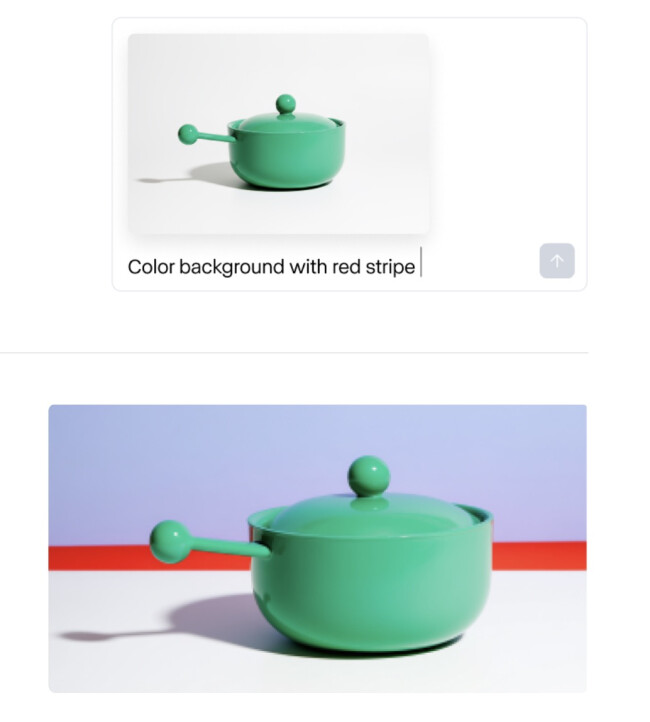
On top of that, the AI supports multi-element scenes and stylistic control, allowing us to produce everything from photorealistic ads to highly stylized animations.
We’ve used it to create marketing campaigns, game trailers, and short films, all in a fraction of the time.
Pricing
- Free plan
- Paid plans: Starts at $15–$35/mo (depending on features and export options)
Sign up to try Runway for free.
What Users Say
Runway Gen 4.5 impresses many with its improved text-to-video generation, strong physics, and visual consistency. Users note it’s especially effective for creative and experimental videos.
Some limitations remain, like replicating example outputs can be tricky, but the general consensus is that it’s a powerful tool for AI-driven video creation.
Who’s It For?
Runway is perfect for content creators, marketers, filmmakers, and gaming studios who want high-quality cinematic videos without the overhead of a production studio.
It’s ideal for anyone producing social content, promotional campaigns, or narrative projects who wants fast, polished results.
Other Notable Features
- Realistic motion and physics, including liquid dynamics and object interactions
- Multi-mode inputs: text prompts, reference images, or videos
- Multi-style output: photorealistic, stylized, cinematic, and everyday scenes
AI eCommerce & Retail Intelligence
AI Tool | Best For | Key Features | Pricing (Starting At) |
| Clerk.io | Product recommendations & merchandising |
| $119/mo |
| Shopify Magic | Shopify content & automation |
| Free (Shopify plan) |
1. Clerk.io: Best eCommerce AI

Customers increasingly expect highly personalized product recommendations from eCommerce stores.
Clerk.io helps businesses meet this demand by using data-driven insights to align search results with the customers' intent.
| Pros | Cons |
|
|
Along with matching keywords, the system intelligently handled misspellings, recognized synonyms, and incorporated data from browsing behavior, order history, cart items, top sellers, and seasonal patterns.

Our team could use the data to segment customers and set triggered campaigns via email and chatbots to reduce abandoned cart rates, win back customers, offer post-purchase recommendations, and, ultimately, increase sales.
Pricing
- Search function: Starts at $119 for 10k monthly searches
- Recommendations: Starts at $119 for 100k monthly recommendations
- Chat: Starts at $119 for 100 monthly conversations
- Email: Starts at $119 for 10k monthly opened emails
- Audience: Starts at $119 for 10k monthly active subscribers
Try Clerk.io's pricing calculator to get a quick estimate.
What Users Say
Users noted increased sales and revenue after adding Clerk.io to their stores.
However, they also find its integrations limited, hoping it can be connected to other e-commerce platforms.
Who’s It For?
With its comprehensive list of features, Clerk.io is a valuable AI eCommerce tool for shop owners, vendors, and retailers to grow their businesses.
It benefits businesses with large product catalogs, facilitating faster and more accurate customer results.
It also helps customer retention through its chatbot and email integrations and supports the growth of small eCommerce brands with its entry-level pricing packages.
Other Notable Features:
- Personalized product recommendations based on user data
- Abandoned cart reminders
- Non-reliant on cookies and data collection, making it GDPR compliant
2. Shopify Magic: Best Shopify AI

Shopify Magic is Shopify’s built-in AI tool that streamlines content creation for merchants.
With it, users can produce writeups and edit images that align with their brand identity and meet the platform's policies.
| Pros | Cons |
|
|
Upon trying Shopify Magic, our team noted how the AI Shopify tool seamlessly integrated with the platform's dashboard, eliminating the need to juggle through multiple platforms.
In terms of its writing and media-editing features, we found it was, indeed, magical.
-content.jpg)
Despite providing a bare prompt with just the product name and a few keywords, it generated a publish-ready, on-brand, and catchy feature piece within a few seconds. Moreover, it translated the content into several other languages.
Additionally, Magic’s higher-tiered plans offer insights and help predict customer spending, enabling us to estimate the customer’s lifetime value and better plan acquisition budgets.
Pricing
- Free for all Shopify merchants; feature availability varies by plan
Try Shopify Magic for free with any Shopify plan.
What Users Say
Users laud Shopify Magic for its practicality, helping them increase efficiency and automate manual tasks.
However, some mention that the written output may be too generic and require some polishing.
Who’s It For?
Shopify Magic works best for time-pressured small businesses, agencies, and retailers.
It helps them quickly draft product pages and marketing emails, manage inventory through AI-backed demand predictions, and maintain consistent storefronts through accelerated photo edits.
It is also useful for support teams, who can use the FAQ generator and chatbot function to improve customer satisfaction.
Other Notable Features:
- AI-generated product, blog, and email content
- Sidekick Assistant for pricing and marketing insights
- One‑click background removal and replacement for product images without leaving Shopify
AI Web, UI & Product Design
AI Tool | Best For | Key Features | Pricing (Starting At) |
| Jimdo | AI web design |
|
|
| Visily | UI/UX prototyping |
|
|
| Uizard | AI product design & rapid prototyping |
|
|
1. Jimdo: Best Web Design AI

Our team found Jimdo Web Design Builder to be one of the most capable AI web design tools available today.
After answering basic questions, such as the purpose of our website and whether it was for an individual or a team, we produced a fully designed website.
| Pros | Cons |
|
|
It saved us from spending too much time mulling over every technical decision, such as selecting the right color, typography, and on-page element sizes.
We also didn’t need to write a single line of code.

Additionally, we could personalize our website by adjusting colors and uploading our photos and logos, with changes reflected in real time.
And if we wanted to go further, Jimdo offered deeper customization options.
All in all, Jimdo provides businesses with a foundation for their online product catalogs, business portfolios, landing pages, and startup websites without needing vast technical expertise.
Pricing
- Free
- Start: $11/month
- Grow: $18/month
- Unlimited: $45/month
Get started with Jimdo for free.
What Users Say
View this post on Instagram
Users appreciate Jimdo's simplicity, allowing even the least technical user to build their website and personalize it with the AI web design tool’s drag-and-drop interface.
However, some have reported Jimdo lagging, having technical glitches, and experiencing delayed domain activation.
Who’s It For?
Jimdo is the practical choice for small businesses, freelancers, and many others who want to launch a website without coding experience.
Moreover, they can benefit from the tool’s built-in SEO, analytics, and content planning features.
Other Notable Features:
- Generates a personalized website in minutes
- Professional, industry-specific templates
- Quick online store setup with secure checkout and inventory tracking
2. Visily: Best UI/UX AI

Visily is one of the rare UI/UX AI tools that provide great creative control while having a beginner-friendly interface.
While trying the AI screenshot-to-wireframe feature, we were impressed by how accurately Visily rendered the image into editable, layered wireframes.
| Pros | Cons |
|
|
And even if we didn’t have a ready-made image, we could still produce wireframes, screen layouts, and feature flows through its text-to-diagram and text-to-design AI features.

Other notable features include Magic Themes, where we could implement professional-looking designs on our website, and Magic Images, which automatically insert realistic stock-style photos that match our current layout.
In conclusion, Visily makes prototyping accessible with its rich UI component library and intuitive drag-and-drop editing functions, saving businesses, teams, and professionals valuable time and resources.
Pricing
- Starter: Free
- Pro: $11/editor/mo
- Business: $29/editor/mo
- Enterprise: Custom; inquire
What Users Say
@visilyai Ideas should flow, not fight back. 💡✨ AI is changing the game—just type what you need and get a full design in seconds. Why start from scratch when AI can fast-track the fun part? #aidesign#aiforcreatives#wireframe#uiuxdesign#futureofdesign
♬ nhạc nền - Visily - Visily
Users of varying backgrounds praise Visily for being powerful and user-friendly, citing how it has made it easy to create wireframes and data-heavy UIs.
Through it, they can transform their concepts into presentation-ready visuals.
Who’s It For?
Visily is an ideal tool for marketing and product teams that want to visually communicate their concepts even without a full-time designer.
It also benefits project managers, early-stage founders, and startup marketers who are rich in ideas but have limited resources.
Other Notable Features:
- Pre-built templates, themes, and color schemes for various use cases (e.g., mobile apps, SaaS dashboards, and landing pages)
- Real-time collaboration on shared boards with annotation, commenting, and sharing features
- Auto-layout and smart spacing tools
3. Uizard: Best AI Product Design

Uizard balances creativity with ease of use, offering a robust template library, text-to-design AI-powered features, and a drag-and-drop editor.
With it, users can quickly visualize and iterate their UI/UX designs and wireframes, making Uizard one of the leading AI product design tools.
| Pros | Cons |
|
|
Its library provided multiple templates with varying designs for mobile, tablet, and desktop apps to help us kickstart our design process.
At the same time, we could highly personalize the design with its drop-and-drag editor and advanced settings to more accurately match our project vision.

We could design from scratch or use the text-to-design generator if we already had a solid concept. For more control, Uizard’s Autodesigner lets us guide the AI with detailed instructions to shape the design exactly how we want.
Pricing
- Free plan: Access to basic features with limitations
- Pro plan: $12/month
- Business plan: $39/month
Get started with Uizard today.
What Users Say
Gauri, the ultimate boss doll! She’s ready to conquer the corporate world from power suits to must-have accessories. 🔥🏆
— J Ganesh Mudaliar 🇸🇬 (@jganesh_sg) April 5, 2025
Created with @fotor_com#AI#DigitalTransformation#SmartTech#AIArt#DigitalArt#AIArtCommunity#figure#AIAnime#Fotor#Ghibli#Ghiblistudio#ghibliartpic.twitter.com/eV6OMrORyE
Users commend Uizard for its beginner-friendly interface and ability to accurately and rapidly convert sketches into digital interfaces.
However, some have mentioned that its customization capabilities can be limited, especially for more intricate designs.
Who’s It For?
Uizard is best suited for startups, product managers, and individuals without a design background, especially those looking to quickly launch an MVP, gather user feedback, and test design concepts.
Other Notable Features:
- Autodesigner 2.0 generates editable prototypes from textual descriptions
- Screenshot scanner can transform screenshots into editable mockups
- Wireframe scanner converts hand-drawn wireframes into digital designs
- AI chatbot assistant feature for fast design improvements
AI Software Testing & QA
AI Tool | Best For | Key Features | Pricing (Starting At) |
| Testim | AI web & mobile Testing |
|
|
| Playwright | End-to-end automation & cross-browser Testing |
| $0.01/test min |
1. Testim: Best AI Software Testing

After trying out Testim, we are confident it’s one of the best AI software testing tools. It uses AI to automate end-to-end web and mobile application testing and has an internal learning loop to continuously improve its capabilities.
Users can streamline their software testing processes and proactively resolve issues through these features.
| Pros | Cons |
|
|
We first tried Testim’s fast-authoring feature, which consistently and accurately records user interactions, automatically tags page elements, and provides the code variation of the test.
Moreover, it clusters test recordings with similar elements, helping our team reduce duplicates and reuse elements for future tests.

However, we liked Testim’s self-healing indicators the most. Through this type of feedback loop, it continuously learns test patterns and solutions and conducts side-by-side evaluations to enhance locators.
Additionally, its results log feature provides actionable recommendations when it runs an error on the test.
Testim is a practical tool for quality management analysts, with its straightforward and low code interface and automated testing features.
Pricing
- Upon request
What Users Say
Senior QA analysts and testers commend Testim for its easy use and customizability in JavaScript.
However, some have noted that the tool is limited in validating multiple elements.
Who’s It For?
Testim is an ideal tool for QA teams and analysts looking for a software testing tool to supplement their tech stack and accelerate their workflows.
Other Notable Features:
- AI-generated tests that adapt to application changes
- Reusable custom code steps for easier maintenance
- Integrates with GitLab, Jira, GitHub, and other development tools
2. Playwright AI: Best for Cross-Browser Testing
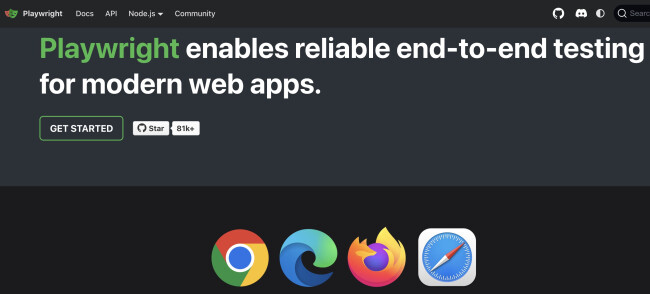
Playwright AI’s AI-powered agents, Planner, Generator, and Healer, work together to cover every stage of testing, from planning scenarios to repairing failing tests.
| Pros | Cons |
|
|
We simply provide a seed test or a prompt describing the user flow, and the Planner produces a human-readable Markdown test plan.
The Generator then converts that plan into executable Playwright tests, and the Healer automatically fixes any failing steps, saving us countless hours that would have been spent debugging flaky tests manually.
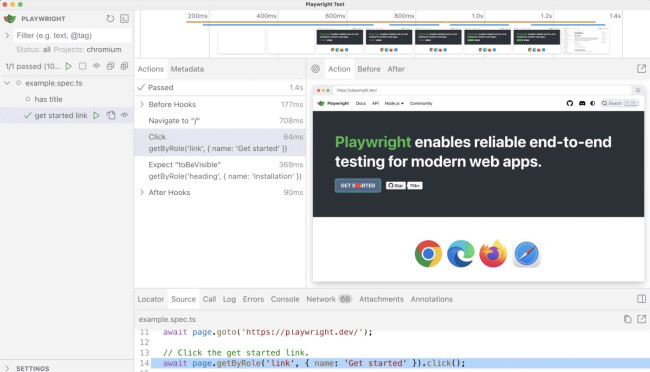
We also relied heavily on Playwright’s cross-browser and cross-platform support, which lets me run tests on Chromium, WebKit, and Firefox across Windows, Linux, and macOS, including mobile emulation, all from a single API.
From testing multi-tab scenarios to handling Shadow DOM elements, Playwright has replaced multiple tools in my workflow with one powerful, adaptable solution.
Pricing
- Cloud-hosted Linux: $0.01 per test minute
- Cloud-hosted Windows: $0.02 per test minute
- Reporting: $3.50 per 1,000 test results
Get started with Playwright AI today.
What Users Say
Developers and QA engineers using Playwright AI generally find it most useful for accelerating repetitive tasks like scaffolding smoke tests, generating Page Object Models, or drafting tests from specs, PRs, or user stories.
But it isn’t a full replacement for human oversight. Outputs often need review and cleanup, while selectors, waits, and test structure require manual refinement.
Who’s It For?
Playwright AI is ideal for QA teams, developers, and software testers who want reliable end-to-end automation for web and mobile applications.
It’s perfect for teams managing complex workflows, multiple user contexts, or cross-browser testing.
Other Notable Features
- Trace viewer with video, DOM snapshots, and action explorer
- Browser context isolation for fully independent tests
- VS Code integration and Codegen for rapid test creation
AI Cybersecurity & Threat Detection
AI Tool | Best For | Key Features | Pricing (Starting At) |
| CrowdStrike | AI endpoint threat detection |
| $59.99/device |
| Darktrace ActiveAI | Autonomous threat detection |
| Custom / quote-based |
1. CrowdStrike: Best Cybersecurity AI

With AI-powered threats becoming an increasing concern, Crowdstrike Falcon presents a robust solution.
By leveraging advanced machine learning, the cybersecurity AI tool immediately detects anomalies and suspicious activities across a system’s endpoint, proactively preventing cyberattacks.
| Pros | Cons |
|
|
Crowdstrike’s Threat Graph helped us create a cohesive picture of the scattered threat indicators. We gained greater visibility into our system and identified attacks we otherwise might have missed.

On top of these features, Crowdstrike offers 24/7 threat hunting, protects against fileless malware, and integrates with multiple modules, further strengthening a system’s vulnerability management and IT hygiene.
Pricing
- Falcon Go: $59.99/device annually
- Falcon Pro: $99.99/device annually
- Falcon Enterprise: $184.99/device annually
- Falcon Complete MDR: Contact sales for pricing
Try any CrowdStrike plan with a 15-day trial.
What Users Say
Users highly commend Crowdstrike’s ability to consistently block red team exercises and multiple major threats for years.
They also highlight that shifting to behavior-focused detection has significantly improved their security operations.
However, they have noticed that the AI cybersecurity tool may miss some malicious files when inactive on a disk.
Who’s It For?
Crowdstrike benefits enterprises and businesses seeking to enhance their cybersecurity capabilities with a 24/7 expert support team that can seamlessly integrate into their system without slowing down performance.
Other Notable Features:
- AI-powered threat hunting correlates endpoint behaviors to detect anomalies
- Threat Graph analyzes activity patterns to uncover hidden attacks
- Managed threat hunting provides 24/7 expert monitoring
2. Darktrace ActiveAI: Best for Autonomous Threat Detection
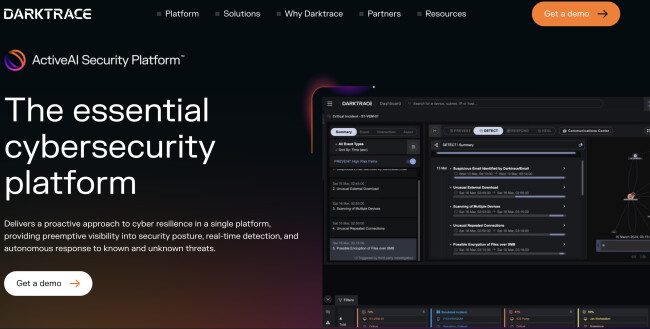
Using Darktrace ActiveAI day to day feels fundamentally different from traditional security tools.
Instead of tuning endless rules or chasing signatures, I watched the platform learn our environment on its own: how users authenticate, how data normally moves, and how systems behave.
| Pros | Cons |
|
|
Once that baseline was established, anything even slightly abnormal stood out immediately, often before it triggered conventional alerts elsewhere.
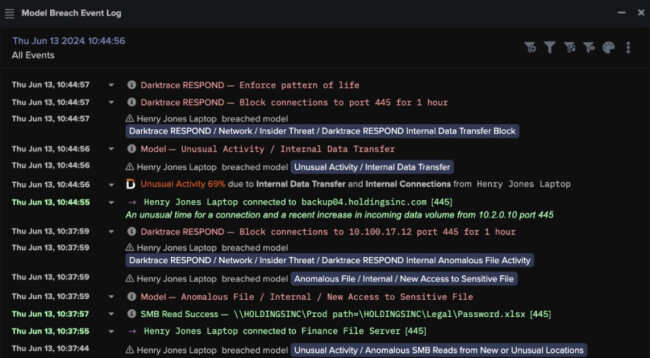
What impressed us most was how every alert is automatically investigated, not just flagged. The Cyber AI Analyst stitches together activity across domains and delivers a clear, narrative-style investigation.
In practice, that meant far fewer alerts to triage and much faster decisions.
Pricing
- Custom, quote-based
Reach out to Darktrace to get a demo.
What Users Say
Users find Darktrace useful for detecting unusual network activity and advanced threat hunting, but many report false positives, heavy setup, and constant tuning.
While it can be valuable in complex environments, some feel the cost and effort outweigh the benefits compared to solid EDR solutions.
What if your endpoint could finally tell the whole story? 🤔
— Darktrace (@Darktrace) October 30, 2025
Join our live broadcast to learn more about how we’re bringing industry-first endpoint visibility and enhanced Agentic AI to the ActiveAI Security Platform™ — closing the gaps between NDR, EDR, and XDR. Register now… pic.twitter.com/GTXaXyBWea
Who’s It For?
From my experience, Darktrace ActiveAI is best for mid-size to large organizations with complex infrastructures, limited SOC bandwidth, or a need to defend against novel, fast-moving threats.
It’s especially valuable for teams looking to consolidate tools and move toward a more proactive approach.
Other Notable Features
- Cyber AI Analyst for SOC Level-2 quality investigations
- Real-time autonomous response tuned to business context
- Full attack-path visibility across the enterprise
Our team ranks agencies worldwide to help you find a qualified partner. Visit our Agency Directory for the top AI companies, as well as:
- Top AI App Development Companies
- Top AI Product Development Companies
- Top AI Web Design Companies
- Top AI Marketing Companies
- Top AI Market Research Companies
Our design experts also recognize the most innovative design projects across the globe. Given the recent uptick in AI tools usage, you'll want to visit our Awards section for the best & latest in AI website designs.
Most Popular AI Tools: FAQs
1. How do I choose the right AI tool?
Match the tool to a single business outcome (e.g., more qualified traffic, faster support) and verify it integrates with your stack.
2. What’s the fastest way to pilot an AI tool?
Pick one narrow use case with clean inputs (e.g., ad variants, product descriptions, meeting notes).
Set a baseline metric, a success threshold, and a two-to-four-week test window. Document prompts, guardrails, and exceptions so a successful pilot scales without becoming “tribal knowledge.”
3. Are free plans enough to run on?
They’re perfect for proving value and mapping workflows, but limitations (usage caps, missing integrations, weaker guardrails) usually show up at scale.
Budget for the first paid tier once your pilot proves repeatable value; negotiate annual terms after three months of stable results.
4. How do I ensure AI outputs areaccurateand reliable?
Regularly validate outputs against known data, define guardrails for edge cases, and assign human review for critical decisions. Track errors and refine prompts or training data over time.
5. How do I measure ROI from AI tools?
Set clear KPIs upfront (e.g., time saved, conversion lift, error reduction). Compare performance against baseline metrics and calculate cost savings, efficiency gains, or revenue impact over time.