
I tested five of the most talked-about text-to-CAD AI tools to see how well they convert prompts into usable 2D and 3D designs across architecture, product, and mechanical use cases.
Text to CAD AI Tools: Key Findings
- Zoo excels in mechanical prototyping when given specific prompts, offering editable B-Rep models in STEP format, great for watertight geometry for 3D printing or simulation.
- OpenArt adds artistic flair to early 2D concepts, while Vondy simplifies basic CAD drafting for beginners with its text-to-DXF workflow.
- AdamCAD and DraftAid speed up production drafting; AdamCAD with fast 2D parametric output, and DraftAid by auto-generating hundreds of drawings from 3D models.
5 Best Text to CAD AI Tools in 2026
1. The Best AI Product Design Tools
2. AI in Product Design
3. Innovative Product Design Idea
Text to CAD turns natural language prompts into usable CAD outputs, cutting hours from the design process.
I tested five of the top tools in 2026 to see which ones can deliver.
| Tool | Best For | 3D Model Generation | 2D Drafting Support | Parametric Editing | Pricing |
| Zoo | Text-to-CAD Prototyping for Mechanical Components | ✅ | ❌ | ✅ |
|
| OpenArt | Creative and Artistic CAD Drawing | ❌ | ✅ | ❌ |
|
| AdamCAD | Technical 2D CAD Drafting | ✅ | ✅ | ✅ | Starts at $5.99/mo |
| Vondy | AI-Generated 2D Drawings for Beginners | ❌ | ✅ | ❌ |
|
| DraftAid | Automated 2D Fabrication Drawings | ✅ | ✅ | ✅ | Inquire |
1. Zoo: Best for Text-to-CAD Prototyping for Mechanical Components
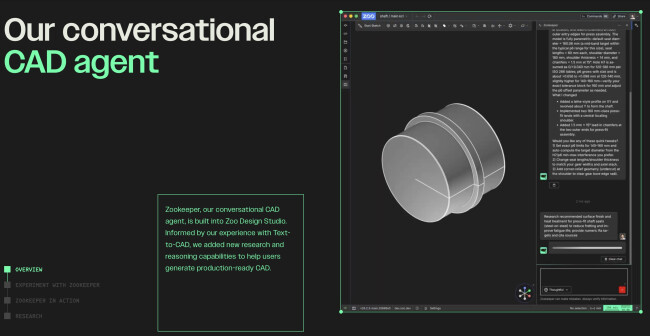
Zoo is a text-to-CAD AI tool within Zoo Design Studio that converts natural language prompts into precise, editable B-Rep CAD models.
It’s designed to accelerate mechanical prototyping, streamline iterations, and generate manufacturing-ready designs for CNC, 3D printing, or downstream CAD workflows.
| Pros | Cons |
|
|
I tested Zoo to see how effectively it translates prompts into usable 2D and 3D designs.
When I input detailed prompts such as “a 10 cm diameter helical gear with 20 teeth,” Zoo generated an accurate, editable model in seconds.
However, vague prompts like “design a car wheel for a 4wd” resulted in less accurate outputs.
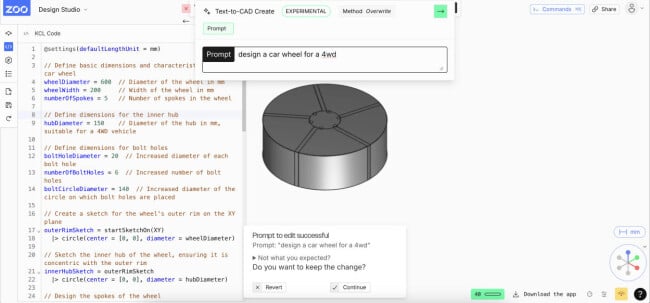
The parametric control was another standout. Zoo allowed me to adjust dimensions using intuitive sliders or refine the prompt to regenerate new variants on the fly.
I also appreciated the built-in B-Rep (boundary representation) structure, which ensured the models were solid and watertight.
View this post on Instagram
Pricing
- Free: Includes 40 free Text-to-CAD credits per month.
- Pro: $99/month ($546/year launch special), includes unlimited Text-to-CAD credits.
- Team: $399/month per user.
- Enterprise: Custom pricing
Get started with Zoo for free.
What Users Say
Users praise Zoo for quickly generating accurate models from detailed prompts, but note limitations with vague instructions.
Some also feel it’s less efficient for highly complex, precision-dependent parts, where manual modeling may still be faster.
Who’s It For?
Zoo is best suited for mechanical engineers, product designers, and manufacturing teams needing rapid mechanical prototyping.
Its precision from detailed prompts helps speed up design cycles and reduce time to market.
Other Notable Features
- Proprietary ML-ephant and Design APIs trained on engineering datasets for parametric CAD
- REST APIs (Python, TypeScript, Go, Rust) for embedding Text-to-CAD in scripts or tools
- Web UI and Discord/CLI bot available as open-source
- Generates editable B-Rep CAD models (STEP, GLTF) from plain-language prompts
2. OpenArt: Best for Creative and Artistic CAD Drawing

OpenArt is a beginner-friendly, AI-powered CAD drawing generator that turns text prompts, sketches, or basic inputs into precise technical drawings.
While it's widely recognized for AI art generation, it also includes features that edge into more technical territory, especially CAD-style outputs.
I explored OpenArt to see how well it functions as one of the more creative product design tools.
| Pros | Cons |
|
|
From our hands-on testing, the biggest strength is how quickly it gets you from concept to usable CAD output with a few textual descriptions.
Even loosely written prompts delivered usable results, and refining outputs felt more like creative iteration than technical troubleshooting.
OpenArt also offers a template library, including floor plans, house designs, and machine parts, which can be customized to fit specific needs.
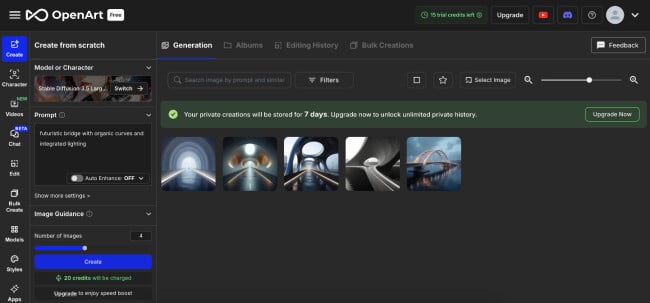
From a workflow perspective, OpenArt is a rapid ideation and validation tool.
For instance, when I described a "futuristic bridge with organic curves and integrated lighting," the AI generated a design that captured my description.
While personally, I wouldn’t replace advanced CAD software for final manufacturing specs, but for speeding up early design thinking, client visuals, and internal reviews, it consistently saved time while keeping outputs accurate and structured.
That perspective echoes industry practice. Tom Bradley, creative consultant at Root Studio, notes:
"We find that AI can be really useful for concept generation and a quick proof of concept especially. We certainly wouldn’t advocate using AI to ‘do the job’ for us.
The only instance where it might find its way into a finished design is for extending/expanding imagery."
Pricing
- Free: Includes 40 one-time trial credits
- Essential: Starts at $7/seat/month (4,000 credits/month)
- Advanced: Starts at $14.50/seat/month (12,000 credits/month)
- Infinite: Starts at $28/seat/month (24,000 credits/month)
- Wonder: Starts at $120/seat/month (106,000 credits/month)
Try OpenArt’s AI CAD Drawing Generator for free.
What Users Say
User feedback on OpenArt’s CAD drawing features is generally positive, with many praising its intuitive interface and ability to generate visuals quickly from simple prompts.
However, some users have pointed out limitations in producing highly detailed or anatomically precise designs.
Overall, it’s seen as a strong tool for creative exploration and rapid prototyping, especially in the early stages of design.
Who’s It For?
OpenArt is ideal for designers, architects, and creatives seeking a quick and intuitive way to visualize concepts without traditional CAD software.
It’s a valuable tool for brainstorming sessions, presentations, and early-stage project development.
However, for projects requiring high precision and technical accuracy, especially in engineering or medical fields, supplementary tools or traditional CAD software might be necessary to meet stringent specifications.
Other Notable Features
- CAD-style visuals for engineering/architectural drawings
- Creates blueprints, floor plans, sketches, and diagrams
- Upscaling for higher-resolution exports
- Adjustable scale, detail, and complexity
3. AdamCAD: Best for Technical 2D CAD Drafting
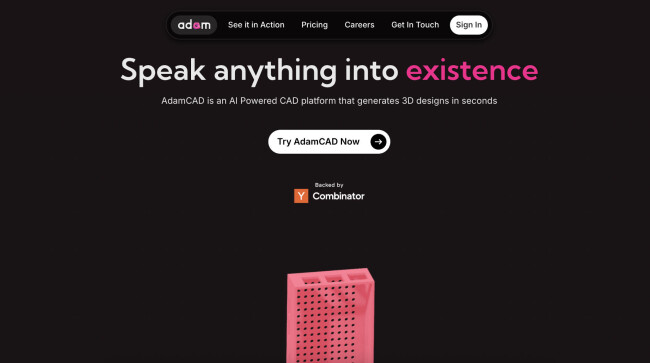
AdamCAD is an AI-powered CAD platform designed to convert natural language prompts into precise 2D and 3D models.
Instead of sketching, clicking, and rebuilding feature trees manually, I used natural-language prompts to edit parts, add features, and refactor models directly inside existing CAD environments.
| Pros | Cons |
|
|
Upon using AdamCAD, I was most impressed by its understanding of context.
It translated intent into dimensionally accurate changes like merging duplicate features, parameterizing messy legacy models, or adjusting geometry for manufacturability.
For instance, when I described a "bracket with a 50mm base, 30mm height, and two 10mm holes spaced 20mm apart," the platform produced a precise 2D representation complete with dimensions and annotations.
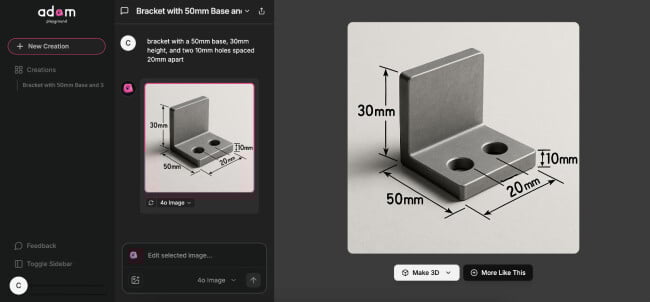
AdamCAD also excels in functional output. Generated models are watertight, manifold, and export cleanly as STL or OBJ for immediate 3D printing.
Unlike many text-to-CAD tools that stop at visuals, Adam consistently produced conceptual designs and models I could prototype, test, and refine without cleanup.
Pricing
- Standard: Starts at $5.99/month
- Pro: Starts at $17.99/month
- Enterprise: Custom
Sign up to try AdamCAD for free.
What Users Say
User feedback on AdamCAD's 2D drafting capabilities is generally positive. Many appreciate its intuitive interface and the speed at which it can produce accurate technical drawings from textual descriptions.
However, some users have noted that while it's excellent for standard components, it may require additional input or adjustments for more complex or unconventional designs.
Who’s It For?
AdamCAD is best for engineers, product designers, and makers who already use traditional CAD tools but want to move faster.
It’s ideal for parametric edits, rapid prototyping, feature iteration, and cleaning up complex or legacy models, especially when you’d rather describe changes than rebuild geometry from scratch.
Other Notable Features
- AI co-pilot that operates inside existing CAD tools
- Feature tree optimization and duplicate detection
- Parametrization of non-parametric models
- Active GitHub and Discord communities
4. Vondy: Best for AI-Generated 2D Drawings for Beginners
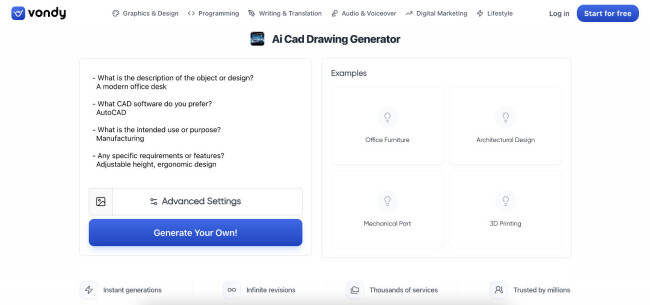
Vondy’s AI CAD Drawing Generator is one of the more straightforward text-to-CAD tools I’ve tested.
The workflow is refreshingly linear: describe the object, choose a CAD style and size, generate, then download a file that’s immediately usable in tools like AutoCAD or SolidWorks.
| Pros | Cons |
|
|
We found the generated drawings to be dimensionally consistent and clean enough to drop into existing CAD projects without rework, especially for common mechanical parts, enclosures, brackets, and basic architectural layouts.
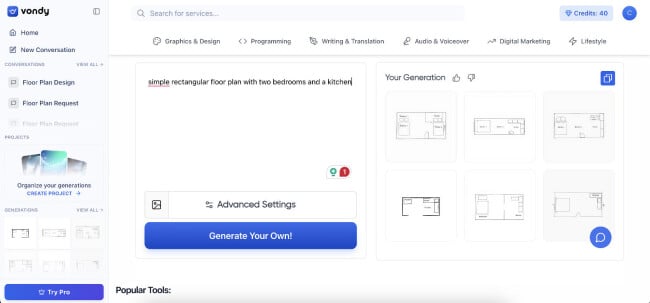
Vondy also offers format flexibility. Being able to export directly to DWG, DXF, STEP, and SolidWorks-compatible formats makes it far more practical than tools that stop at visuals or meshes.
Additionally, the platform offers a range of templates and customization options, allowing users to adjust dimensions, add annotations, and modify layouts with ease.
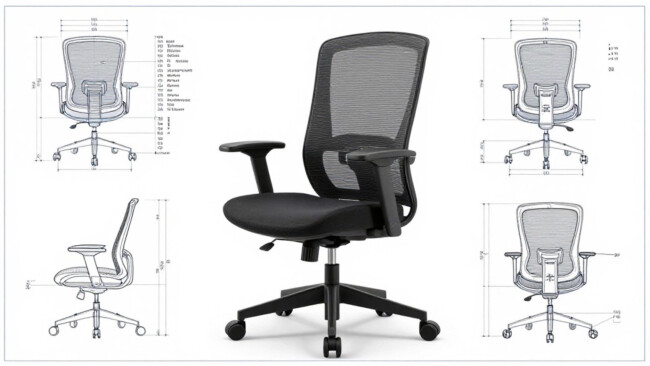
Vondy excels as a fast front-end generator for early drafts, iterations, and documentation-ready drawings.
For teams juggling multiple concepts or needing fast turnaround on CAD assets, it dramatically shortens the time between description and usable file.
Pricing
- Free plan with limited daily credits
- Plus: $19/month
- Pro: $49/month
- Business: $99/month
What Users Say
User feedback on Vondy's 2D CAD drawing capabilities is generally positive. Many appreciate its user-friendly interface and the speed at which it can generate designs from simple prompts.
@cesaromero8 Try Vondy AI if you feel stuck! Been having endless ideas lately.
♬ Chamber of Reflection - Your Anxiety Buddy
However, some users have noted limitations when seeking highly detailed or specialized drawings, indicating that the platform is best suited for basic design tasks.
Who’s It For?
Vondy is ideal for engineers, architects, product designers, and manufacturers who want to skip repetitive drafting work.
It’s especially useful for freelancers, startups, and teams that need CAD outputs quickly but still want full control once files are imported into their primary CAD software.
Other Notable Features
- Upload reference images to guide CAD generation
- Adjustable drawing sizes and aspect ratios
- Supports mechanical, architectural, and electrical designs
- Files remain fully editable post-download
5. DraftAid: Best for Automated 2D Fabrication Drawings
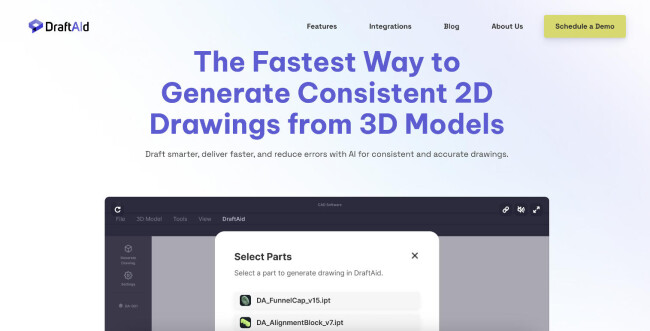
DraftAid takes a very practical approach to text-to-CAD workflows.
Instead of generating geometry from prompts, it focuses on one of the most time-consuming parts of engineering work: turning 3D models into manufacturing-ready 2D drawings.
| Pros | Cons |
|
|
With just a single click, its automation of dimensioning and annotation significantly reduced the time typically spent on manual drafting.
For instance, when working on a mechanical component with intricate features, DraftAid accurately captured all necessary details, producing a comprehensive fabrication drawing ready for production.
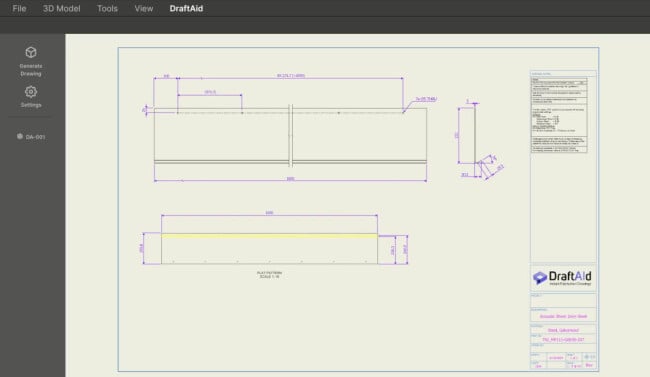
One of the standout features is DraftAid’s adaptability to evolving product design trends and company-specific documentation standards.
It allows teams to customize outputs based on internal templates, ensuring consistency across all technical drawings.
DraftAid is clearly built for scale. The ability to batch-generate hundreds of drawings in the background makes it especially valuable for manufacturers and engineering teams dealing with high part volumes.
Pricing
- Available upon inquiry
Schedule a DraftAid demo here.
What Users Say
Users have generally expressed positive sentiments about DraftAid's capabilities. Many appreciate the significant reduction in drafting time and the accuracy of the generated drawings.
However, some have noted that while the tool excels in standard fabrication drawings, it may require manual adjustments for more complex or unconventional designs.
Overall, DraftAid is recognized for enhancing productivity and reducing the potential for human error in the drafting process.
Who’s It For?
DraftAid is ideally suited for engineers, designers, and manufacturers who regularly produce 2D fabrication drawings from 3D models.
Its automation features are particularly beneficial for industries such as automotive, construction, and manufacturing, where precision and efficiency are paramount.
Organizations looking to streamline their drafting processes and reduce manual workload will find DraftAid to be a valuable addition to their toolkit.
Other Notable Features
- Intelligent dimensioning and annotation
- Custom templates, styles, and drafting standards
- Batch generation of hundreds of drawings
- Integrates with SolidWorks, Inventor, CATIA, Siemens NX, Solid Edge, and more

Our team ranks agencies worldwide to help you find a qualified partner. Visit our Agency Directory for the top AI companies, as well as:
- Top AI App Development Companies
- Top AI Product Development Companies
- Top AI Web Design Companies
- Top AI Marketing Companies
- Top AI Market Research Companies
Our design experts also recognize the most innovative design projects across the globe. Given the recent uptick in AI tools usage, you'll want to visit our Awards section for the best & latest in AI website designs.
Text to CAD AI Tools FAQs
1. Are text to CAD AI tools accurate enough for engineering applications?
Text-to-CAD AI tools can quickly generate accurate drafts for simple to mid-level designs, but complex or regulated projects still require human review.
They’re best used for early-stage concepting and prototyping, not critical applications.
2. Do I need CAD experience to use text to CAD AI tools?
Many text-to-CAD platforms are easy to use thanks to natural language inputs, even for non-technical users. However, some CAD or design experience helps achieve more precise results and refine outputs.
3. What are the limitations of text to CAD AI tools?
These tools are effective for quick visualization but often fall short with complex geometries, constraints, or assemblies.
Their outputs may also lack production-level precision, making manual refinement in professional CAD software necessary.