
I tested five UI/UX agents to see which deliver the most value in practical design workflows. In this guide, you’ll learn the strengths and weaknesses of each one and what they’re best suited for.
Key Findings
- Replit and Webflow can generate and modify design elements via text-based prompts.
- Miro and UX Pilot are practical for accelerating design sprints and producing prototypes and high-fidelity mockups.
- Vortex IQ excels at optimizing user journeys by using AI agents to monitor metrics and provide actionable suggestions.
Top UI/UX AI Agents Reviews
I’ve tried and tested popular UI/UX agents to help you determine which ones are worth adding to your tech stack. Below, you’ll find tools for quickly generating mockups, prototypes, and web designs.
| Tool | Best For | Cross-platform view | Auto-generates code | Staging for A/B testing | Pricing (starting at) |
| Replit | Codeless visualization | ✅ | ✅ | ❌ | $30/month (billed annually) |
| Vortex IQ | UX optimization | ❌ | ❌ | ✅ | Custom pricing |
| Miro AI | Design sprints | ❌ | ✅ | ❌ | Free |
| Webflow | Generating new page sections | ✅ | ✅ | ✅ | $14/month |
| UX Pilot | High-fidelity mockups | ❌ | ✅ | ❌ | $12/month |
1. Replit: Best for Codeless Visualization
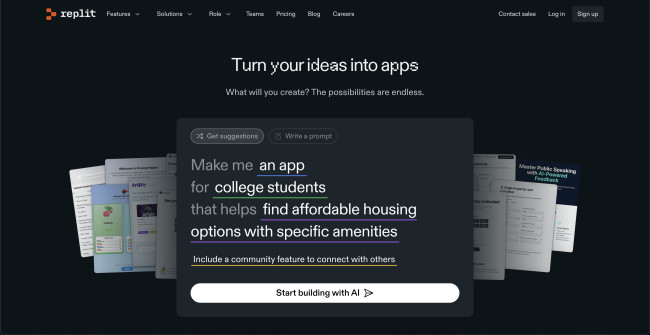
Replit is a software development platform that translates text-based prompts into digital products. It’s a virtual environment that has development capabilities for connecting front- and back-end architectures, creating databases, and deploying full-stack apps. For the purpose of today’s batch, I tested its UI and UX design capabilities.
| Pros | Cons | Pricing |
|
|
|
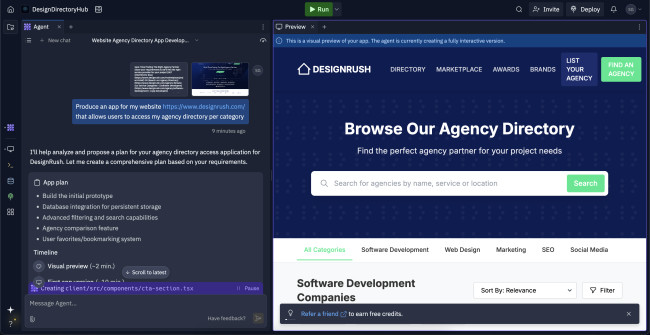
The setup process began with a straightforward dialogue box where I could provide details about my project, upload relevant files, and include website links. The UI/UX AI agent automatically detected the links and offered to capture a screenshot and extract the content. This feature saved a significant amount of time by transferring both the visual elements and text directly into my project.
After submitting my input, the agent analyzed my prompt, created a step-by-step project plan, and suggested additional features I hadn’t initially considered. It also estimated the time needed for each part of the process, which helped me understand what to expect.
Try Replit’s free starter pack.
Within ten minutes, I had a fully functional app prototype based on my original request, which was to generate an app version of the DesignRush website.
Design enhancements were easy to make through the same dialogue interface. I was able to instruct the agent to remove buttons, tweak colors, or add new pages. I also experimented with asking it to critique its own work. When I did, it captured a screenshot of the latest design and implemented improvements based on its own analysis.
If I wasn’t satisfied with any changes, rolling back to a previous version was easy as the agent keeps a record of all modifications, so I could revisit earlier stages of the project, if needed.
What I found was that the agent had quite an interactive nature. At each step, it checked back with me to make sure the project stays aligned with my vision rather than producing something off-mark.
As it worked, Replit displayed the underlying code alongside the visual output. This was helpful, as I could quickly spot and fix any coding issues. At the same time, it felt accessible enough for non-technical users who just want to watch their product come together without diving into the code.
What Users Say
While many users are impressed by Replit’s ability to produce software products with simple text-based prompts, many also report that it has fallen short in the UI/UX department.
They note they had to undergo multiple trial-and-errors to adjust the design or pair it with another tool to fix the problem. Namely, as the agent currently only supports native JavaScript, it can't use frameworks like React or Vue, making it more restricted in terms of design capabilities.
Who’s It For?
Replit can be used by both UI/UX professionals and business owners without a design background. UI/UX design agencies can validate design concepts, instantly generate minimum viable products (MVPs), and turn their designs into high-performing solutions. On the other hand, businesses can use Replit to build an entire solution from scratch without needing to code the features, functions, or designs.
Other Notable Features
- Real-time iterations
- Automatically creates responsive designs to adjust the layout to different screen sizes
- Rapid prototyping to production
- Easy deployment for paid accounts
2. Vortex IQ: Best for UX Optimization

Vortex IQ’s specialty includes eCommerce AI tools, or AI agents, designed to support different flows across online store operations. As part of its portfolio, it also has a UI/UX AI agent, built to help business owners and designers analyze user behavior, identify gaps in user experiences, and stage new designs and features before deploying them live.
| Pros | Cons | Pricing |
|
|
|
Vortex IQ has over 16 AI agents, but I mainly tinkered around the UI/UX design one.
After testing it, I would say it's mostly suitable for identifying pain points in the design flow. It analyzes user interaction data, while tracking navigation paths and engagement patterns to highlight inefficiencies. Based on this analysis, it recommends targeted improvements, ranging from layout restructuring to adjustments in color schemes and interactive elements.
Book a demo to see Vortex IQ’s capabilities.
The agent didn’t rely on static templates; instead, it adapts design recommendations based on observed user behavior and preferences. Another practical feature I found was its real-time performance monitoring.
As changes were implemented, the agent continuously evaluates how users interact with the updated design. In real-case scenarios, this loop of feedback can help refine the user experience incrementally, rather than requiring large overhauls.
Throughout the process, the agent adhered to mobile-first and responsive design standards to ensure consistency across devices. It’s also practical for optimizing page load speeds and refining the placement of key interface elements like calls to action.
I also explored the built-in A/B testing functionality that enables direct comparisons between design variations, making it easier to determine which version has a stronger impact on conversion rates and engagement.
Integration-wise, the agent works with popular design platforms like Figma, Sketch, Adobe XD, and Webflow. For more customized workflows, it also supports API-based integration.
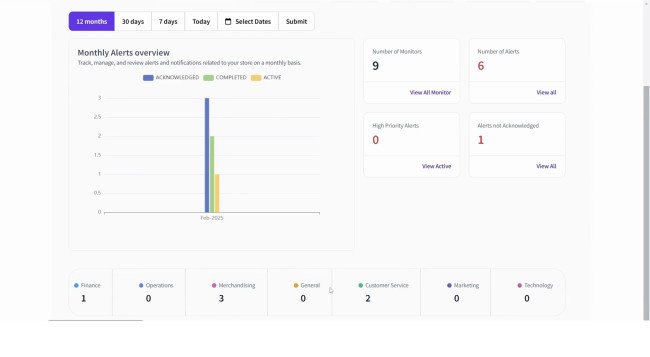
Another notable tool is the Monitoring AI Agent, which automatically conducts end-user experience monitoring — from clicking a product to adding it to the cart and checking out — and pinpoints areas where they drop off.
Who’s It For?
Vortex IQ digs into session-level behavior to spot issues like confusing navigation paths, ineffective CTAs, or visual elements causing drop-offs. With those insights, designers can fine-tune flows, layout hierarchy, or mobile responsiveness based on actual user pain points, not just best practices.
Other Notable Features
- Image optimizer for compressing images to increase page load speed while maintaining high-quality resolution
- Brand guide optimizer that ensures the entire platform aligns with set guidelines
- Category data optimizer for actionable insights into readability, user experience, and SEO
- Rollback AI agent restores website to a previous version
- Compatible with Shopify, BigCommerce, Adobe Commerce and XD, Salesforce, Figma, Sketch, and Webflow
3. Miro AI: Best for Design Sprints
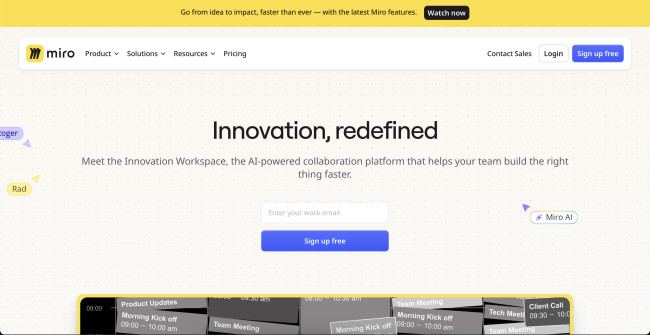
Miro AI is a collaborative workspace similar to a digital whiteboard, where members from different teams can work on projects together and share ideas. The platform offers a rich library of templates, including customer journey maps, customer touch point maps, user personas, design sprints, and a UX research repository.
| Pros | Cons | Pricing |
|
|
|
Through these templates, the agent encourages users to brainstorm ideas with their team and plot wireframes, information architecture, user flows, and individual page layouts to realize their envisioned designs. It also has a dot voting feature for endorsing elements that they deem to have higher importance.
Miro allows users to quickly summarize all these concepts and turn them into a rapid prototype.
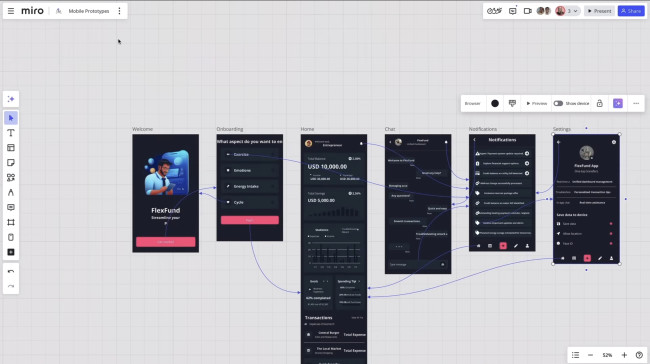
Users can iterate on their UI/UX designs by leaving sticky notes on specific sections of a prototype within Miro. These notes can flag areas needing improvement, which can then be addressed by prompting Miro AI to generate revised design concepts. This feature enables teams to collaboratively refine interface elements in context, directly on the shared board.
The agent also includes a code block tool that allows users to convert parts of their design into production-ready code. By simply describing the intended functionality or layout in natural language, users can trigger the “generate code from natural language” feature, which produces line-by-line code automatically. This makes it easier to bridge the gap between design and development without needing to switch platforms.
Try Miro’s AI features for free.
The tool supports multiple programming languages, including JavaScript, Swift, Ruby, and C++.
What Users Say
Many users highlight Miro as a highly intuitive, low-barrier tool that fosters inclusive collaboration, particularly during the early stages of product development. Its strength lies in enabling quick ideation, mapping flows, and facilitating workshops without requiring much (if any) onboarding. The ability to run creative sessions with varied methodologies, supported by Miro’s learning resources, is also seen as a way to keep collaboration lively and engaging in remote work environments.
However, Miro is not without limitations. While it's embraced for its ease of use, many users acknowledge that it lacks the depth required for advanced UI design, prototyping, and developer handoff. There's also some concern around Miro's version control and feature discoverability, especially during more complex activities like retrospectives.
Some users point out that if Miro were to introduce more advanced design capabilities, it might compromise its simplicity, which is one of its most valued qualities.
Who’s It For?
Miro is well-suited for cross-functional teams and non-design stakeholders who need to contribute during the early stages of product development. It's a natural fit for roles involved in strategy, research, facilitation, and team alignment — anyone who needs to visualize thinking, map ideas, or run collaborative workshops without needing design expertise.
Other Notable Features
- Miro AI research assistant that compiles target user data
- Automatically generates entity diagrams, UML sequence diagrams, and product briefs
- Text-to-image generator
- Broad variety of UI/UX design templates, including app and web wireframes and iPhone app mockup
- Extensive integration capabilities
4. Webflow: Best for Generating New Page Sections
Webflow’s AI Assistant introduces automation into the design workflow by generating page sections that align with an existing site’s design system. Functionality centers around drag-and-drop interaction, wherein once a section is placed on the canvas, the assistant offers layout options based on site context. Users can explore pre-listed components like navbars, hero sections, or type in custom layout descriptions for more specific needs.
| Pros | Cons | Pricing |
|
|
|
The assistant applies existing classes and variables by default and generates new ones only when necessary to maintain consistency across designs. Notably, it can’t update existing classes, which helps prevent unintended styling conflicts. While the tool streamlines early-stage layout creation, it doesn’t extend to generating individual elements, components, images, or dynamic content.
@andyhafell Bring your vision to life in minutes with Webflow's Al site builder. #aiwebsitebuilder#websitebuilder#webflow#webflowtutorial
♬ FEEL THE GROOVE - Queens Road, Fabian Graetz
A simple undo function, either via the in-app button or native OS shortcuts, makes revisions non-disruptive. Still, given that it’s in beta, some users may encounter performance variances, especially during a site’s initial analysis phase.
Explore Webflow’s AI site builder while it’s free.
From a design standpoint, the AI Assistant focuses on fidelity to the user’s site styles. The layouts it generates are visually cohesive and use the site’s typography, spacing, and existing visual hierarchy.
The assistant has a library of high-resolution photographs, intuitively laid out sections, and functioning buttons. It also allows users to view the layout in desktop, mobile portrait, mobile landscape, and tablet mode, for comprehensive assessment.
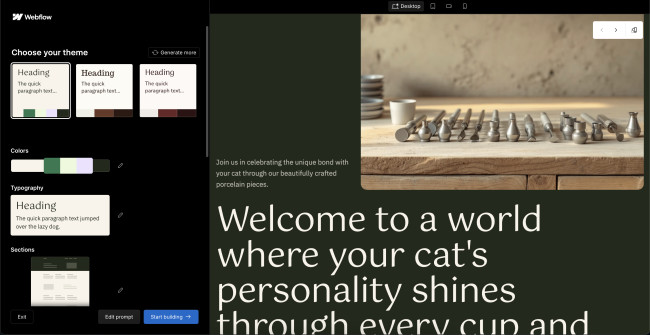
Overall, the design suggestions are functional rather than experimental, positioning the tool more as a speed booster than a creative ideation partner. For standard sections, such as footers and testimonials, it gets the job done quickly and consistently. However, designers looking to push boundaries or fine-tune micro-interactions will still need to step in after generation.
What Users Say
Webflow is widely appreciated for its balance of design freedom and usability, especially by users looking to design and publish websites without heavy reliance on developers. The active Webflow community, along with a growing ecosystem of third-party components and design libraries, makes troubleshooting and enhancement more accessible.
However, users have pointed out several limitations pertaining to Webflow. While it's marketed as no-code, more advanced customizations may still require coding knowledge, which can be a barrier for those without technical backgrounds. Some users find that the software’s learning curve, particularly around how styles and page-level changes interact, can be confusing, especially for beginners or those used to other design tools.
There’s also mention of quirks in the interface that can trip up both novice and experienced users alike. Templates, while a great starting point, can also come at a premium price, which may not fit into everyone's budget. Ultimately, while Webflow opens a lot of doors for non-developers, it may still pose challenges for those expecting a purely plug-and-play experience.
Who’s It For?
Webflow is a good fit for teams that seek to quickly spin up landing pages or campaign sites without technical delays. The ability to control the design and deployment process from start to finish gives users autonomy and speed, which is especially practical in fast-paced environments.
Designers who want more creative freedom without diving into backend code will also find Webflow helpful. It gives them full visual control over layout, responsiveness, and styling, with a system that mimics the logic of front-end development but in a more accessible, visual format.
Other Notable Features
- Smart layout adjustments
- Provides contextual help as the user builds their websites
- Ability to build personalized user experiences through A/B testing
- SEO optimization assistant
- Localization functionality that auto-translates web copy and produces localized URLs, subdirectories, and metadata
- Figma to Webflow plugin, which automatically turns designs into functioning websites
5. UX Pilot: Best for High-Fidelity Mockups
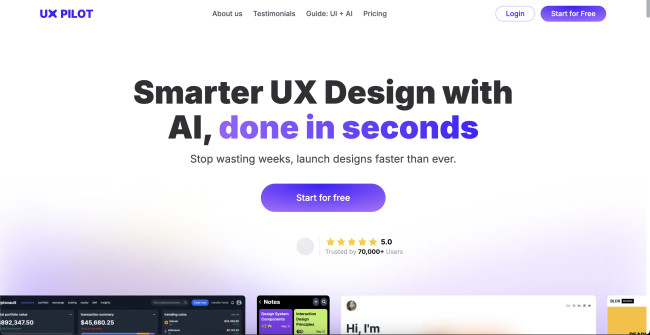
UX Pilot is a UI/UX AI agent that automatically generates wireframes and high-fidelity UX designs through natural language prompts. The agent comes with a Figma plugin, which can accurately transfer the AI-generated output into a Figma canvas.
| Pros | Cons | Pricing |
|
|
|
UX Pilot was built to accelerate the design and prototyping processes. It can also help overcome creative blocks by nudging users to explore its extensive list of design elements.
Users can choose between wireframe or full UX design. A text-based prompt allows them to describe their project. The more specific the input, the better the results. They also have full creative control over the color palette and typography.
Images can be uploaded to use in the prototype or serve as a design reference.
UX Pilot also asks about the user flow, which can be inputted manually or auto-generated with AI. Within seconds, it provides over 10 flow options that can be rearranged, modified, or removed.
Once setup is complete, UX Pilot delivers an interactive high-fidelity prototype in just minutes.
Get started with UX Pilot for free.
Each design can further be iterated by double-clicking the specific page and writing new prompt instructions. The agent then creates a copy of the new design next to the original, so users can compare them.
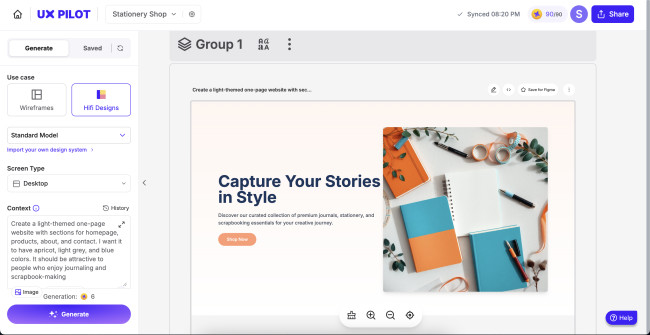
Prototypes can be exported directly to Figma, where UX Pilot’s AI assistant remains available for ongoing design support. Alternatively, users can copy the auto-generated source code and implement it directly into their product.
The AI assistant can also review designs and offer actionable improvements. For example, it can assess a layout using Nielsen’s 10 usability heuristics, which tests for usability, visibility, and real-world applications, among other factors.
What Users Say
Many users report that UX Pilot effectively translated screen functions into a clear and organized UI, demonstrating good contextual understanding, such as recognizing a messaging interface as a task-oriented layout. However, others mention that the experience was impacted by limitations in the free version, including the lack of export and sharing options. Frequent upgrade pop-ups were also noted as a major usability issue.
Who’s It For?
UX Pilot is a practical tool for UI/UX specialists that want to save time and resources by transforming their concepts into workable mockups. It can also help them gather user feedback before producing the full UI/UX framework to test design concepts and determine user demand for their product.
The AI agent can also help business owners better visualize their design and concepts, thus reducing chances of miscommunication and misalignment when they start collaborating with a development company.
Other Notable Features
- Provides UX workshops and frameworks to brainstorm ideas
- Instantly produces single or multiple components based on the prompt
- Auto-generates heatmaps to gain more insight into my design

Our team ranks agencies worldwide to help you find a qualified partner. Visit our Agency Directory for the Top UI/UX Design Agencies as well as:
- Top AI UI/UX Design Agencies
- Top AI Automation Companies
- Top AI Consulting Companies
- Top Design Agencies
- Top Austin UX Designers
Our design experts also recognize the most innovative design projects across the globe. Visit our Awards section to see the best & latest in design.
UI/UX AI Agents: FAQ
1. What is a UI/UX AI agent?
UI/UX AI agents are software programs that use artificial intelligence to generate user flows, page layouts, information architecture, wireframes, and other visual and interactive elements by studying and analyzing datasets.
2. What is the difference between a UI/UX AI agent and a UI/UX AI tool?
A UI/UX AI agent automates or enhances entire workflows or processes and automatically interacts with other software or programs with little human intervention. On the other hand, a UI/UX AI tool focuses on a single task.
3. What are the benefits of a UI/UX AI agent?
A UI/UX AI agent can automate tasks, improve efficiency, create more personalized experiences, and advance time-to-market releases. These AI agents can also facilitate collaboration, provide actionable insights based on data, optimize user experiences through A/B testing, and improve businesses’ bottom line.