
AI tools moved beyond fancy wireframe suggestions. Now, they accelerate design research, generate prototypes in minutes, and flag usability issues before your team writes a line of code.
AI Tools for UI/UX Design: Key Findings
- UX Pilot AI and Figma AI speed up research, structure, and system-aligned UI so teams reach validated layouts much faster.
- Uizard and Google Stitch accelerate early prototyping by turning simple prompts into multi-screen flows and code-ready scaffolds.
- Adobe Firefly removes creative bottlenecks by generating production-safe icons, visuals, and assets in seconds.
Top AI Tools for UI/UX Design Overview
Demand for AI-enhanced design capabilities continues to climb as companies seek faster iteration, stronger output consistency, and better customer experiences.
This momentum mirrors the broader market shift, with forecasts projecting the AI-powered design tools sector to reach $14.92 billion by 2029.
| Tool | Best For | Text-to-UI | Design System Alignment | Code Export | Asset Generation | Pricing (Starting At) |
| UX Pilot AI | Research-to-prototype UX workflows | ✅ | ❌ | ❌ | ❌ | Free |
| Figma AI | Component-driven product UI at scale | ✅ | ✅ | ❌ | ❌ | Free |
| Uizard | Text-to-UI and rapid prototyping | ✅ | ❌ | ✅ | ❌ | Free |
| Google Stitch | Code-ready UI generation | ✅ | ❌ | ✅ | ❌ | Free (Labs) |
| Adobe Firefly | Visual exploration + asset generation | ❌ | ❌ | ❌ | ✅ | Free |
Why Leaders Invest in AI Tools for UX Design
The State of AI in Design Report found 89% of designers improved their workflow with AI this year.
For you, that translates into faster cycles, fewer bottlenecks, and teams spending more time on strategic problem-solving instead of repetitive production tasks.
It means concepts move to validation faster, decisions get clearer sooner, and you protect velocity without increasing headcount.
Top AI Tools for UI/UX Design in 2026
The strongest tools in 2026 help product teams move from idea to validated interface with less friction at every step.
These platforms support exploration, strengthen design-to-dev alignment, and protect quality while teams scale output.
- UX Pilot AI: Best for research-to-prototype UX workflows
- Figma AI: Best for component-driven product UI at scale
- Uizard: Best for text-to-UI and rapid prototyping
- Google Stitch: Best for code-ready UI generation from prompts
- Adobe Firefly: Best for visual exploration and asset generation in UI design
1. UX Pilot AI: Best for Research-to-Prototype UX Workflows
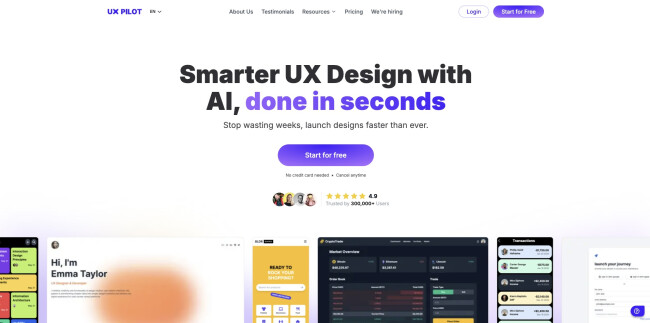
UX Pilot started as a research assistant and grew into a full companion for early-stage UX work.
It supports question drafting, insight clustering, wireframe generation, and high-fidelity screens.
| Pros | Cons | Pricing |
|
|
|
UX Pilot AI transforms raw research documentation into workable UI outputs.
You upload transcripts or direct input, the tool clusters themes, suggests flow diagrams, then outputs wireframes ready for refinement.
The wireframe generator tool automatically produces low-fidelity screens from prompts like “search results page for eco-friendly goods” and connects screens into flows.
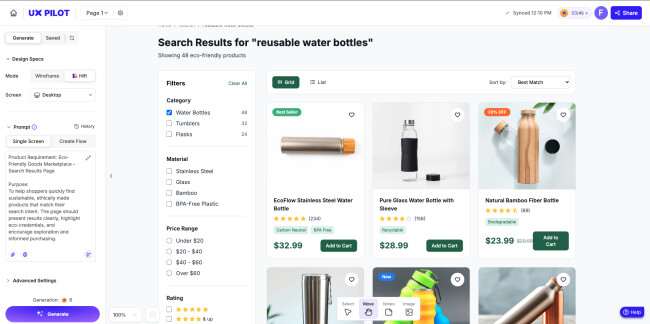
After the first result, you can rework the prompt to be more detailed and end up with a more detailed design, tailored to your needs.
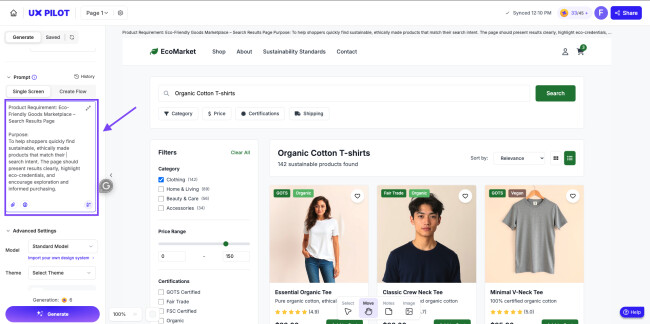
It also includes a design review feature that runs accessibility and usability heuristics and flags issues like missing alt text and poor contrast.
It suits teams that embed UX research tightly with design and want to compress timelines.
Teams that already have solid design systems will need to couple it with their library to achieve production fidelity.
View this post on Instagram
Other Notable Features
- Automatically generates multi-screen flows from a prompt, including screen links and basic navigation.
- Reviews designs for usability and accessibility issues and flags contrast, alt-text, and layout problems.
- Supports importing your own design system on paid plans, keeping AI output aligned with brand components and tokens.
- Offers role-based access and priority support on enterprise tiers to maintain governance and team control.
2. Figma AI: Best for Component-Driven Product UI at Scale
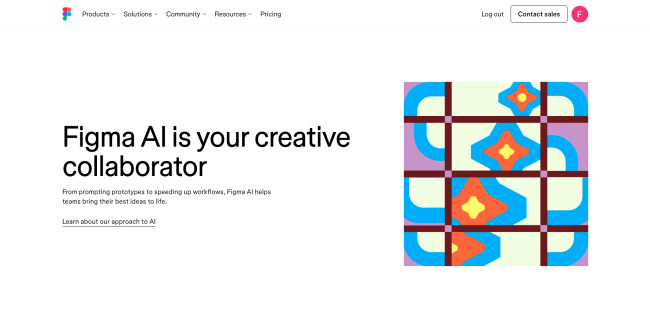
Figma dominated collaborative design long before AI accelerated the field.
The platform now shifts from a manual component system toward an intelligent design engine that analyzes your components, reads design tokens, and produces production-aligned interfaces from text prompts.
| Pros | Cons | Pricing |
|
|
|
Figma AI generates screen layouts from simple prompts and expands flows quickly.
For example, from “mobile checkout flow with upsell banner” you can get a set of wireframes.
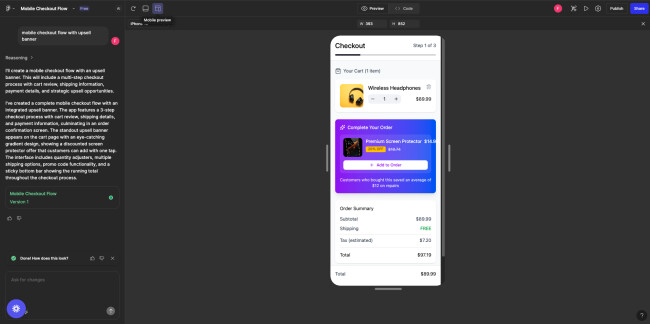
Then the content suggestions feature rewrites placeholder text into realistic copy.
The platform offers AI-powered content suggestions, auto-layer naming, and quick visual fixes for structure and alignment.
The tool “Rename layers automatically” feature allows designers to clean up messy files in seconds instead of minutes.
View this post on Instagram
Figma’s Model Context Protocol (MCP) support gives engineering teams a direct pathway to automation.
Agents can read design structure rather than screenshots, which improves accuracy for code handoff, QA validation, and automated UI audits.
Figma AI fits teams that value design system fidelity, streamlined collaboration, and fast iteration cycles.
Product pods, enterprise UX groups, and SaaS teams gain the most lift by pairing Figma AI with a mature component library and structured naming conventions.
Other Notable Features
- AI text-to-wireframe with component selection and layout rules.
- Automatic content fill with tone controls for product copy.
- Instant layer cleanup and text hierarchy alignment.
- Component keyword search with vector replacement.
- AI-assisted flow expansion and variant mapping.
3. Uizard: Best for Text-to-UI and Rapid Prototyping
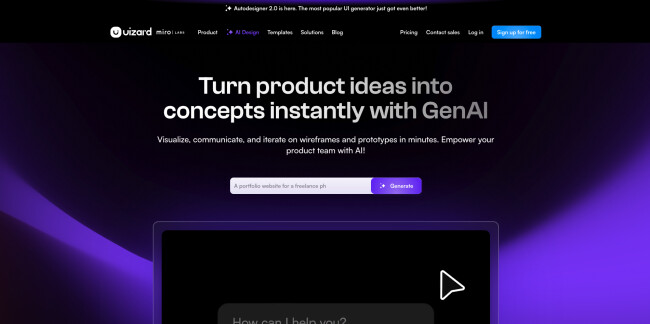
Uizard presents a straightforward proposition: turn simple text prompts or sketches into editable UI designs in minutes.
The tool emphasizes speed and ideation over full enterprise design system compliance.
| Pros | Cons | Pricing |
|
|
|
Uizard supports features such as:
- Autodesigner 2.0 which generates multi-screen drafts from a prompt
- Focus Predictor which estimates user attention zones
- Screenshot Scanner which converts images into editable UI mockups
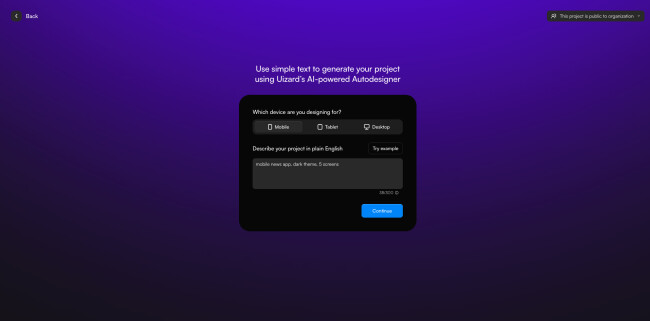
It makes the early design phase fast and collaborative.
Example: prompt “mobile news app, dark theme, 5 screens” produces initial screens in seconds.
Then you refine inside the drag-and-drop editor.
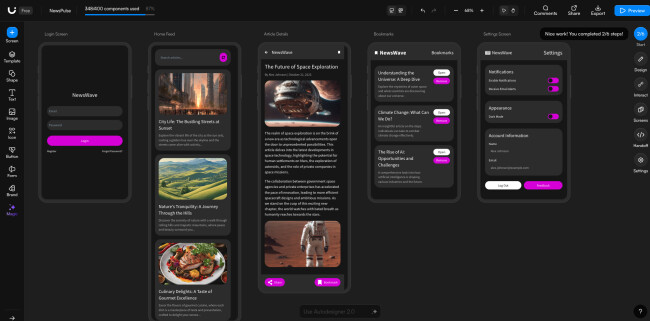
It also supports teamwork in browser, feedback loops, export to CSS or React for implementation.
This tool works best for early-stage product teams, founder-led prototypes, and cross-functional workshops.
Teams needing strict component token enforcement or large-scale system compliance will need to layer on other tools.
@radnolan @Uizard just dropped AutoDesigner 2.0 and I got early access!! The design capabilities are seriously improved, and the UX design of the workflow feels like the future. You are actually able to collaborate with AI while designing. Makes sense why they have just been acquired by Miro! See, when you’re doing ui design work, the first iteration likely needs a bit of work. Most AI generators account for this by making 4+ versions of the same thing so you can choose the best. But even in that, there’s parts of the design that likely still need to be refined. Enter “Modify Selection”… In Uizard, you can now select any section of a design and prompt for an update to JUST that part of the ui. Then you can continue to go back and forth until you’ve found something that fits just right. I found this worked really well when working with the theme generator. The new theme generator is great for updating the look of your ui design, but it may have generated a non-accessible color palette. You can grab the elements in question and ask Uizard to update to a new color. What do you think of #autodesigner 2.0? #uiux#uidesigner#uizard#aidesign#ad♬ original sound - Nolan Perkins | Product Design
Other Notable Features
- Converts screenshots or hand-drawn sketches into editable UI screens so teams can jump straight into refinement.
- Generates themes from images or URLs by extracting colors, typography, and visual style for consistent UI direction.
- Supports real-time collaboration in the browser, letting teams edit, comment, and iterate together without extra tools.
- Exports designs to CSS or React, giving developers a faster starting point for implementation.
4. Google Stitch: Best for Code-Ready UI Generation from Prompts
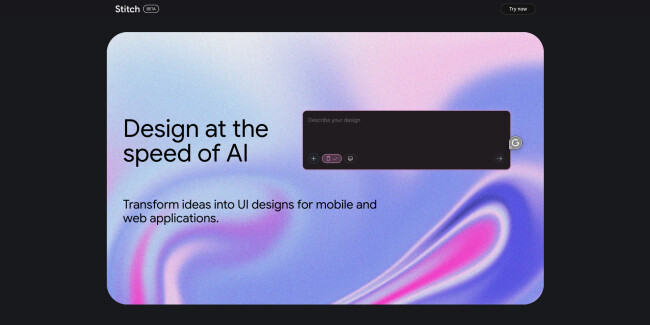
Stitch by Google pushes the boundary between design and development.
The tool takes text or image prompts, generates UI layouts, and outputs frontend code ready for handoff.
| Pros | Cons | Pricing |
|
|
|
The tool uses prompts like “dashboard analytics web app, teal palette, sidebar nav” and returns UI screens plus exportable HTML/CSS, ready to bring into a dev environment or design tool.
Stitch targets teams where front-end code generation and prototyping speed matter most.
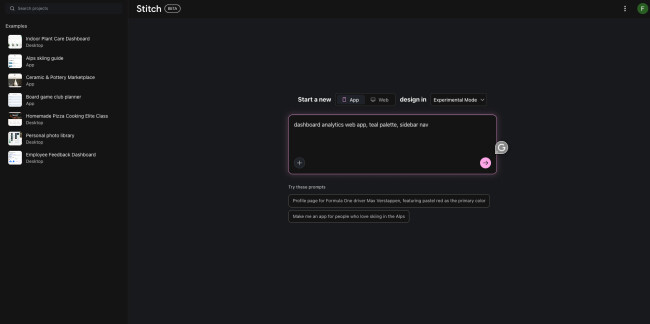
Example: From sketch upload and prompt, you receive production-ready HTML file with CSS grid layout and component classes.
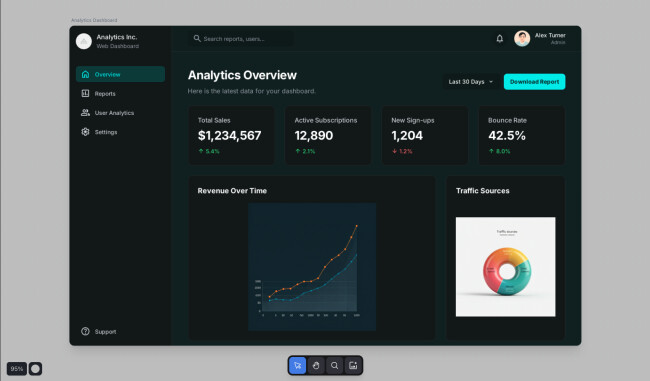
Use Stitch when you want to prototype with real code and bridge hand-off friction between design and engineering.
For established design systems and fine-grained token control you may require follow-on manual adjustments.
Other Notable Features
- Turns text prompts or reference images into UI proposals, giving teams quick starting points for layouts.
- Exports UI to HTML/CSS so designers and engineers get a usable code scaffold, not just visuals.
- Imports easily into tools like Figma for refinement inside existing design workflows.
- Lets teams control themes, colors, and layout structure through prompts for faster style and layout variation.
Check out Google Stitch for free.
5. Adobe Firefly: Best for Visual Exploration and Asset Generation in UI Design
Adobe Firefly focuses on visual creativity rather than full UI flows.
The tool generates image assets, vector graphics, icons, mood boards, and even video or audio elements.
UI teams can incorporate these into screens, templates, and design systems.
| Pros | Cons | Pricing |
|
|
|
Firefly supports Generative Fill for non-destructive editing (e.g. adding an object to an image with text prompt).
It supports vector generation and offers commercially safe output for production use.
Firefly suits UI design teams that need asset generation, art direction, or brand-compliant icons and visuals.
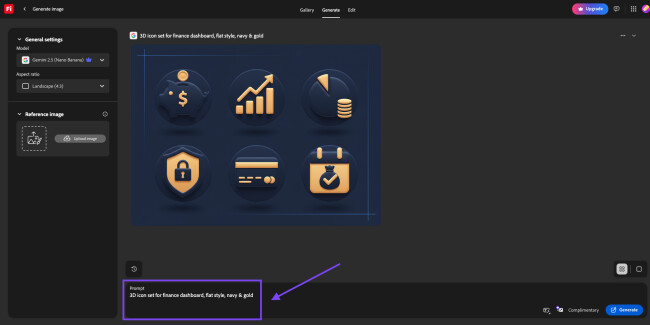
Example: Prompt “3D icon set for finance dashboard, flat style, navy & gold” returns a vector icon set ready for import.
Use Firefly as part of your UI toolkit when your bottleneck is visual asset production, not layout or interaction design.
View this post on Instagram
Other Notable Features
- Generates images and video from text prompts and supports generative fill and expansion for fast visual iteration.
- Creates sound effects and voiceovers so teams can add audio and motion elements to product visuals.
- Supports custom model training so brands can generate on-brand assets and integrate external models when needed.
- Provides an infinite canvas for brainstorming and asset creation, letting teams explore and refine visual directions in one space.
How To Choose the Best AI Tools for UI/UX Design
Start with your biggest friction points:
- Early-stage exploration
- Research synthesis
- System-tight UI
- Handoff
Then pick the tool that removes that bottleneck fastest.
The right stack lifts designers into higher-value thinking and shortens your path from concept to validated experience.
Where Each Tool Wins
| Workflow | Best Tool | Why |
| Idea → Prototype in 5 minutes | Uizard | Bulk screen drafting + editable UI |
| Research → Personas → Wireframes | UX Pilot | Real UX-ops compression |
| Polish product UI at enterprise scale | Figma AI | Token-aligned components |
| Sketch → UI → Code scaffold | Google Stitch | Frontend-first generation |
| Brand-ready UI visuals | Firefly | Style exploration + icons |
Quick selection rule
- Match tools to stages, not skill levels.
- Your designers stay in command.
- AI just clears the runway faster.
Brizy’s Co-Founder and CEO Dimi Baitanciuc sees exactly what happens when teams remove friction in their design workflow.
“Imagine AI analyzing data and recommending tweaks to UI or content to maximize conversions,” he says. “That’s where we’re heading.”
Dimi notes that teams feel the impact immediately: less repetitive work, more strategic focus, and a clear lift in delivery velocity.
Enterprise Challenges With UX AI Tools (and Solutions)
Most challenges fall into process, quality control, and governance.
The good news: each has a straightforward path to resolution when leaders treat AI as part of the operating system rather than a side tool.
| Challenge | What Happens | Solution |
| Inconsistent output quality | Results vary across designers and prompts | Standardize prompt templates and “definition of done” rules for AI-generated screens |
| Design-system drift | AI can generate layouts outside your tokens and components | Train AI on your system, enforce token libraries, and require a design-system pass before handoff |
| Security and data protection | Risk when teams paste research or proprietary info into tools | Use approved AI platforms, redact sensitive data, and require SOC2+ vendors |
| Overuse of AI for decisions | Teams can shortcut thinking and default to AI suggestions | Set review gates: AI drafts, human judgment, usability validation |
| Research accuracy and bias | AI synthesis can miss nuance in qualitative feedback | Pair AI analysis with real user signals and design leadership review |
| Tool fragmentation | Teams experiment with too many tools | Approve a core stack and create an “innovation lane” for controlled pilots |
| Skill and workflow adoption | Some designers move fast, others struggle | Provide real training plans, AI practice sprints, and prompt libraries |
Practical Rules That Keep Enterprise AI Design on Track
- Use AI for speed, not vision. Strategy stays human.
- Protect brand and design standards with system-level constraints.
- Treat AI output as draft, not decision.
- Document your workflows and codify prompts that work.
- Evaluate tools quarterly and retire the ones that do not move velocity or quality.
The Future of AI Tools in UI/UX Design
The next wave of AI in UX design will reshape how product teams work end-to-end.
In the State of AI in Design, designers say their biggest unmet need is stronger UI and UX generation at 24.8%, which signals where the industry is heading.
Lenovo’s Executive Director Tom Butler describes the future as a deeper blend of creativity and computation.
He points out that AI already supports content generation, image and video editing, and design optimization, all tasks that once slowed designers down.
“This seamless intersection of technology and creativity empowers professionals to push boundaries and achieve their artistic vision more efficiently and effectively,” he explains.
- Agent-aware design-to-code
- Research support that still requires user data
- From “assist” to “operate”
- The merging of design, product, and egineering roles
- Vibe-coding and front-end generation for UX/Code Sync
Agent-Aware Design-To-Code
@umacodes AI Coding Agents can be your secret weapon as a developer… or your biggest liability. The difference? Knowing when to use it. Here’s my take: Use AI coding agents to speed up your workflows, but you should never hand over control. Here’s what I mean. #umacodes♬ original sound - Uma Abu
Design tools now expose structured design data to AI agents, so agents read the graph and code rather than guessing from screenshots.
Expect faster, more accurate app scaffolds and audits as Figma expands MCP access across IDEs and agent platforms.
Research Support That Still Requires User Data
AI will keep accelerating planning, transcription, clustering, and draft insights, while human research validates signal and nuance.
NN/g advises heavier AI use in planning and analysis, and lighter use where real user evidence matters most.
From “Assist” To “Operate”
High performers will pair AI assistants with operating guardrails: system tokens enforced at generation time, review gates for accessibility and usability, and quarterly value checks.
McKinsey notes value concentrates among organizations that couple adoption with process change.
The Merging of Design, Product, and Engineering Roles
According to a news piece on Figma’s CEO’s remarks, AI is accelerating the “generalist” behavior where design, product and code blur.
That means fewer silos, faster feature delivery, better cross-functional cohesion. If you don’t plan for role evolution, you risk misalignment and slowdowns.
Vibe-Coding and Front-end Generation for UX/Code Sync
@rileybrown.ai Is programming going to be replaced by vibe coding? Yes, yes it is.
♬ original sound - Riley Brown
The latest research shows enterprise UX professionals increasingly use generative AI to translate design intent into functional prototypes or code, reducing the traditional buffer between UX, design handoff, and engineering.
The shift raises the bar on UX operations; leaders must invest in design system governance, AI-tool selection, and process redesign to realize these gains.

Our team ranks agencies worldwide to help you find a qualified partner. Visit our Agency Directory for the top web design companies, as well as:
Our design experts also recognize the most innovative design projects across the globe. Visit our Awards section for the best & latest in website design.
Top AI Tools for UI/UX Design FAQs
1. Where does AI create the most value today?
Early exploration, research analysis, screen drafting, and content variation. Teams reach clarity faster and ship validated ideas sooner.
2. How do we evaluate AI design tools?
Look at output quality, design-system adherence, handoff efficiency, security, and adoption across the team. Prioritize measurable cycle-time reduction.
3. How do we onboard AI responsibly?
Start with a narrow pilot, set review rules, protect user data, document prompts, and track time saved and cycle-time improvement.