
Good websites tend to prioritize user goals: the main action is obvious, content is easy to scan, and hierarchy guides the eye.
Bad website designs do the opposite. Clutter often hides the main message, while artistic minimalism can leave users lost. Sites heavy on ads are spammy, whereas plain pages can feel broken.
The worst examples mix these problems. We’ll break down some of them below.
Websites With Bad UI: Key Findings
- If users cannot quickly identify the purpose, value, and next steps, they will leave your site.
- A poorly designed website can reduce trust within seconds, so clarity must be immediate.
- Readability drives usability. Poor contrast, inconsistent typography, or dense text blocks make content inaccessible and increase drop-offs.
When Website Design Works Against You
1. Best Modern Website Designs
2. Web Design Trends for 2026
3. Website Design Ideas
4. Web Design Best Practices
Bad website design can undermine trust and cost businesses real money.
In fact:
- 75% of people judge a company’s credibility by its website’s design.
- 42% of users decide whether to stay or leave a site within the first 10 seconds.
- 60% of online shoppers abandon purchases due to poor UX, while 37% leave carts due to poor navigation or layout. (PR Newswire).
Gabriel Shaoolian, CEO of Digital Silk, adds that any of these issues become even more pronounced on mobile:
“More than 60% of users browse from mobile devices, yet many businesses fail to prioritize mobile design and alienate the majority of their audience.
Ensuring you have a mobile-first approach that focuses on designing for smaller screens first and then scaling up is a must today.
However, you must remember that it’s not just about resizing content; it’s about creating a fluid user experience that’s just as intuitive on mobile as on desktop.”
These numbers aren’t theoretical. Here are 21 examples where poor website design leads to confusion, frustration, and lost users.
1. BRUTØ
A restaurant & bar focused on local and regional cuisine
Where it went wrong: Prioritizes visuals over clarity
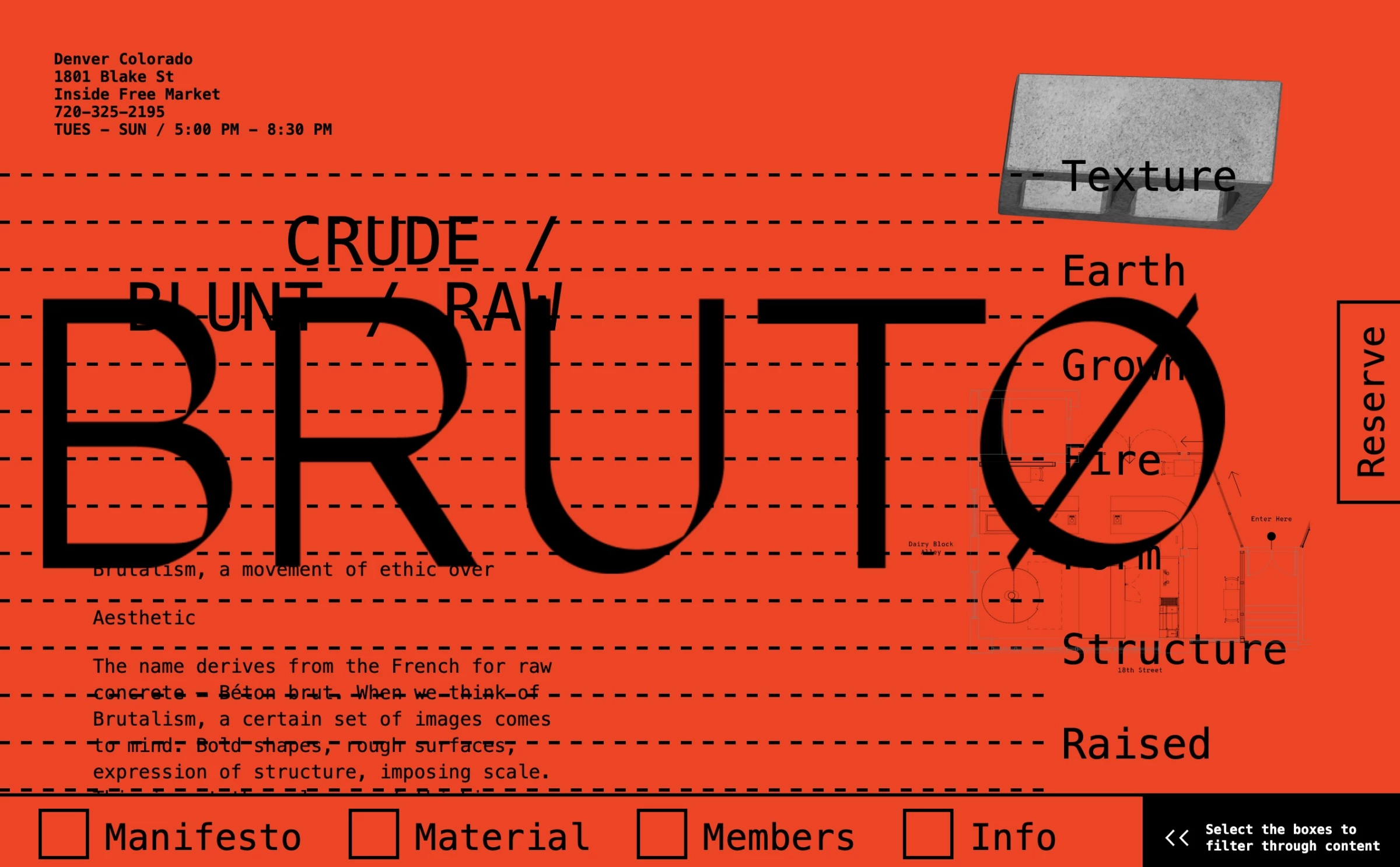
Even the flashiest restaurant site still needs to quickly answer: “What kind of place is this? How do I book? What’s on the menu?”
BRUTØ’s design delays those answers behind graphics, likely frustrating anyone who just wants dinner info or an easy reservation.
Its overlapping visuals and text, and the persistent oversized logo, become more distracting than impactful, while the bold red palette adds mood but works against usability. Its layout makes it impossible to figure out how to navigate the site.
Most importantly, the site fails at first glance: it’s unclear what BRUTØ actually is. It could be a construction brand, an art project, or eventually, if you’re patient, a restaurant.
How to fix this design:
- Limit how much of the screen the brand or logo occupies. Don’t let it overshadow navigation or calls-to-action.
- Keep navigation elements obvious. Avoid hiding menu links in artistic checkboxes or vertical tabs. Instead, use clear headers or buttons.
- Emphasize user tasks first. For a restaurant, that means displaying “Reserve a Table,” the menu link, and location or address prominently.
2. The Wolf’s Tailor
A multi-course tasting and a concept dining restaurant
Where it went wrong: Experimental layout removes any clear reading flow or navigation.
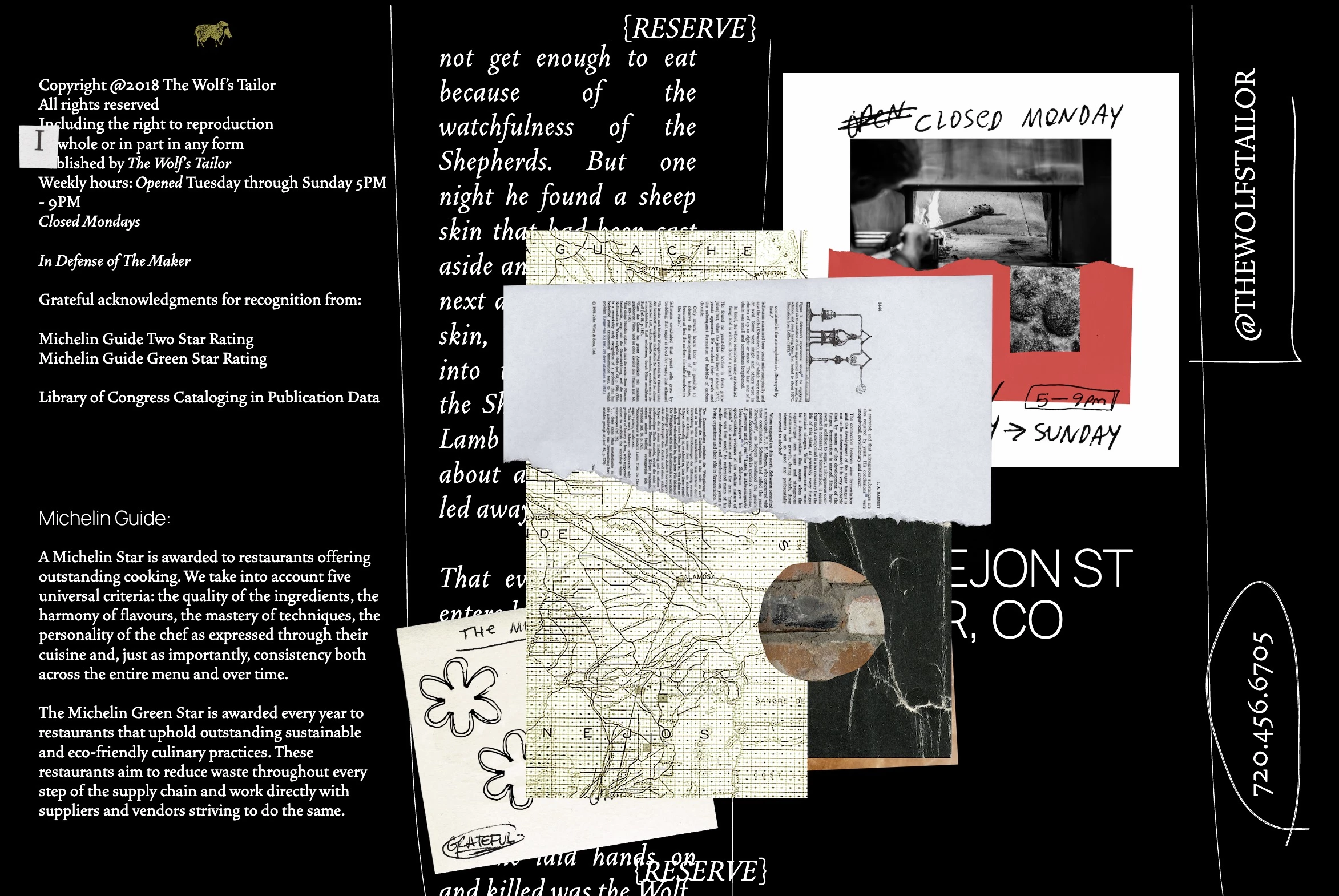
The Wolf’s Tailor site leans so heavily into expression that usability feels almost optional. It’s visually interesting, but functionally, it asks more from users than most are willing to give.
It throws lots of experimental elements onto the page: collage‑style scraps of text, handwritten notes, vertical labels, and animated photos all jumbled together. But there's just no clear reading order.
To top it all off, the page even gets stuck at the end, which means you have to refresh to return to the top. At this point, you’re not sure if that’s part of the concept too.
High-concept restaurants can lean into visuals, but their websites still need to guide diners.
How to fix this design:
- Preserve a clear hierarchy. Even if the page is collage-like, highlight core items like contact info, booking link, or “View Menu” with a distinct size or placement.
- Ensure animations don’t interfere with usability. Movement should enhance the experience, not block or obscure text.
3. Condo London
An art exhibition event connecting international galleries and artists.
Where it went wrong: Treats key information like art, sacrificing readability and usability.
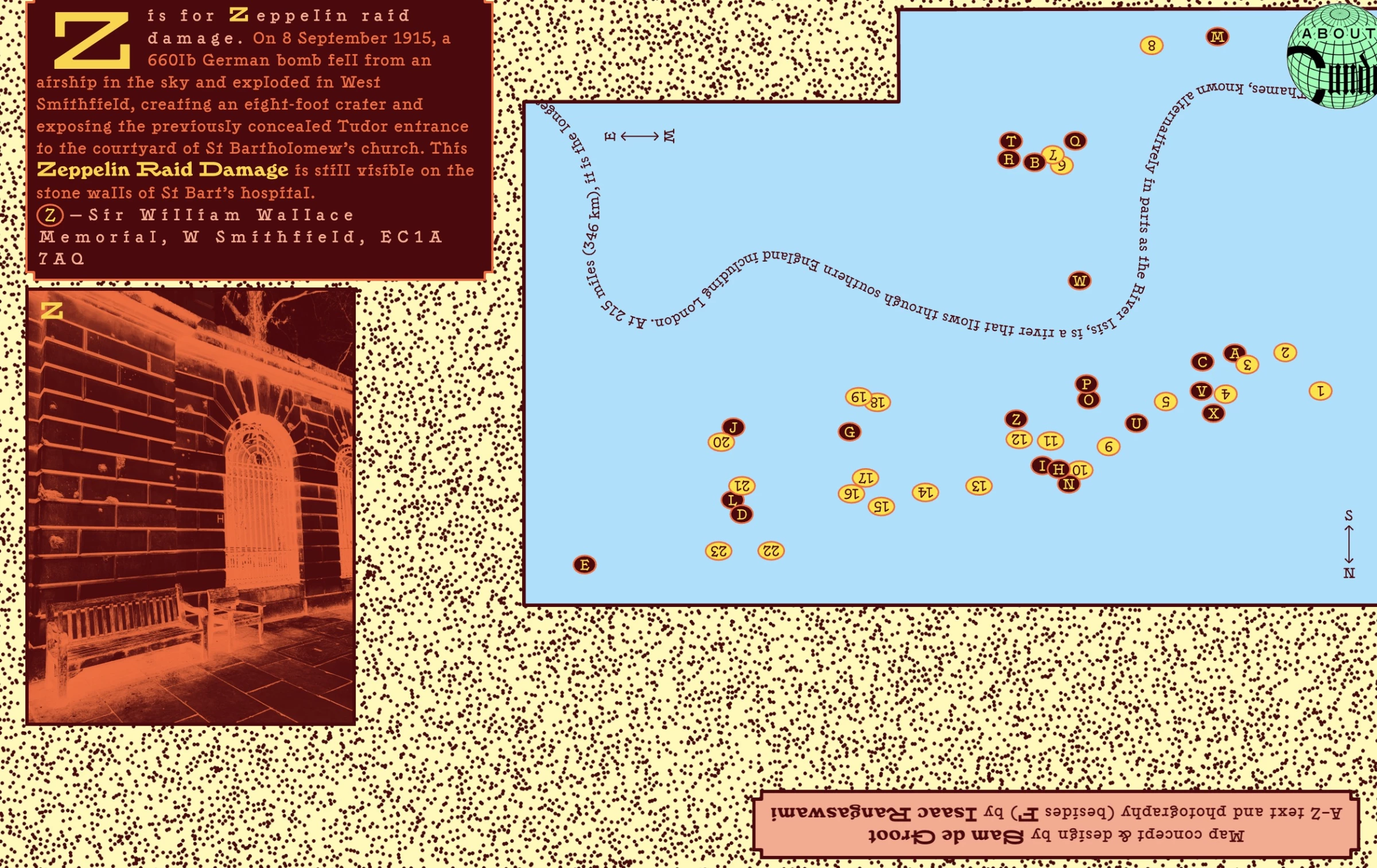
Condo London’s site centers on a large map that is neither intuitive nor directive. Despite occupying most of the page, it’s no more than a scattered cluster of numbers on a blank canvas.
Readability is also a major issue. The text is squeezed into a narrow side panel, while the font varies in size, color, and spacing within the same paragraph. At some point, you stop navigating and start squinting.
Worse, some labels are inverted, so you end up tilting your head. Not quite the kind of immersive experience you want from an event website.
For cultural or creative events, key details like dates, locations, and schedules need to be immediately clear, otherwise users risk missing essential information.
How to fix this design:
- Ensure the map is interactive or at least clearly labeled. Users should easily zoom, click, or search locations instead of decoding stylized text.
- Simplify typography. Stick to 1–2 font styles for main text.
- Group event info logically. Separate “About,” “Schedule,” and “Venue” sections. These tasks should be accessible.
4. Craigslist
A classifieds platform for jobs, housing, services, and community listings.
Where it went wrong: Lacks visual hierarchy
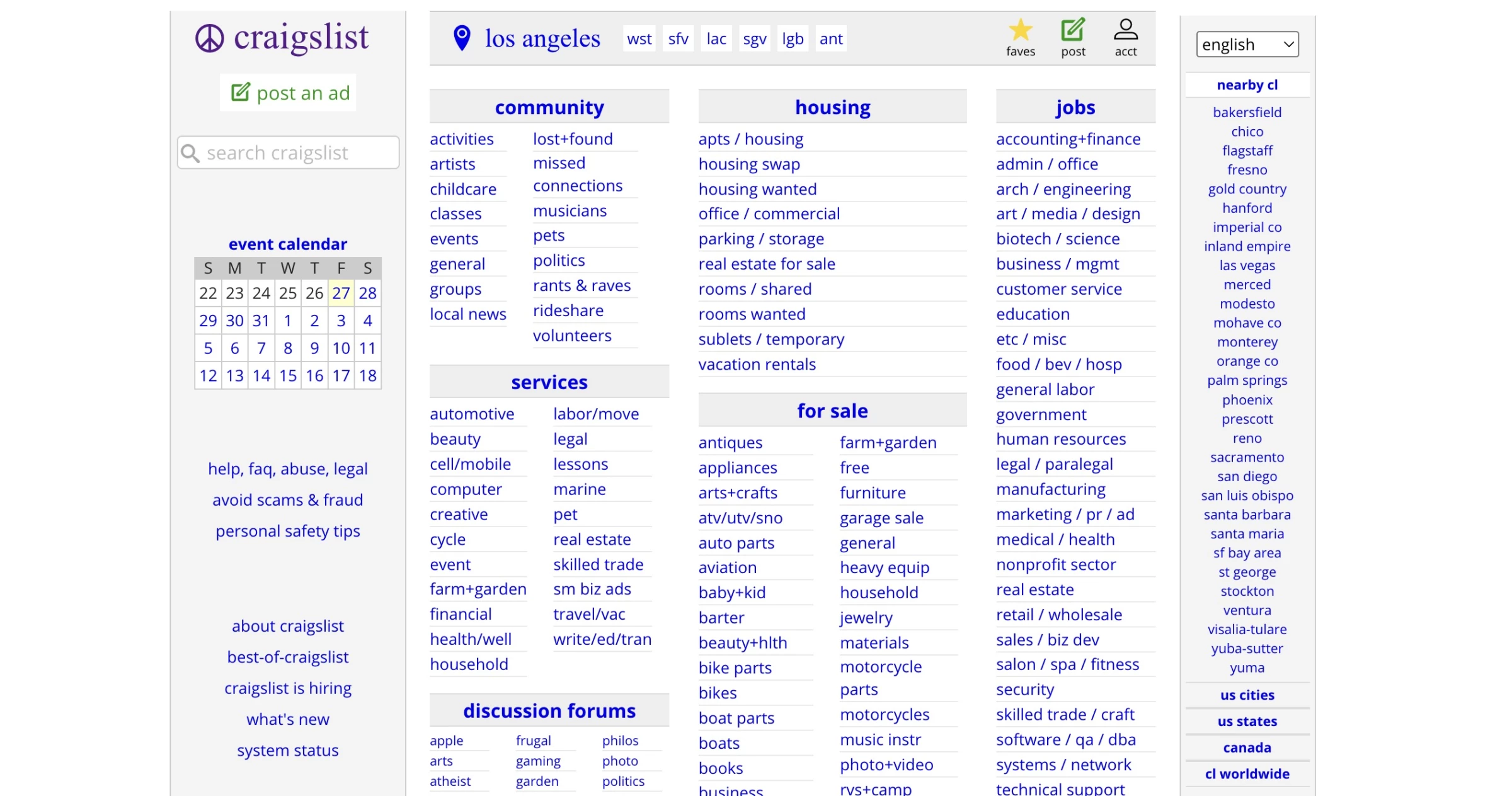
Craigslist’s design is famously bare‐bones: a wall of uniform blue links on a plain background. While experienced users navigate via search or headings, new visitors face almost zero guidance.
Every link, from apartment listings to personals, has the same low priority and small text. There’s no visual hierarchy at all.
Unlike earlier examples, Craigslist sacrifices aesthetics for speed and simplicity. However, even a marketplace depends on letting new users find what they need quickly.
As a result, it’s often cited among popular websites with bad design, not because it fails functionally, but because it lacks accessibility.
How to fix this design:
- Use simple visual cues to help people scan the page. Slightly larger text or more spacing can greatly improve scanability without sacrificing functionality.
- Highlight search functionality. Craigslist largely relies on search, but promoting it on the homepage makes it easier to jump in.
5. Montana Government
A state government website for public services
Where it went wrong: Overloads users with content and a spammy overlay panel
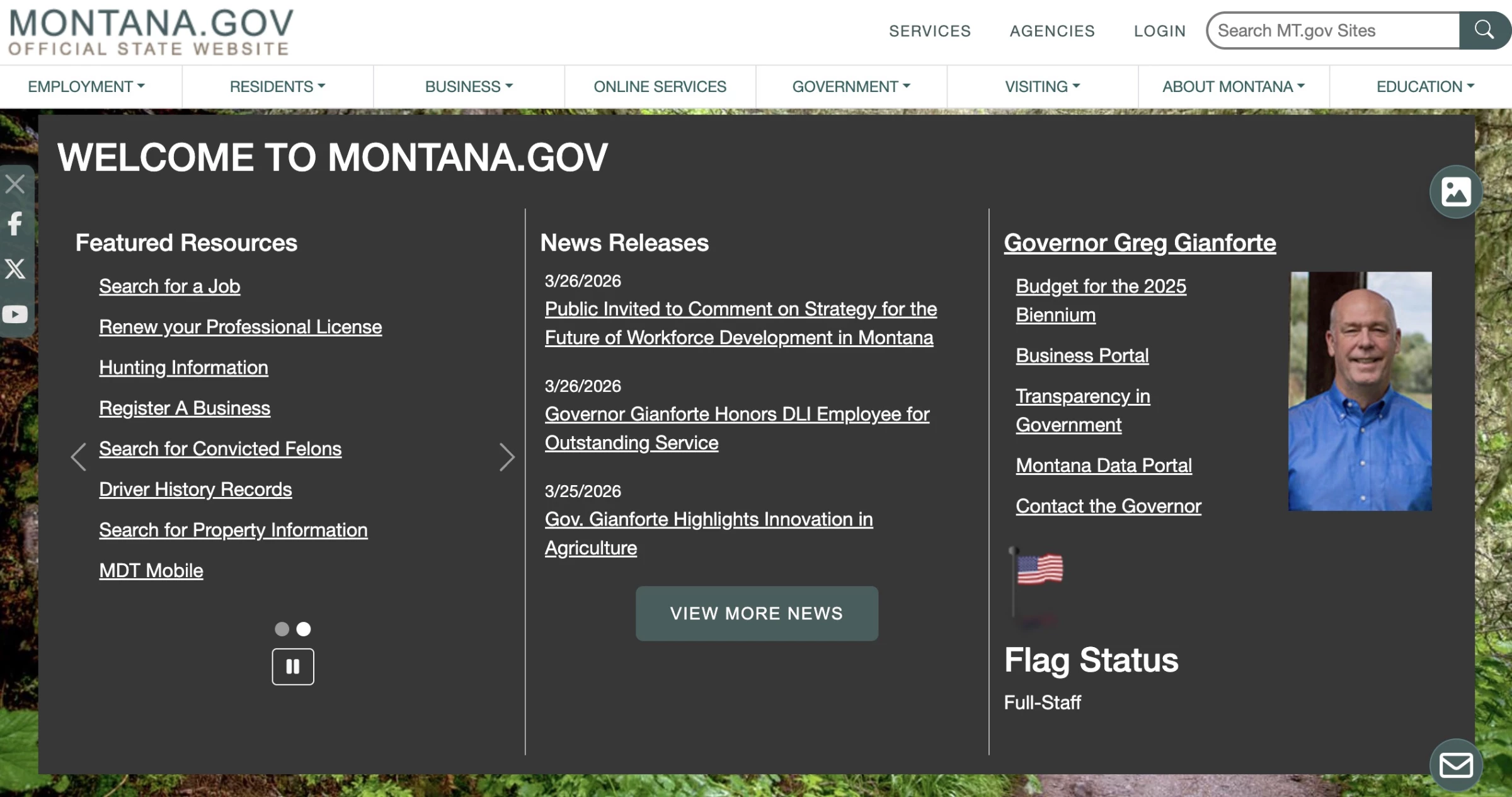
The Montana government homepage tries to serve every audience at once: services, news, the governor’s page, featured resources, and more.
The dark overlay panel, filled with dense white text and a long list of links, gives the site a slightly spammy appearance.
Citizens typically want to accomplish tasks fast, and a cluttered portal forces them to hunt. Government sites often lack strong aesthetics anyway, so they should compensate with simplicity and logical organization.
How to fix this design:
- Prioritize common tasks. Use data or user research to place the most-used services (e.g., “Renew Drivers License,” “Make a Payment”).
- Use a lighter, more open layout with clear grouping and spacing to improve readability and signal legitimacy.
6. Berkshire Hathaway
A multinational holding company for investments.
Where it went wrong: Extreme minimalism makes the site feel outdated
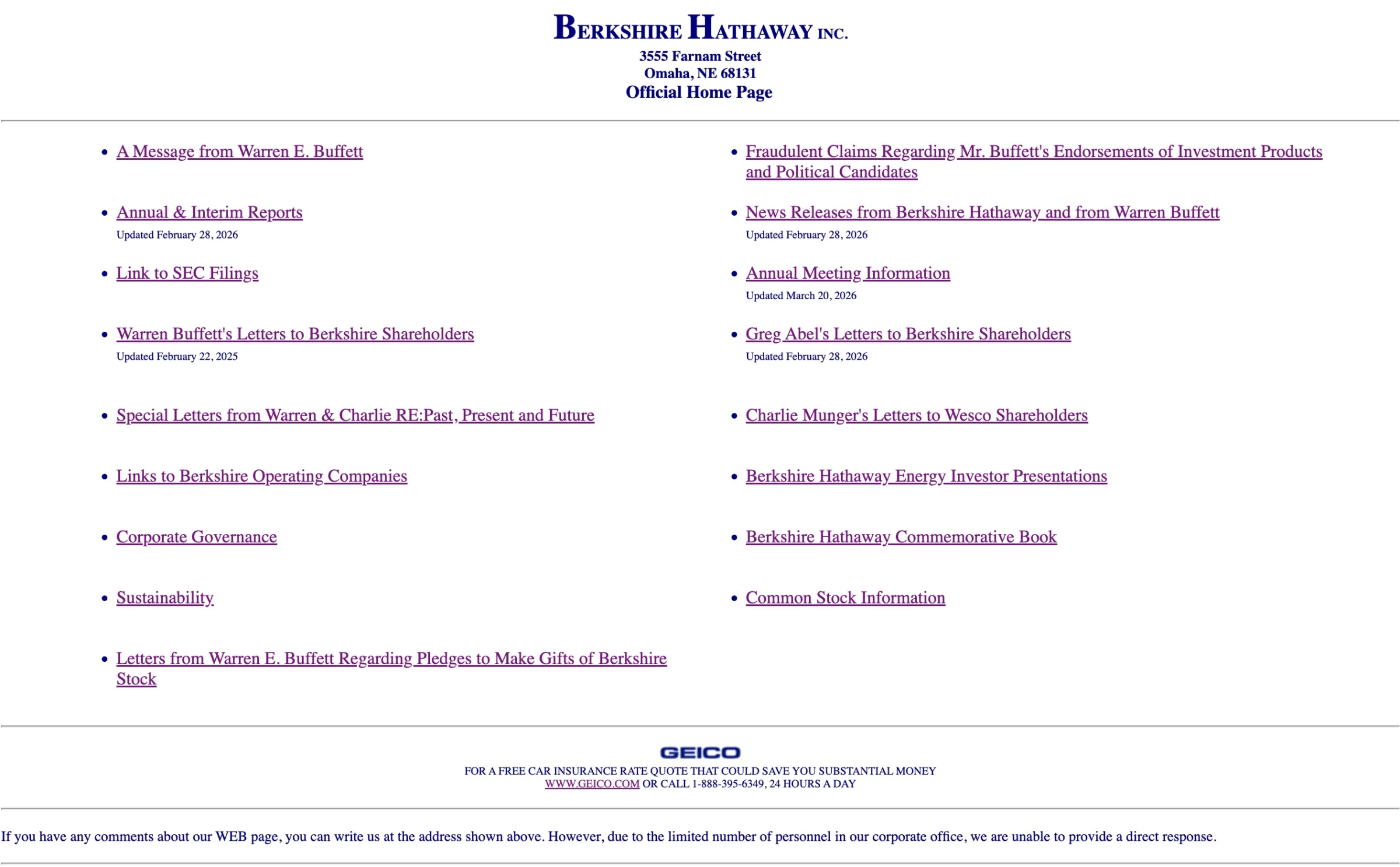
The Berkshire Hathaway site is so minimal it almost feels like a statement: “We’re too big to care about design.” Which, fair, but it still leaves users wondering if something failed to load.
While this old-fashioned layout is consistent with Warren Buffett’s famously low-key style, it’s essentially a plain list of links on a white page and under-delivers information.
Given that Berkshire Hathaway is a major multi-billion-dollar company, its overly simple website feels disproportionate to its scale. It can also feel outdated and out of step with modern expectations.
How to fix this outdated website design:
- Add a simple header or sectioning to break the monotony and align the page with standard navigation patterns users expect on modern sites.
- Incorporate basic modern UI elements like clear typography hierarchy, consistent spacing, and responsive layout, so the interface adapts across devices and feels aligned with contemporary design standards.
7. Edward Abbey
A site dedicated to the legacy of author Edward Abbey.
Where it went wrong: Poor color contrast and loose structure
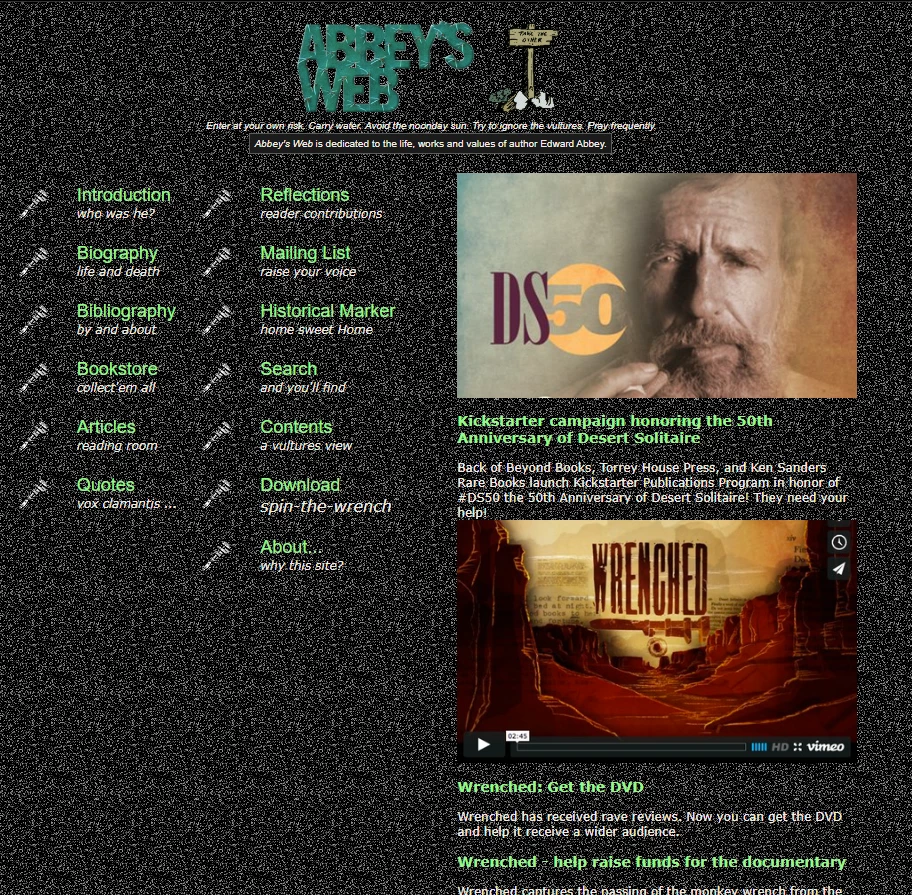
The site's speckled black background with bright green text makes it very hard to read, especially for large blocks of text. The menu has many items that appear loosely arranged, rather than grouped by category.
The overall design also feels dated and lacks a cohesive tone. The bright green text clashes with the otherwise serious intent of the site.
How to fix website design mistake:
- Choose legible color combinations. Avoid bright text on noisy backgrounds. Use a solid, dark color or low-contrast pattern and high-contrast text, like white.
8. Amazon
A global e-commerce company selling products and services online.
Where it went wrong: High-density layout with too many competing elements.
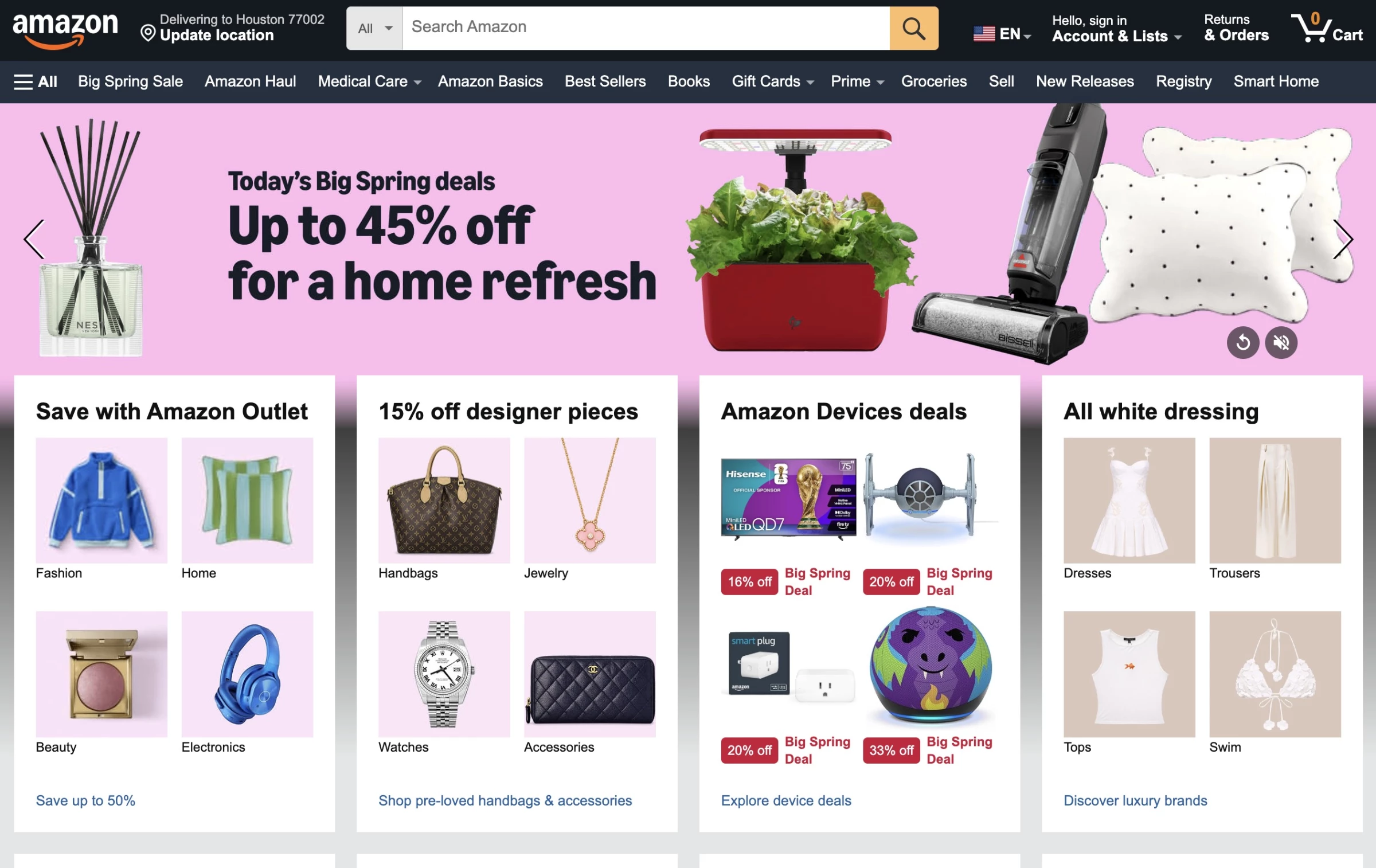
Amazon’s homepage is functional but very dense. It juggles dozens of elements: top nav bars, shopping paths, promo banners, recommended item grids, and more.
Each section competes for attention; thus, the eye is overwhelmed by incessant carousels and badges.
This design is by conscious choice to maximize sales; however, it leads to high cognitive load and a cluttered look. Users may know how to shop on Amazon from experience, but the first‑time visitor must parse an avalanche of options.
How to fix this design:
- Streamline focus. Try highlighting one main call-to-action at the top, like “Today’s Deal” so the page has a clear starting point.
- Personalize or simplify. Show the most relevant sections to each user, so that casual visitors see fewer, more tailored options.
9. American Express
A financial services company offering banking products.
Where it went wrong: Dense, legal-heavy content presented as unreadable walls of text.
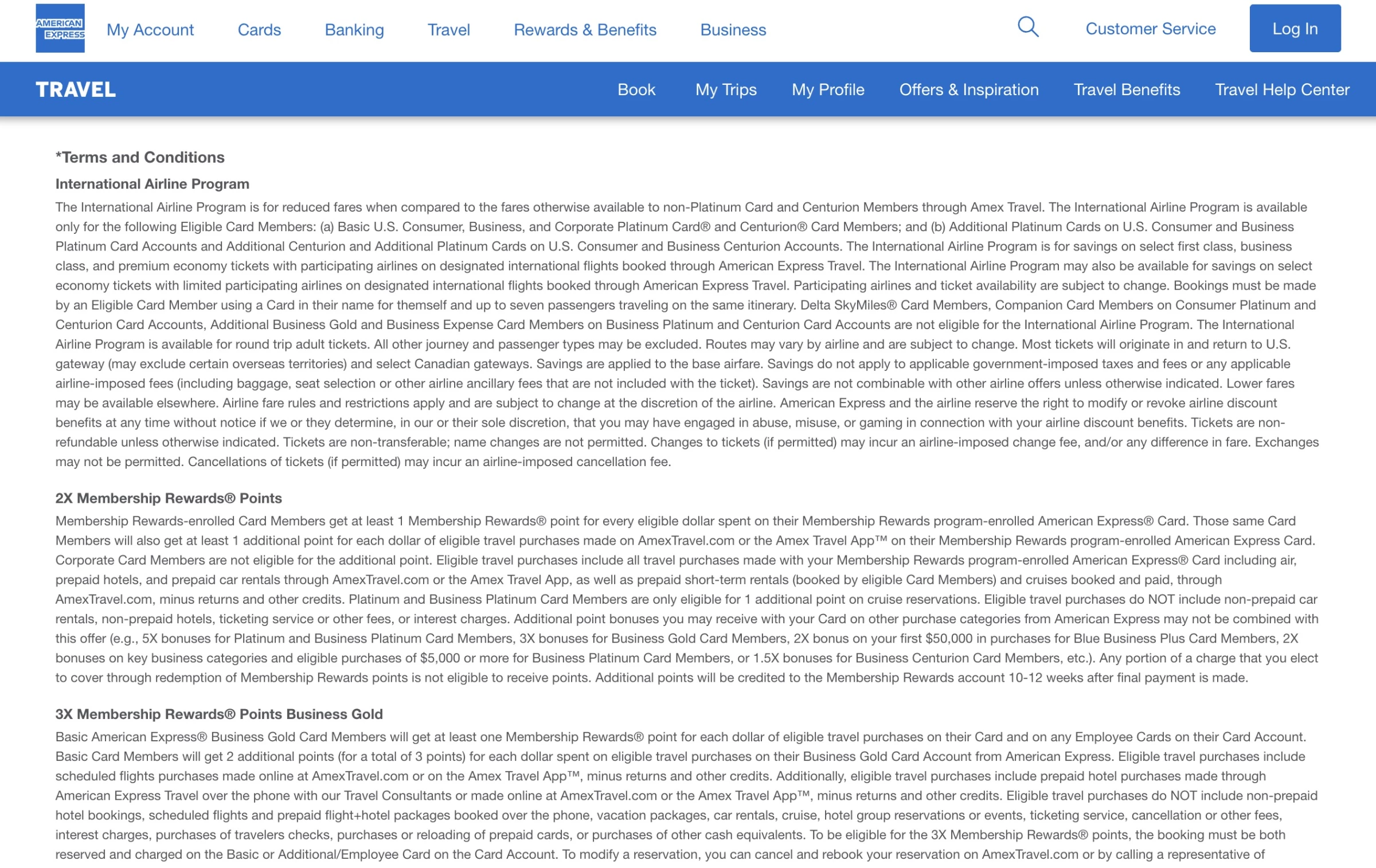
American Express’s main site is sleek and professional, but drop into any content page, and you hit a wall of dense text.
For example, their benefits page is a giant wall of legalistic copy in very small fonts. It looks polished, but it isn’t formatted for readability.
For financial services, legal details are crucial, but the UX should present them digestibly. A big chunk of copy is intimidating, especially for consumers coming to credit card sites looking for simple answers.
How to fix this design:
- Use drop-downs or toggles to show an overview first, then hide fine print behind expandable sections or separate pages. That way, the main page isn’t just legalese.
- Increase legibility. Use larger font sizes and shorter line lengths for body text. White space is your friend in finance.
10. National Library of Greece
A national institution providing access to books and archives
Where it went wrong: Over-minimal design hides core functionality like search.
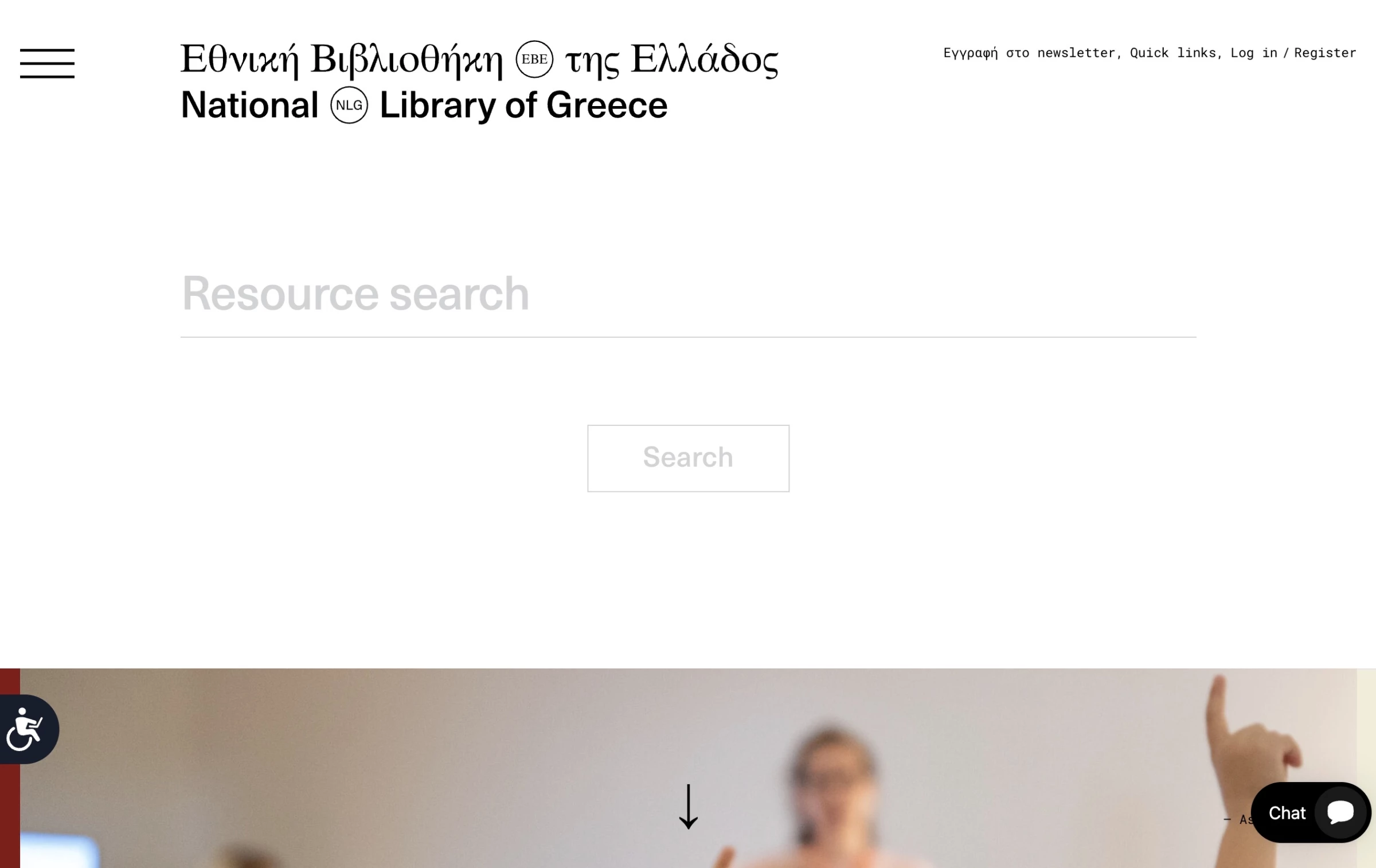
The Greek National Library site suffers from the opposite problem of many cluttered pages, in that it’s too minimal. Its homepage is almost blank except for a tiny, faded search box and a small hamburger menu.
Important functions are hidden in a corner. The big empty spaces on the screen make it look as though nothing is there, instead of highlighting anything.
Users likely don’t realize the search field is even interactive because it’s so understated. A library site’s main function is to help people find books or resources. If the search box is hidden or faint, the library fails to serve its purpose.
How to fix this design:
- Make search prominent. The search bar should be front and center, with a clear border or background so it’s obvious.
- Don’t hide navigation. A tiny hamburger menu hides too much. Use a visible menu bar.
- Fill space with guidance or highlights. Instead of giant blank areas, consider featuring “Popular Collections,” or “Search Tips,” or showing that the site is alive.
11. Castanet
A local news outlet covering regional stories, events, and updates.
Where it went wrong: Excessive ads and content blocks compete with the actual news.
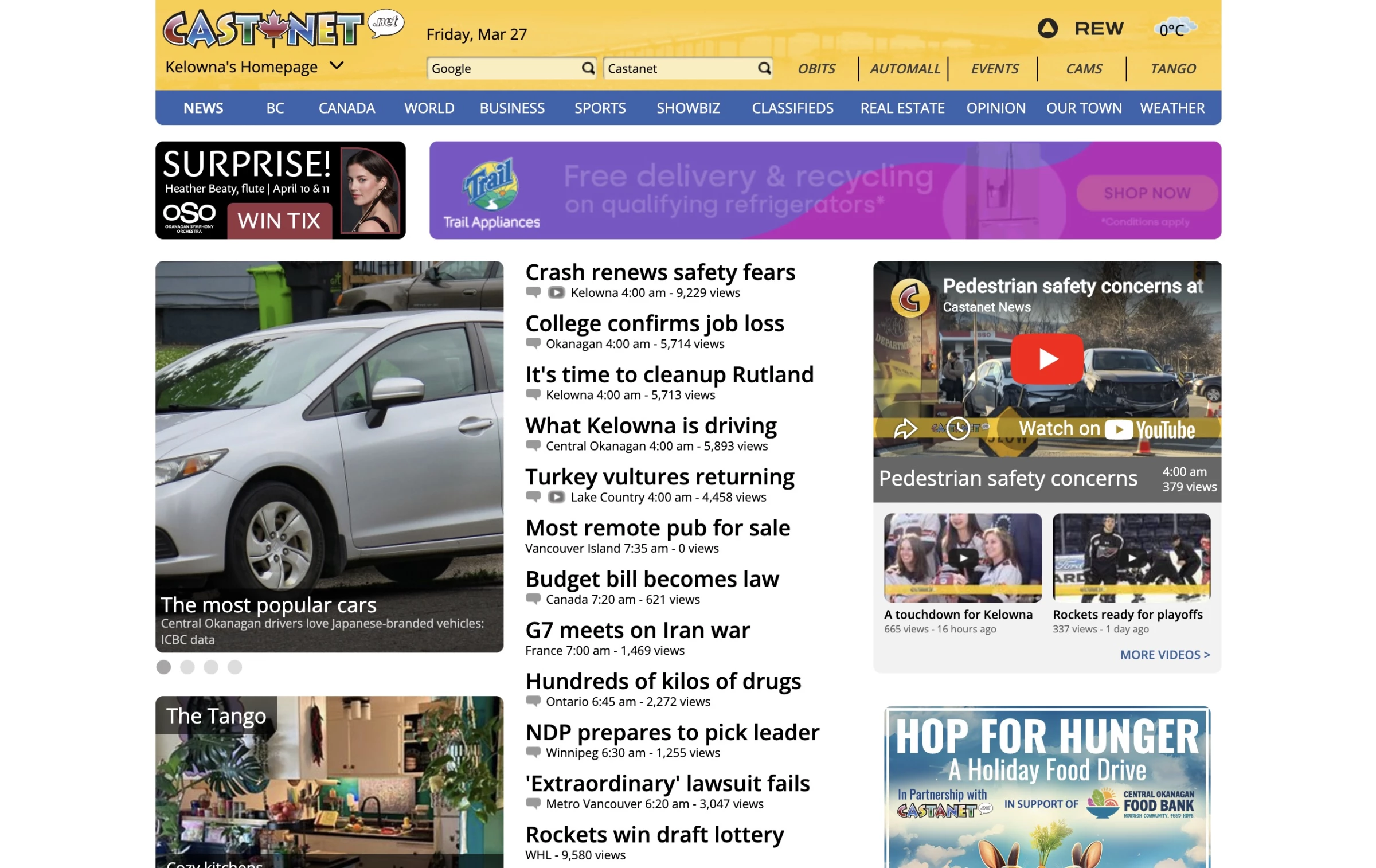
Castanet, a local news site, is visually crowded. There’s no single dominant article. Instead, dozens of headlines compete for attention. The header itself has several banner ads before any story starts.
Local media often rely heavily on ad revenue, so it’s common to see multiple ad placements. But too many can undermine editorial trust and overwhelm the reader, especially since news consumers want to quickly find top stories.
How to fix this design:
- Establish a clear hero story. Give the lead story a prominent position (big image or font), and let other stories recede beneath it.
- Limit above-the-fold ads. Even if you need ads, cap how much of the first screen they occupy. Users resent scrolling past ads to get to the news.
12. Screw the News
An opinion-based news site focused on commentary and viral topics.
Where it went wrong: Overuse of AI-generated visuals
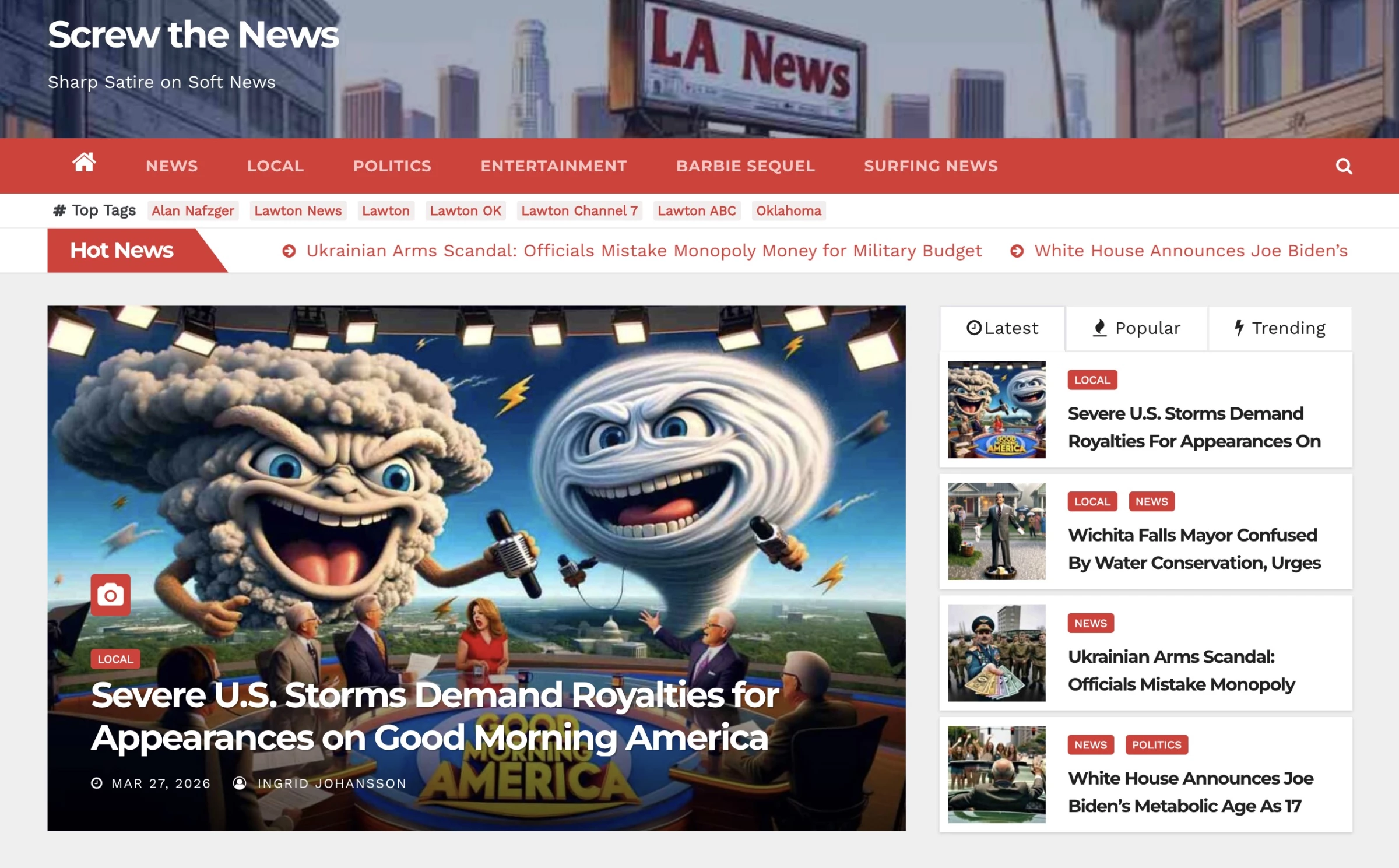
Screw The News uses oversized AI-generated or stylized graphics alongside a crowded mix of news elements on every page.
Images that feel generic, exaggerated, or clearly synthetic can make the content appear clickbait-heavy, sensationalized, and less credible.
In contexts like journalism or opinion sites, visuals should support credibility, not distract from it, or feel artificially produced.
How to fix this design:
- Be selective with AI imagery. If used, ensure they are accurate, consistent, and clearly support the story.
- Favor real photography or clearly labeled editorial illustrations for news content to maintain credibility and trust.
13. McMaster-Carr
A supplier of industrial parts and hardware
Where it went wrong: Simplistic interface lacks visual guidance.
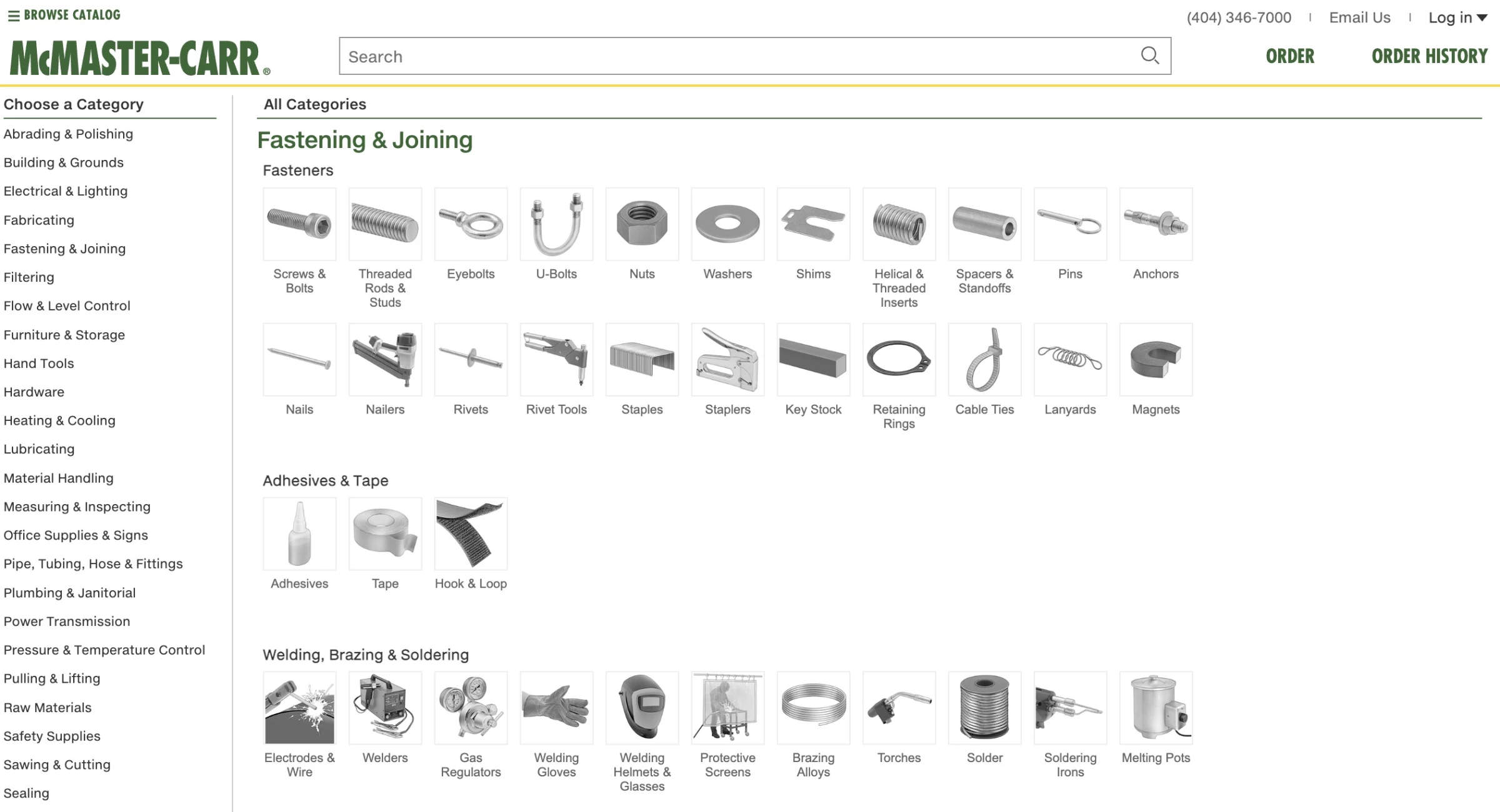
The McMaster-Carr website is famous for its extremely fast loading speeds, so fast that videos have been made explaining just how responsive the site is.
However, despite this high level of performance and functionality, the visuals fall flat.
The homepage is almost entirely text with small monochrome icons arranged in dense rows. For an experienced industrial buyer, this density is efficient.
Experienced customers tolerate utilitarian design if it helps them find specifications quickly. For a newbie, it’s intimidating: the site looks like a spreadsheet, with no imagery or warm cues. These buyers often need more guidance.
How to fix this design:
- Include colored images or diagrams. Even technical icons or photos for categories can break the monotony. A visual hint often aids in recognition.
14. Drudge Report
A news aggregation platform linking to stories from various publishers.
Where it went wrong: Outdated layout and dominant ads
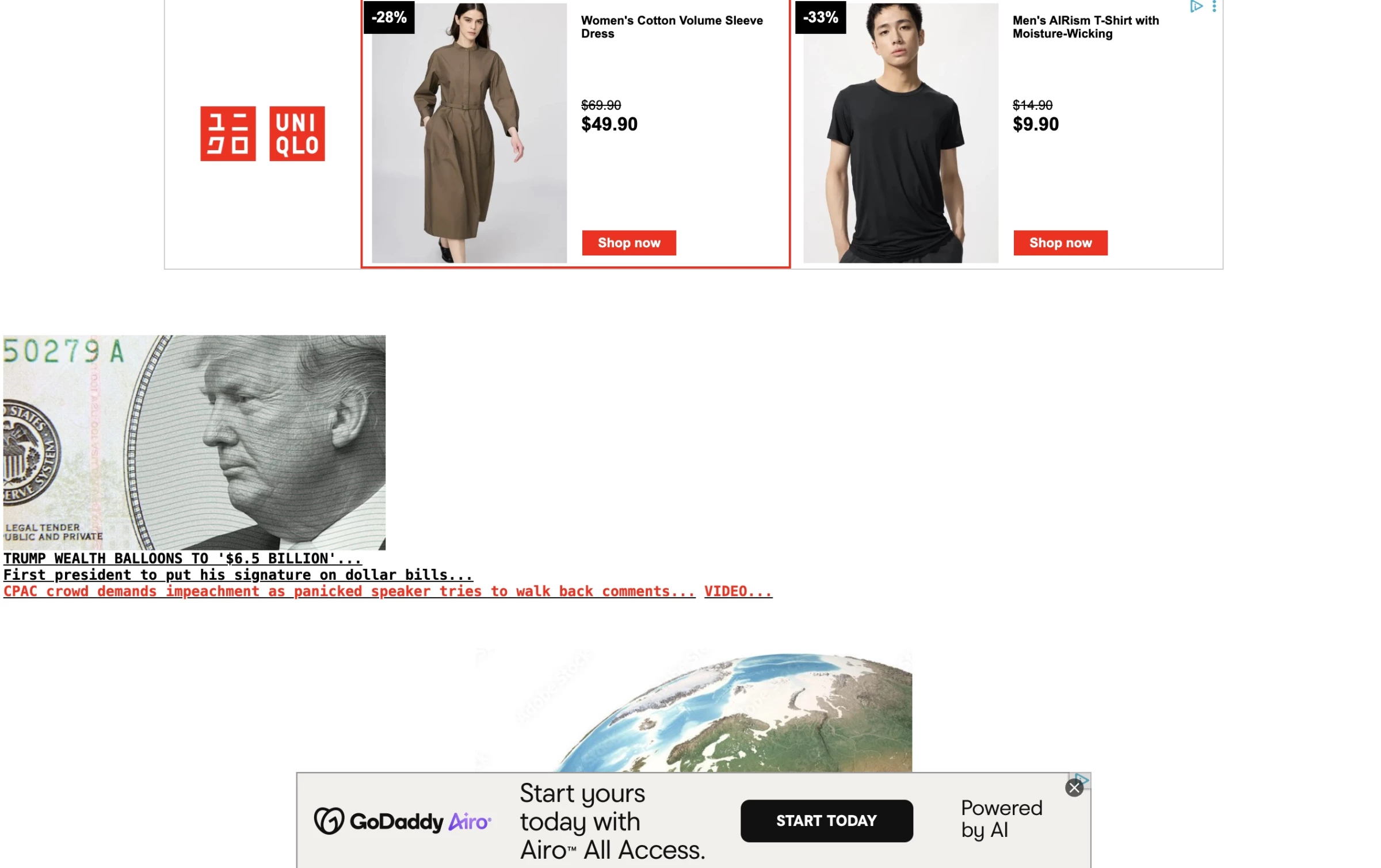
Drudge Report is infamous for its stripped-down, text-link format. However, the hierarchy is inverted: ads are larger and more visually prominent than any story.
Its homepage banner ads and graphics dominate, while news headlines are tiny and squeezed into a narrow column. And there is no menu at all to guide navigation.
The whole look is old web, reminiscent of 1990s portals. This presentation can feel spammy and untrustworthy, as readers may not be sure which content is editorial and which is promotional.
How to fix this design:
- Clearly separate “sponsored” vs “editorial” sections. Place ads between stories rather than letting them overshadow headlines.
- Use color or spacing for sections. You might keep the vintage feel, but at least differentiate sections (e.g., a light background behind links vs. the header).
15. Rock Auto
An online retailer specializing in automotive parts and accessories.
Where it went wrong: Sparse, spreadsheet-like interface
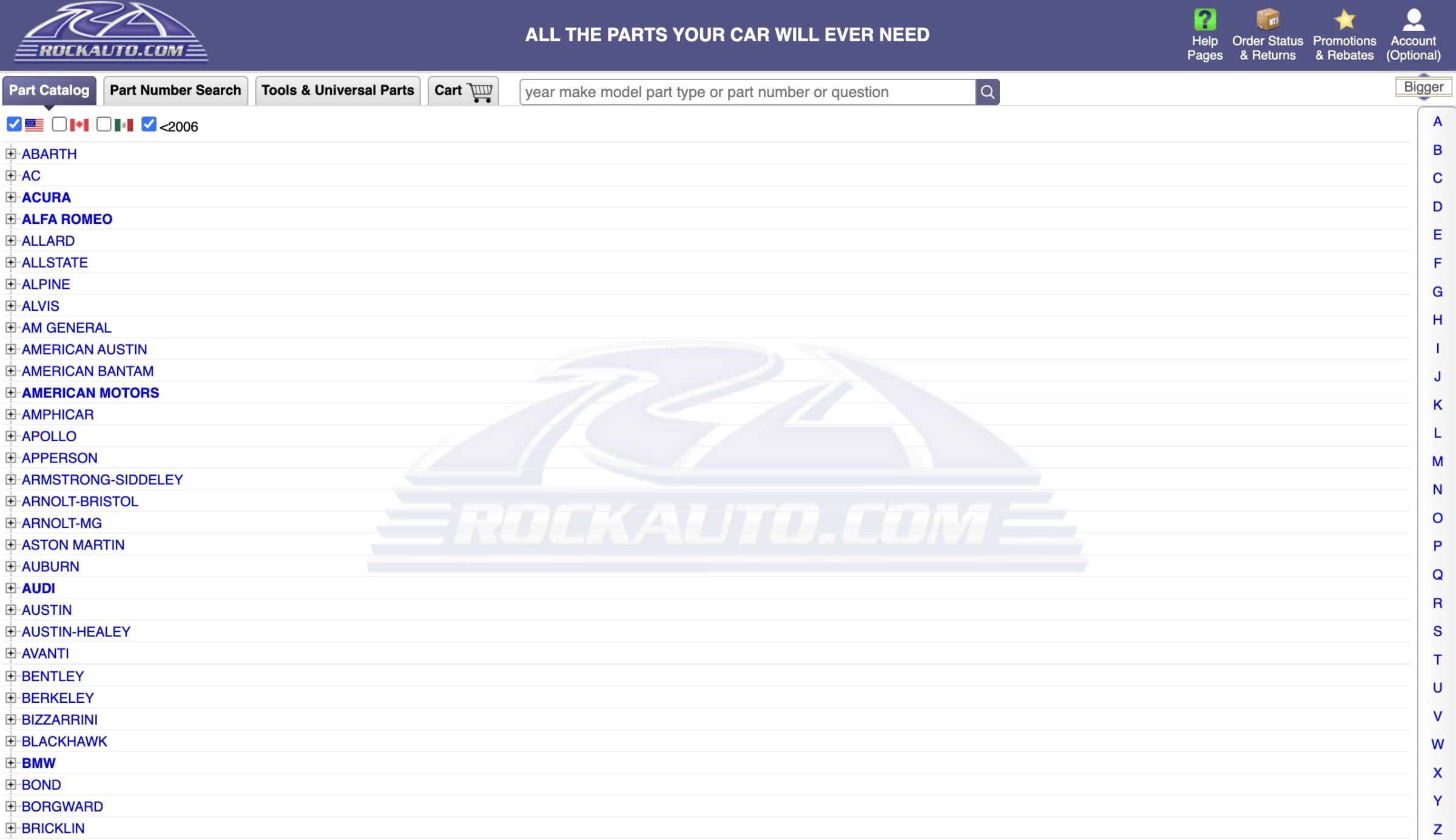
RockAuto throws a huge amount of interface at users immediately. The left side is a long, collapsible list of car brands, while the middle of the page is largely empty.
It’s powerful for experienced users, but visually, it feels closer to a parts data-like than a modern website.
Parts websites are allowed to be complex because buyers often need detailed info. But these are also high-consideration purchases, which makes credibility important.
How to fix this design:
- Guide the initial search. Add a search pop-up to the user’s advantage. For example, “Enter your vehicle’s year/make/model to narrow results”.
- Clean up visuals. Reduce white and use clear typography. RockAuto is data-heavy, but slight modern styling with icons or color coding could make it friendlier.
16. Märker Bowling
A bowling alley offering recreational play, events, and group bookings.
Where it went wrong: Clashing colors and poor layout
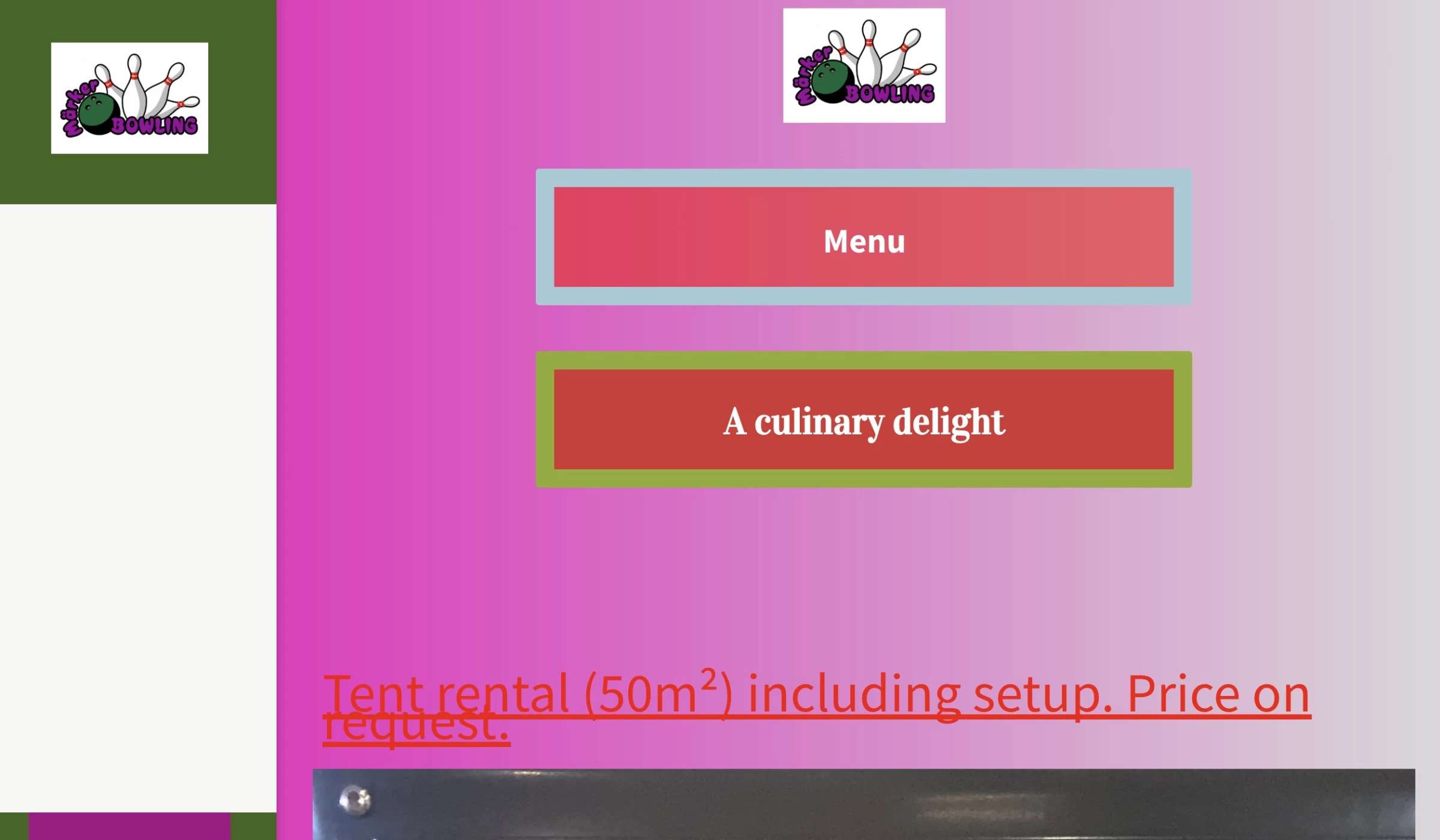
Märker Bowling’s site has a very loud, clashing palette: a magenta‑to-olive gradient background with coral buttons and red link text.
Many sections have a big space on one side, and key buttons float seemingly in mid-air. Readability is also an issue with a dark olive text over a magenta background.
Bowling alleys should look fun and welcoming. Color can be vibrant, but the UX must be intuitive.
How to fix this design:
- Simplify the color scheme. Pick 2–3 brand colors that complement each other. Avoid extreme contrasts that make text or buttons hard to read.
- Balance layout. Don’t leave huge empty columns. If you want asymmetry, fill it with relevant images or a brief intro.
- Prioritize calls-to-action. Make sure “Book a Lane,” “Hours,” and “Pricing” buttons are obvious and near the top. The site shouldn’t hide the fact that this is a place to visit.
17. TäbyPressen Oil Press
A manufacturer of oil-pressing machinery for industrial use.
Where it went wrong: “Link soup” layout with no hierarchy
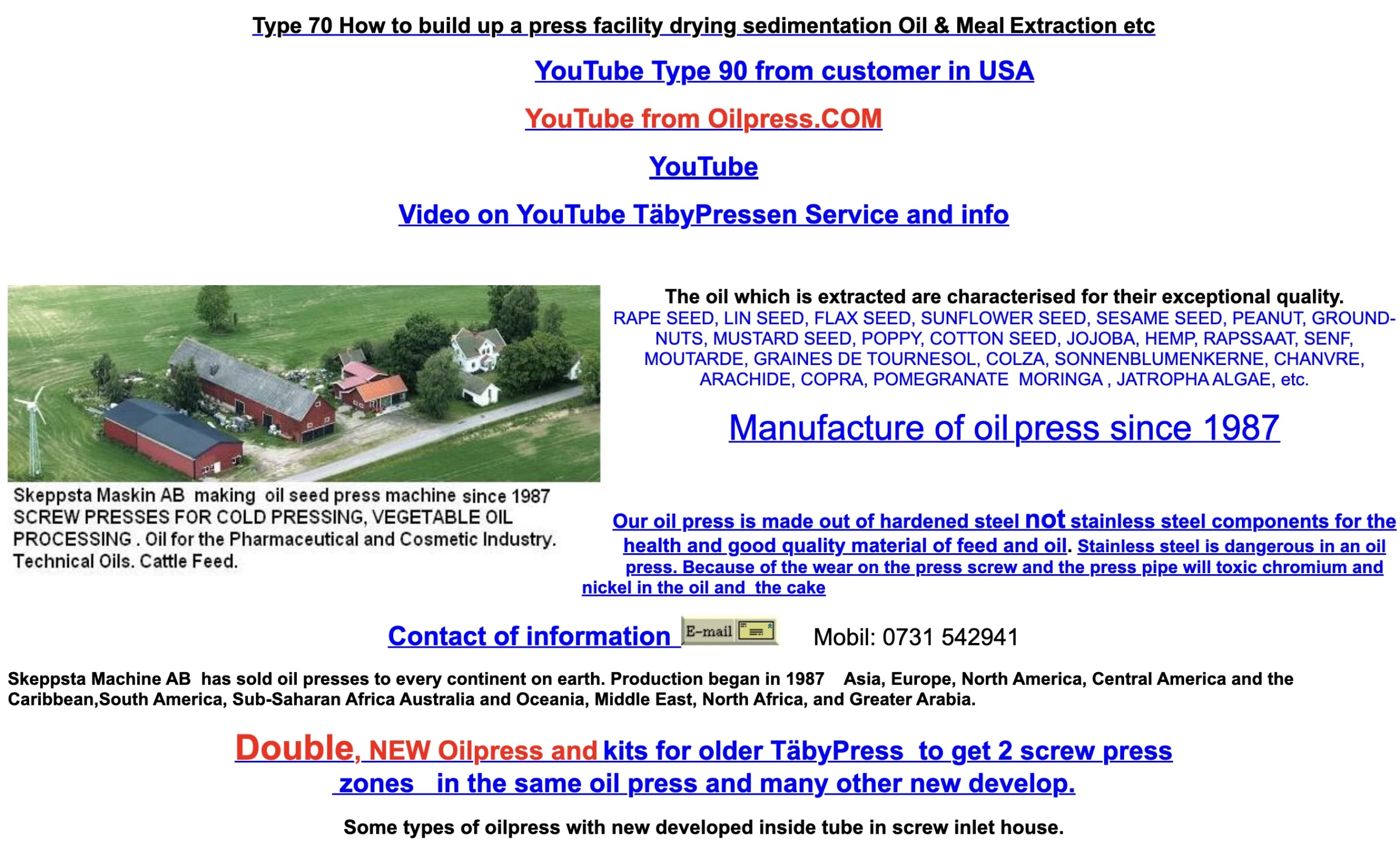
TäbyPressen is in the oil-pressing machinery business, and its site looks very old-school. It’s classic “hyperlink soup” with blue underlined links of various sizes and centers, chunks of text with no clear anchor, and a flyer-like layout.
All of these compete for attention. Nothing jumps out as the main action or selling point.
B2B manufacturing buyers often expect technical specs and functionality. An archaic site might be forgiven if it has deep content, but ideally, it should also look up-to-date enough to convey competence.
How to fix this design:
- Modernize the layout. Use columns or sections with clear headings (“About us,” “Technical Data,” “Support”), so visitors can find answers quickly.
- Group related links. Instead of centers of text linking everywhere, put “Products” and list sub-links underneath.
- Update visuals. Replace random text blocks with professional product images or diagrams of the machinery.
18. Kentucky Department of Education
A state education agency for schools, educators, and families.
Where it went wrong: Overloaded navigation makes it hard to find relevant content quickly.

The Kentucky DOE homepage is relatively tame visually, but the information architecture is overloaded.
The top nav bar has dozens of institutional categories before you ever see any relevant content.
The audience for government sites is broad, and so the DOE site could better align with user needs. For instance, adding “Parent Resources” or “Teacher Resources” CTAs.
How to fix this design:
- Design by audience. Instead of department names, use tabs or boxes like “For Parents,” “For Teachers,” etc. Each leads to the relevant content.
- Highlight tasks. Feature quick links on the homepage (“Register to Vote,” “Apply for Scholarship,” “Report Bullying”), based on actual user tasks.
19. Yale School of Art
An art school website for a visual arts program
Where it went wrong: Prioritizes artistic expression over usability and clear navigation.
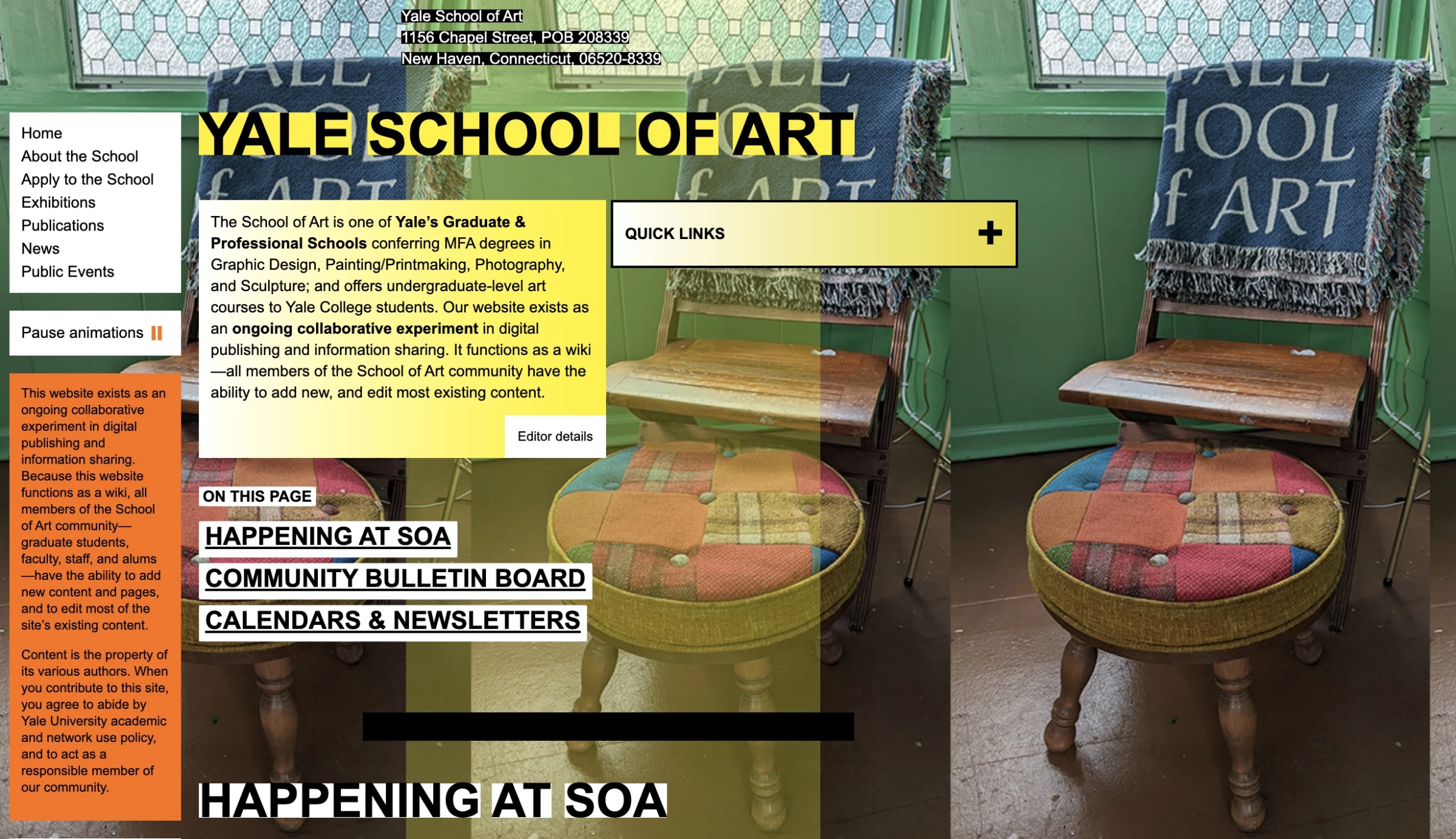
The Yale School of Art website is visually striking. It clearly has a strong personality, but it sacrifices usability for intentional chaos. The result is more of an artistic statement than a navigable site.
Creative programs have leeway to showcase experimental design, and artistic students might appreciate the style. However, applicants and parents still need concrete info like program lists or application deadlines that must be findable without decoding the art.
How to fix this design:
- Ensure clarity. High-design backgrounds are cool, but make sure any text overlay has sufficient contrast.
- Streamline navigation. Perhaps offer two modes: “Learn more” to explore artistically and “Apply” for direct info.
20. Pacific Northwest X-Ray Inc.
A provider of X-ray and radiography equipment
Where it went wrong: Dated, playful design mismatched with industry
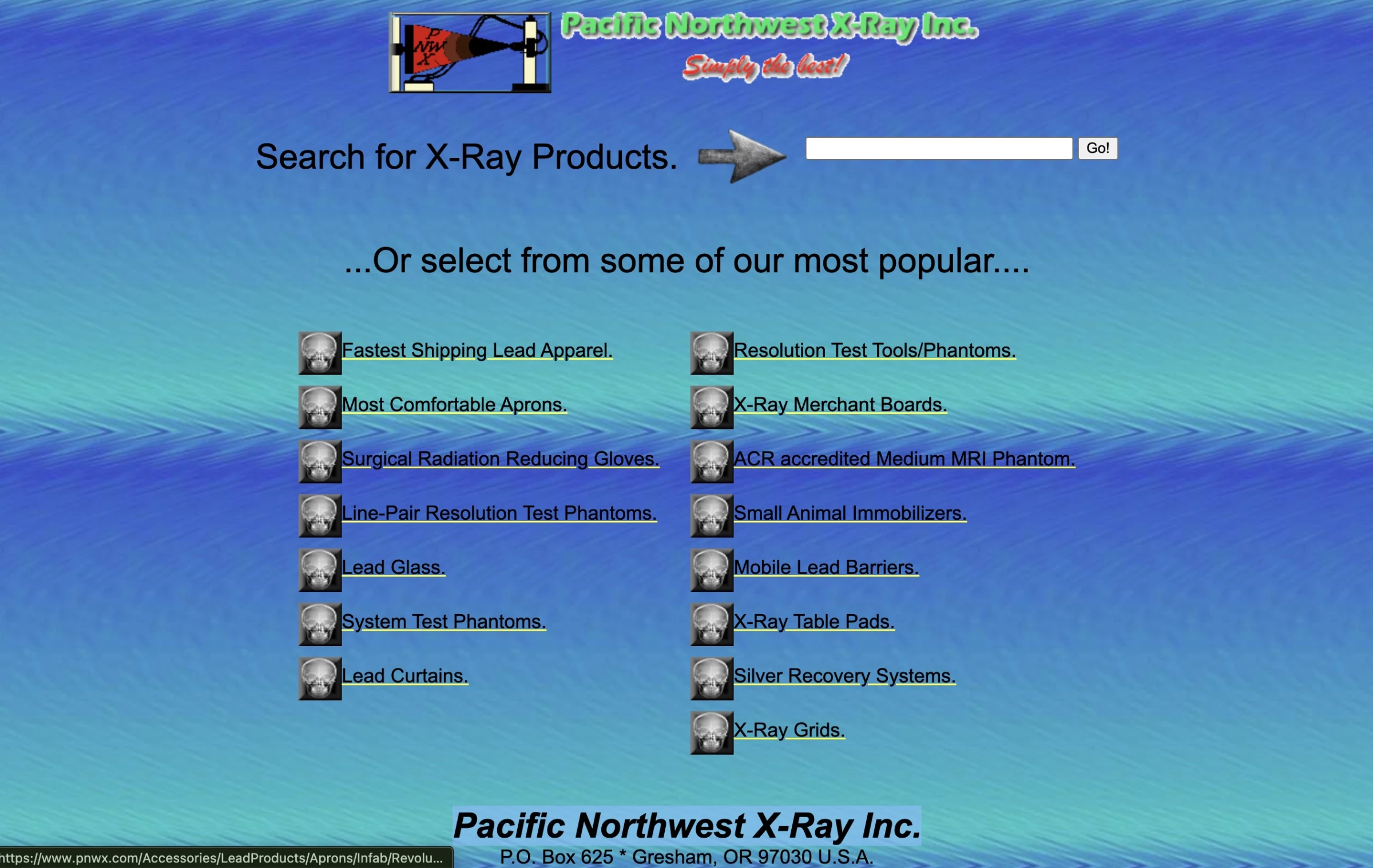
This company’s site feels instantly dated. It uses a gradient background and even a novelty arrow graphic. The layout is very sparse with blocks of text and small section links.
In the medical and health equipment industry, buyers expect a high level of professionalism and clarity. A colorful, playful background by concept is mismatched with the seriousness of the field.
A dated interface also undermines trust, especially when users are evaluating critical or regulated products.
How to fix this design:
- Use a clean, modern design. A simple white or light background (no gradients) with a professional color accent like blue would instantly update the feel.
- Add visual cues. Show photos or diagrams of the X-ray systems, rather than just text links.
21. ARNGREN.NET
An online retailer selling consumer goods and equipment.
Where it went wrong: Extreme clutter removes all hierarchy
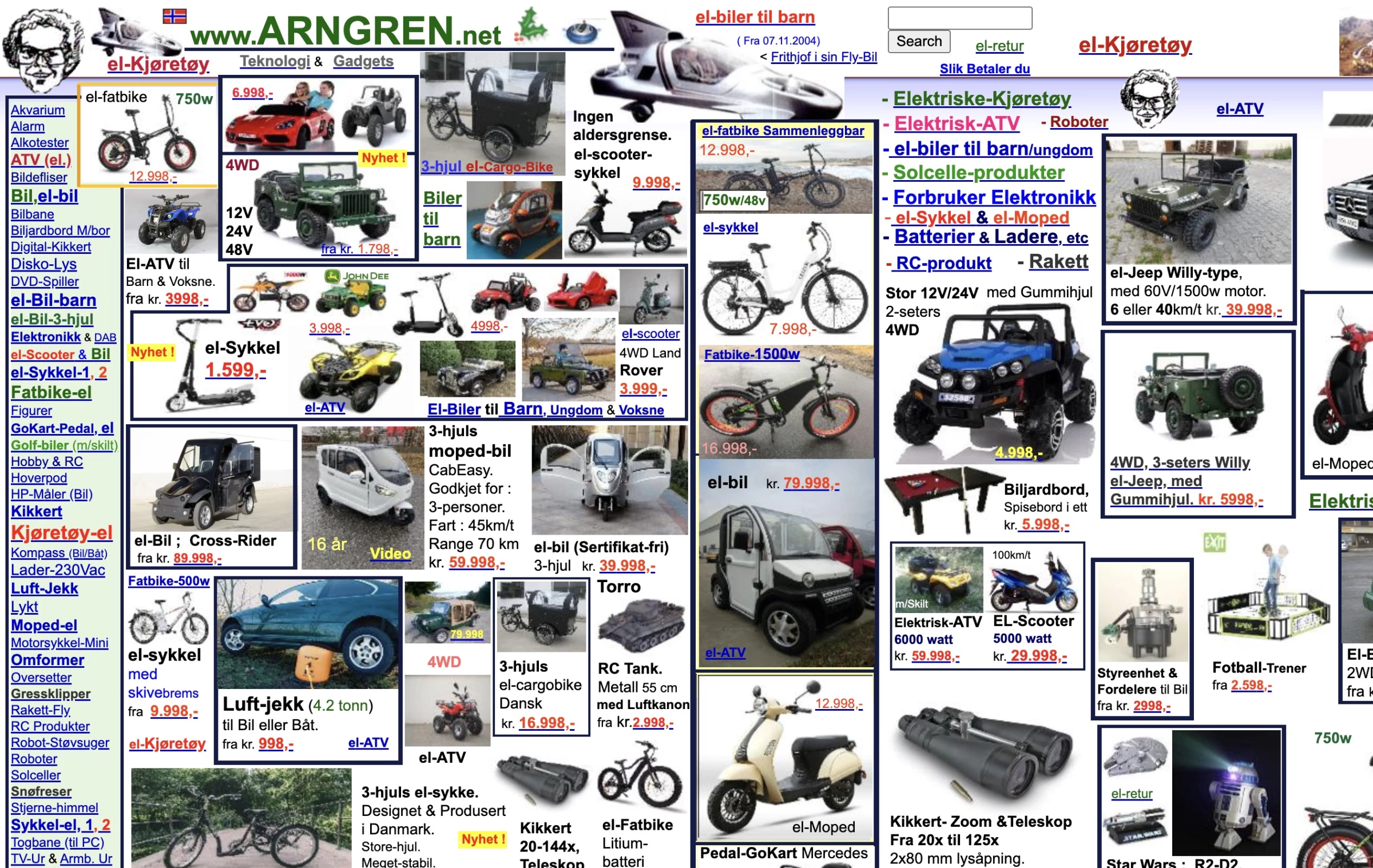
ARNGREN.NET is the ultimate picture of clutter. Its homepage is literally wall-to-wall products, each with tiny images, labels, prices, and “buy” buttons.
There is no hierarchy and no distinction between categories, sales items, or featured products. Every product fights for attention, and none of them wins.
In discount or auction-style sites, abundance is often part of the brand. But without filters or organization, users must visually brute force their way to a result.
How to fix this design:
- Introduce filtering. Let users narrow down products by category and sort. Don’t dump hundreds of items at once.
- Use spacing.White space (or at least logical spacing) is important. Even budget sites should have a grid with margins.
What Makes a Website "Bad"? The 5 Most Common Design Failures
Bad websites either overwhelm or under-communicate. They bury the point in noise or strip away so much structure that users feel directionless.
Here are the five design failures that show up again and again:
- No clear purpose
- Clutter that hides what matters
- Minimalism that goes too far
- Poor readability
- No visual hierarchy
1. No Clear Purpose (a.k.a. “What am I even looking at?”)
If users can’t figure out what your site is within a few seconds, they leave. This is the fastest way to lose trust.
A website shouldn’t feel like a puzzle you have to solve just to understand what it does.
2. Clutter That Hides What Matters
Too many elements competing for attention, like ads, banners, links, and pop-ups, bury the main action. Instead of guiding users, the interface overwhelms them. Ironically, the more you try to show, the less people actually see.
3. Minimalism That Goes Too Far
On the flip side, stripping things down too much can be just as bad.
When navigation is hidden, buttons are unclear, or key actions are barely visible, users feel lost. Clean design is great, but not when it removes the very tools people need to use your site.
4. Poor Readability
Users shouldn't have to squint, zoom, or re-read to understand your website's content.
Low contrast, inconsistent typography, cramped text, or chaotic layouts make content harder to process. Readability directly impacts usability and whether people stay or leave.
5. No Visual Hierarchy
When everything looks the same, users don’t know where to start.
Good design guides the eye. Bad design dumps everything on the page with equal weight, and so users have to work to figure out what matters, and most won’t bother.
Worst Websites of All Time: Final Words
Bad websites either overwhelm or under‑communicate. They bury the main purpose in noise or art, or strip away navigation until users feel lost.
Whether the culprit is an overzealous designer or technical limitations, the fix is similar: start with the user’s goals, then design the structure around that.
Make it obvious what the site is for, then get creative.

Our team ranks agencies worldwide to help you find a qualified partner. Visit our Agency Directory for the Top Web Design Companies as well as:
- Top UI/UX Design Agencies
- Top Web Development Companies
- Top Responsive Web Design Companies
- Top B2B Web Design Agencies
- Best Website Designers NYC
Our design experts also recognize the most innovative design projects across the globe. Visit our Awards section for the best & latest in web design.
Bad Website Design Examples FAQs
1. Why are government websites so bad?
Government sites face many bureaucratic hurdles, such as multiple agencies updating the content, outdated infrastructure, and budget constraints.
Thus, priorities can favor internal organization over UX.
2. What makes a “good” website design by contrast?
Good websites start by understanding user goals. They present key actions front and center. For example, a clear search bar on a library site, or a prominent “Add to Cart” button on a shop.
High-performing sites also test and iterate. They measure what users click, where they hesitate, and adjust accordingly.
3. How do I know if my site is confusing to users?
Watch your analytics for high bounce rates or quick exits. Even better, conduct user testing.
If new visitors can’t find what they need in a few seconds, you likely have a design issue. Also, tools like session recordings can reveal where users get stuck.
4. What are the dangers of overcrowding my homepage?
Crowding too much on one page dilutes your message. Users may leave without finding the main CTA. It can also slow load times.
Aim for focused content; feature 2–3 main items or stories. White space and clear sections also help focus attention.
5. Are AI-generated websites any good?
AI site builders can be fine for quick prototypes, but they often produce one-size-fits-all layouts.
They may mix unrelated styles for your industry or generate nonsensical content snippets. Always review and edit any AI output. Use AI as a starting point, then refine with human judgment.
6. Why do some sites look so outdated?
Many legacy sites were built years ago and never redesigned. They might use old HTML/CSS or even unsupported software, leading to dated visuals.
While content can remain useful, looks matter for credibility. In business or high-tech sectors, an old‑looking site can make visitors wonder if the company is behind the times.